Luminys Camera – Incorrect Model and Vendor Display in Nx Witness
Answered
Description:
- Product: Luminys IP Camera
- VMS: Nx Witness
- Issue: The camera's Model and Vendor information is displayed incorrectly in Nx Witness after ONVIF device discovery.
- Expected Behavior: The camera's Model and Vendor information should be displayed correctly.
- Actual Behavior: The Model and Vendor values appear to be reversed.
- Test Results: When the ONVIF Model/Vendor values are modified to match those of other tested devices, Nx Witness displays the information correctly.
Could you please investigate how Nx Witness processes the Model and Vendor fields returned by ONVIF device discovery and advise whether any changes are required on the camera side or the VMS side?
-

Hi andrew.he ,
The VMS makes the following request:
POST /onvif/device_service HTTP/1.1
Host: 192.168.178.183
User-Agent: gSOAP/2.8
Content-Type: application/soap+xml; charset=utf-8; action="http://www.onvif.org/ver10/device/wsdl/GetDeviceInformation"
Content-Length: 1378
Connection: keep-alive
SOAPAction: "http://www.onvif.org/ver10/device/wsdl/GetDeviceInformation"

<?xml version="1.0" encoding="UTF-8"?>
<SOAP-ENV:Envelope xmlns:SOAP-ENV="http://www.w3.org/2003/05/soap-envelope" xmlns:SOAP-ENC="http://www.w3.org/2003/05/soap-encoding" xmlns:xsi="http://www.w3.org/2001/XMLSchema-instance" xmlns:xsd="http://www.w3.org/2001/XMLSchema" xmlns:xmime="http://tempuri.org/xmime.xsd" xmlns:xop="http://www.w3.org/2004/08/xop/include" xmlns:wsse="http://docs.oasis-open.org/wss/2004/01/oasis-200401-wss-wssecurity-secext-1.0.xsd" xmlns:wsu="http://docs.oasis-open.org/wss/2004/01/oasis-200401-wss-wssecurity-utility-1.0.xsd" xmlns:wsa5="http://www.w3.org/2005/08/addressing" xmlns:tt="http://www.onvif.org/ver10/schema" xmlns:onvifDevice="http://www.onvif.org/ver10/device/wsdl"><SOAP-ENV:Header><wsse:Security SOAP-ENV:mustUnderstand="true"><wsse:UsernameToken><wsse:Username>admin</wsse:Username><wsse:Password Type="http://docs.oasis-open.org/wss/2004/01/oasis-200401-wss-username-token-profile-1.0#PasswordDigest">/eFO1LSn0MxBJ7N/kxsolvjYGEE=</wsse:Password><wsse:Nonce EncodingType="http://docs.oasis-open.org/wss/2004/01/oasis-200401-wss-soap-message-security-1.0#Base64Binary">wM7VaqDMlyPDCMrCrOZ6cpSqCK8=</wsse:Nonce><wsu:Created>2026-10-19T02:38:55Z</wsu:Created></wsse:UsernameToken></wsse:Security></SOAP-ENV:Header><SOAP-ENV:Body><onvifDevice:GetDeviceInformation></onvifDevice:GetDeviceInformation></SOAP-ENV:Body></SOAP-ENV:Envelope>
And expects the following response:
HTTP/1.1 200 OK
Date: Mon, 19 Oct 2026 10:38:55 GMT
Server: App-webs/
Connection: close
Content-Length: 2317
Content-Type: application/soap+xml; charset=utf-8

<?xml version="1.0" encoding="UTF-8"?>
<env:Envelope xmlns:env="http://www.w3.org/2003/05/soap-envelope" xmlns:soapenc="http://www.w3.org/2003/05/soap-encoding" xmlns:xsi="http://www.w3.org/2001/XMLSchema-instance" xmlns:xs="http://www.w3.org/2001/XMLSchema" xmlns:tt="http://www.onvif.org/ver10/schema" xmlns:tds="http://www.onvif.org/ver10/device/wsdl" xmlns:trt="http://www.onvif.org/ver10/media/wsdl" xmlns:timg="http://www.onvif.org/ver20/imaging/wsdl" xmlns:tev="http://www.onvif.org/ver10/events/wsdl" xmlns:tptz="http://www.onvif.org/ver20/ptz/wsdl" xmlns:tan="http://www.onvif.org/ver20/analytics/wsdl" xmlns:tst="http://www.onvif.org/ver10/storage/wsdl" xmlns:ter="http://www.onvif.org/ver10/error" xmlns:dn="http://www.onvif.org/ver10/network/wsdl" xmlns:tns1="http://www.onvif.org/ver10/topics" xmlns:tmd="http://www.onvif.org/ver10/deviceIO/wsdl" xmlns:wsdl="http://schemas.xmlsoap.org/wsdl" xmlns:wsoap12="http://schemas.xmlsoap.org/wsdl/soap12" xmlns:http="http://schemas.xmlsoap.org/wsdl/http" xmlns:d="http://schemas.xmlsoap.org/ws/2005/04/discovery" xmlns:wsadis="http://schemas.xmlsoap.org/ws/2004/08/addressing" xmlns:wsnt="http://docs.oasis-open.org/wsn/b-2" xmlns:wsa="http://www.w3.org/2005/08/addressing" xmlns:wstop="http://docs.oasis-open.org/wsn/t-1" xmlns:wsrf-bf="http://docs.oasis-open.org/wsrf/bf-2" xmlns:wsntw="http://docs.oasis-open.org/wsn/bw-2" xmlns:wsrf-rw="http://docs.oasis-open.org/wsrf/rw-2" xmlns:wsaw="http://www.w3.org/2006/05/addressing/wsdl" xmlns:wsrf-r="http://docs.oasis-open.org/wsrf/r-2" xmlns:trc="http://www.onvif.org/ver10/recording/wsdl" xmlns:tse="http://www.onvif.org/ver10/search/wsdl" xmlns:trp="http://www.onvif.org/ver10/replay/wsdl" xmlns:tnshik="http://www.hikvision.com/2011/event/topics" xmlns:hikwsd="http://www.onvifext.com/onvif/ext/ver10/wsdl" xmlns:hikxsd="http://www.onvifext.com/onvif/ext/ver10/schema" xmlns:tas="http://www.onvif.org/ver10/advancedsecurity/wsdl"><env:Body><tds:GetDeviceInformationResponse><tds:Manufacturer>HIKVISION</tds:Manufacturer>
<tds:Model>DS-2CD4B26FWD-IZS</tds:Model>
<tds:FirmwareVersion>V5.4.1 build 160329</tds:FirmwareVersion>
<tds:SerialNumber>DS-2CD4B26FWD-IZS20160409AAWR590454661</tds:SerialNumber>
<tds:HardwareId>88</tds:HardwareId>
</tds:GetDeviceInformationResponse>
</env:Body>
</env:Envelope>
In this case specifically for the Vendor and Model names:
<tds:Manufacturer>HIKVISION</tds:Manufacturer>
<tds:Model>DS-2CD4B26FWD-IZS</tds:Model>
If you capture the communication between VMS and device with Wireshark or tcpdump and check the
POST /onvif/device_servicerequests withSOAPAction: "http://www.onvif.org/ver10/device/wsdl/GetDeviceInformation"you can check what information is provided by the camera to the request.Best regards.
0 -
Hi Norman,
Thank you for the explanation.
We have completed additional testing and found that the issue may be related to how Nx Witness identifies camera manufacturers during ONVIF device discovery.
Our test results are as follows:
- When the ONVIF device scope contains
name/Luminys, Nx Witness displays the Model and Vendor information incorrectly, with the two fields appearing to be reversed. - When we change the scope to
name/General, the information is displayed correctly. - When we change the scope to
name/Hanwha Visionorname/Dahua, the information is also displayed correctly.
Based on these results, we suspect that Nx Witness may apply different device identification or parsing logic depending on the manufacturer information returned by the camera.
Could you please help clarify the following?
- Does Nx Witness use the ONVIF
namescope to identify the camera manufacturer and determine how Vendor and Model information is displayed? - Is
Luminyscurrently recognized as a supported camera manufacturer in Nx Witness? - If the manufacturer is not currently recognized, is it possible to add Luminys to the platform's manufacturer identification rules or database to resolve this issue?
We would appreciate your guidance on whether this can be addressed on the Nx Witness side or whether any changes are required to our ONVIF implementation.
0 - When the ONVIF device scope contains
-
Hi andrew.he,
Thanks for reaching out! Here are the answers to your questions:
- Manufacturer Field Usage: No, we rely on the standard manufacturer field as shown in the previous message.
- Luminys Integration: We support Luminys cameras via the standard ONVIF protocol; we do not maintain a dedicated, brand-specific integration for Luminys.
- ONVIF Compliance & Analytics: We expect device manufacturers to comply with ONVIF standards rather than building custom integrations for standard functionality. However, some manufacturers offer their own plugins to enable specialized features—such as advanced analytics and object detection—within Nx Witness VMS.
Because we rely on standard ONVIF protocols, any fixes or adjustments regarding device compatibility will need to be made by the manufacturer within their ONVIF implementation.
Best regards.
0 -
Hi Norman,
Thank you for your previous explanation.
Our R&D team has conducted further testing and would appreciate your clarification on two points.
1. ONVIF authentication during device discovery
Nx Witness appears to discover devices on the local network and retrieve their device information through ONVIF, including the Manufacturer field via the GetDeviceInformation operation.
When the camera requires ONVIF authentication, could you please clarify how Nx Witness handles authentication during automatic device discovery?
* Does Nx Witness use previously saved device credentials, or does it require the user to provide credentials before retrieving device information?
* If authentication is required before the device has been added to Nx Witness, how does the platform handle the request?
* Does Nx Witness support ONVIF WS-Security UsernameToken authentication using Password Digest?2. Incorrect Vendor/Model display when ONVIF authentication is disabled
We also tested the camera with ONVIF authentication disabled. The camera was configured to return the expected Manufacturer information, but Nx Witness still displayed the Vendor and Model fields incorrectly.
Could you please advise whether disabling ONVIF authentication could affect how Nx Witness parses or displays the Manufacturer and Model fields, or whether this behavior should be investigated separately?
We will continue verifying the actual GetDeviceInformationResponse returned by the camera and comparing it with the information displayed in Nx Witness.
Any guidance on the expected behavior during device discovery and the handling of these fields would be greatly appreciated.
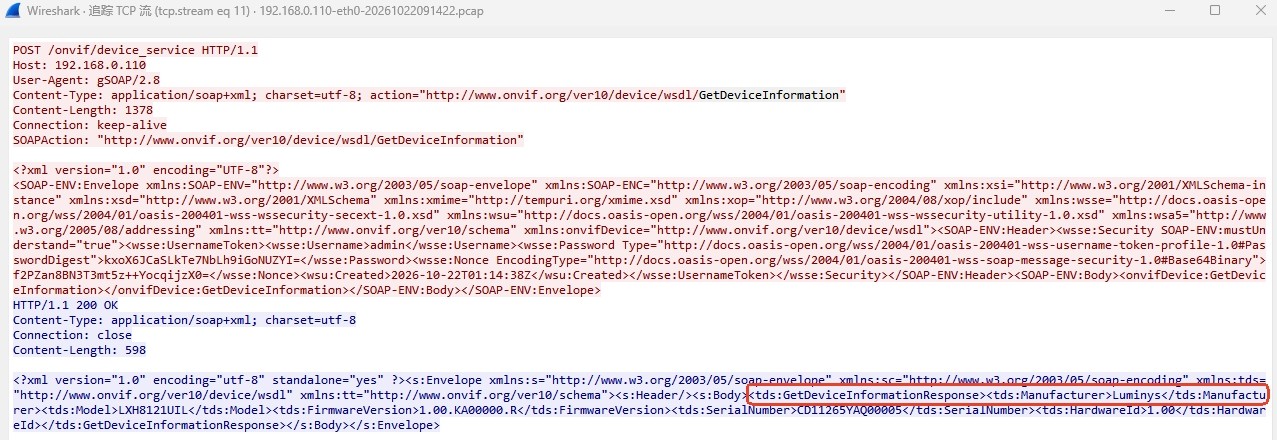 0
0 -
Hi andrew.he,
Please sign up to become a Tech Partner here:
You request will be reviewed, and I'll inform our team to authorize Luminys.
This allows you to create a ticket to get direct support.I already discussed a solution to resolve this.
0
Please sign in to leave a comment.
Comments
5 comments