Connection to camera (secondary stream) was unexpectedly closed (after NX upgrade)
Answered
My NX VMS system was running fine, until I updated to the latest build a few months ago (build number 4.2.0.33832). After the upgrade, I started receiving multiple network issue notifications a day, from virtually every single camera we have. Sometimes for the primary and sometimes for the secondary stream.
In the VMS log file, it says: "RTP connection was forcibly closed by camera. Reopen stream"
When I look at the images, recording sometimes jumps about a second ahead, maybe two.
I have been running a constant network monitor on these cameras for weeks, polling for jitter, delay, ping response times, ping loss. Everything seems just fine. No packet loss and response times are great. The cameras themselves also show no issues in their logs. All cameras have been running on the latest firmware for about a year now, without issue until the NX VMS update.
Does this sound familiar to anyone?
-

Hi Jonathan K,
Most of the network issues should relate to the camera itself. I would suggest you collect the Wireshark packet on the server computer while the network issue happened(The ring buffer would be helpful for the case, see the instruction here).
Feel free to share the file and IP address of the camera with us. Possibly we'll find something in the packet content(e.g., RTSP TEARDOWN request).
Thank you.0 -
Hi Wendy,
Thank you for the suggestion.
Wireshark capture is not really an option in this case. Because the errors appear randomly across all of our cameras, we would have to capture all incoming traffic 24/7. I have tried this with a ring buffer, but it filled up the 50x500MB files I configured in a matter of minutes and lead to a memory overflow for the Wireshark process, killing the VXwitness server process as well.Besides, I would have to basically witness the event more or less live, and then hurry to stop the Wireshark capture within a few minutes or the captured packets would be overwritten.
Do you have any other suggestions?
0 -
It seems I spoke too soon. I was lucky enough to catch one of the errors in time to stop capturing and export the captured packets for the specific camera where the error occurred. Straight away, I don't see anything out the ordinary. Can I send you the capture for analysis?
0 -
I think I've found the smoking gun. Exactly the moment the stream drops, there is a re-authentication taking place from the server to the camera stream. I'm seeing an HTTP 401 Unauthorized, followed by what looks like a successful authentication attempt and the stream resumes.
 0
0 -
Hi Jonathan K,
Glad to hear that something you got with the packet sniffer.
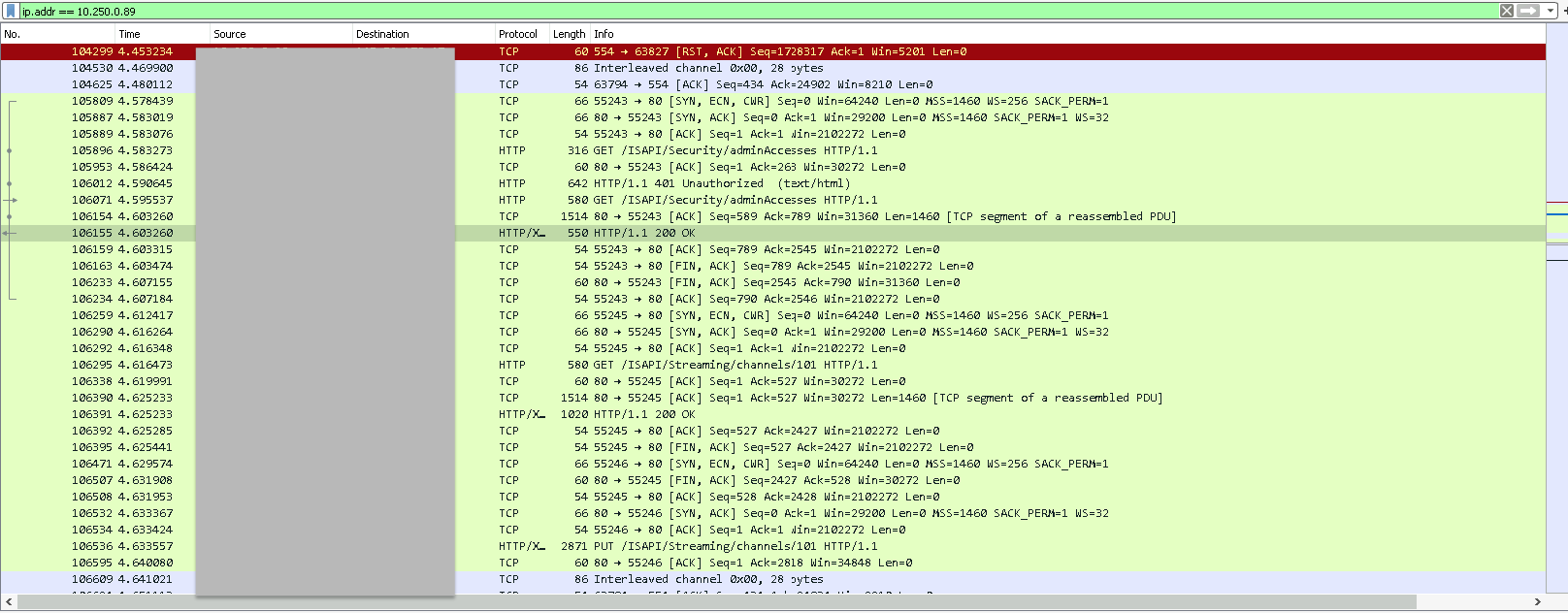
However, HTTP is not what you should look for in this case. You should add the RTSP protocol as well on the Wireshark display filter(rtsp && ip.addr==10.250.0.89).
From packet no.104299 in your screenshot, you should find the camera sent out the RST to drop the RTP connection. I believe that's why you'll see the network event under our software.
Thanks.0 -
There's no RST sent from the camera (please refer to the screenshot below). Instead, the server asks for OPTIONS on the strea, the camera replies, then the server sends a DESCRIBE, and the camera replies with an RTSP 401 Unauthorized
 0
0 -
Hi Jonathan K,
My bad. It's the TCP level thing so it will be filtered.
Please look at your first screenshot which only checks the packet with ip.addr==10.250.0.89 filter.
No.104299 indicates that the camera sent the RST, ACK to terminate the TCP session.
And further RTSP OPTIONS, DESCRIBE requests are the normal procedure when the server attempt to re-establish the stream connection.
Thanks.0 -
Hi Wendy,
Good catch! Do you have any idea what might cause our cameras to do this? Or perhaps how to configure the VMS not to raise an alarm for any frame loss less than a second?
0 -
Hi Jonathan K,
Unfortunately, we would never know why the camera drop the connection. And this was not only the frame loss, but the whole RTSP session was closed.
The alarm is necessary for the administrator to check the event. I would suggest you find out the root cause still. Maybe you could check if the problem happened at a certain time, a certain vendor of the camera, or any pattern. Perhaps you could simply set up another test system and directly connect to the camera for clarifying the problem.
Thanks.
0 -

The same thing is happening to me at one of my new install sites. Using Hanwha cameras. Im using build number 34634. The log shows the same thing. RTP connection was forcibly closed by camera. Reopen stream. Im not as advanced in the network monitoring department so I don't have all the extra info you do. All the streams from every camera show this at the exact same time periodically throughout the day. Camera logs show [RTSP] logout and login at the time of the errors. Obviously the logouts are not initiated by anyone.
0 -
-

Calvin,
I am having this issue using Hanwha cameras (disconnecting camera streams). Did you get a definitive fix or answer to this issue?
0 -
I ended up looking in the windows event viewer and finding some correlating errors. It was related to the lack of intel quick sync driver or the drive or the cable. I install the driver, replaced the drive (SSD that the analytics were going to. Not even the archive drives) , and replaced the sata cable and the issues stopped.
0 -
Please sign in to leave a comment.
Comments
12 comments