ObjectMetadata not sync with EventMetadata?
Answered
Hi,
I am experiencing a strange scenaria that when an ObjectMetadata is pushed to Nx server, Nx client is able to render the bounding box and attributes on top of layout. However, the objects do not popup in "Objects" column, and this cause the popups in "Objects" column not sync to the "Events" column.
Please refer to the following video clip: https://drive.google.com/file/d/14_BhGSg2amfYzK8pYYW79_m_CUxQlIvt/view?usp=sharing
=> Objects on the left and Events on the right
=> Bounding box and attributes are rendered for plate ends with "6398", but no popup
=> Event pops up whenever the plate ends with "6398" is detected
I wonder the reason causes such strange behaviour.
-

Hi James,
do you have any kind of logging in your plugin to confirm what was pushed to mediaserver? As a first step, could you please run similar test with sample analytics plugin? This would help us to understand how to troubleshoot the issue further. If sample analytics plugin won't have similar problem for your environment, we'll need more info on how you generate object metadata. Would it be possible to share code snippets?
0 -
Hi Anton,
This is how the eventMetaPacket (upper box) and objectMetaPacket (lower box) are created
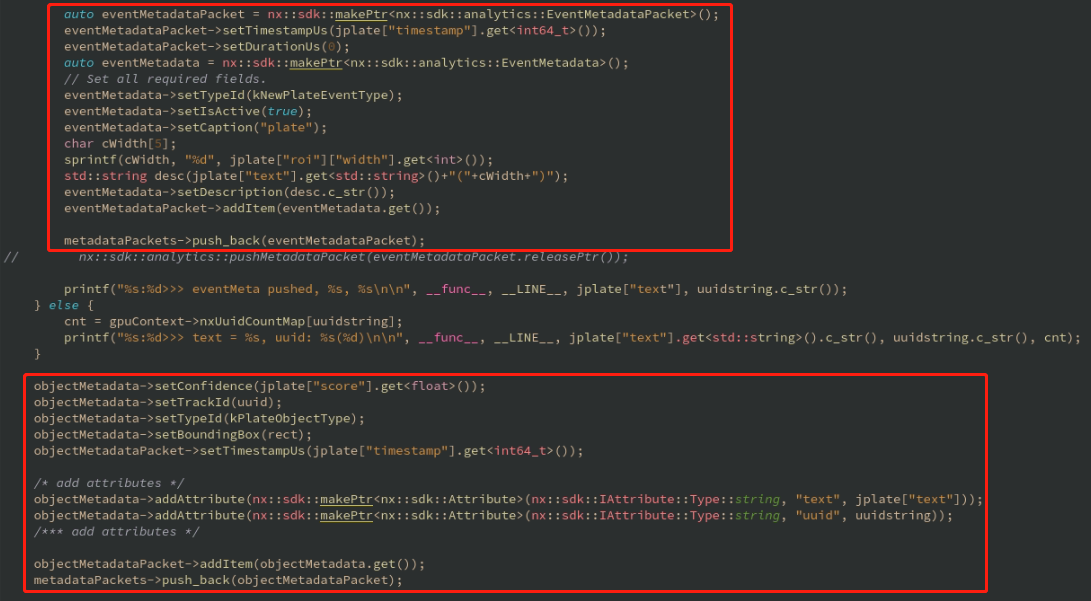
and this is how the metaPacket got pushed
What confuses me most is that for the objectMetaPackets not shown as object records, Nx client somehow manages to successfully render the bounding box and attributes.0 -
Hi James,
sorry for the late reply. We need to look into analytics logs to see what could be the issue. This process is described in our troubleshooting guide - https://support.networkoptix.com/hc/en-us/articles/1500006332441-Troubleshooting-Analytics-Issues-for-Cameras-and-Plugins
Would it possible provide us with your plugin binary and steps to reproduce the issue or would it possible to arrange remote access to your test system?
0 -
Hi Anton,
I put the config into iniFilesDir returned by API and restarted the networkoptix-metavms-mediaserver
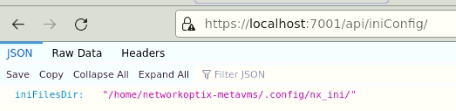

But the log file is not there
I am able to setup a google Hangouts session to show you the details then maybe you could tell me what to do.0 -

Hello James,
The guide states https://support.networkoptix.com/hc/en-us/articles/1500006332441-Troubleshooting-Analytics-Issues-for-Cameras-and-Plugins
Before opening the analytics_logging.ini file and changing its settings, create the analytics_log_dir directory.
analyticsLogPath=analytics_log_dirThat means,
first, the analyticsLogPath varialbe should point to a directory, not to a file;
second, the directory has to be created manually before being pointed.0 -
Oh, my bad.
Now I have the logs, and the objects with highlighted attribute in rtp_parser_AnalyticsPanel*.log do not show up in object notification panel.
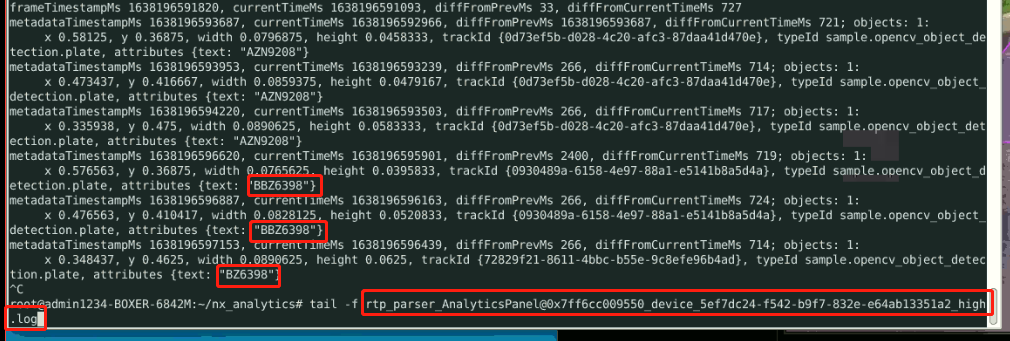 0
0 -
Hi Andrey,
which email should I send the plugin binary to?
0 -
Hi,
I created a support ticket. Please, check your email box.
0 -
Summary on the investigation conducted.
I also noticed that diffFromCurrentTimeMs is higher in NX Desktop (~2000) than NX server (~40).
There is a timeout of 2000 ms in GUI for incoming object metadata to be displayed in the right panel. When timeout is exceeded, no data is displayed in the right panel, but object are still searchable.
0
Please sign in to leave a comment.
Comments
9 comments