Hard drive is always lost . Jetson Nano 4 GB
Answered
I have this problem again with the Jetson Nano 4GB.
the hard drive is lost again and is there after being plugged into the USB port
Does anyone know the problem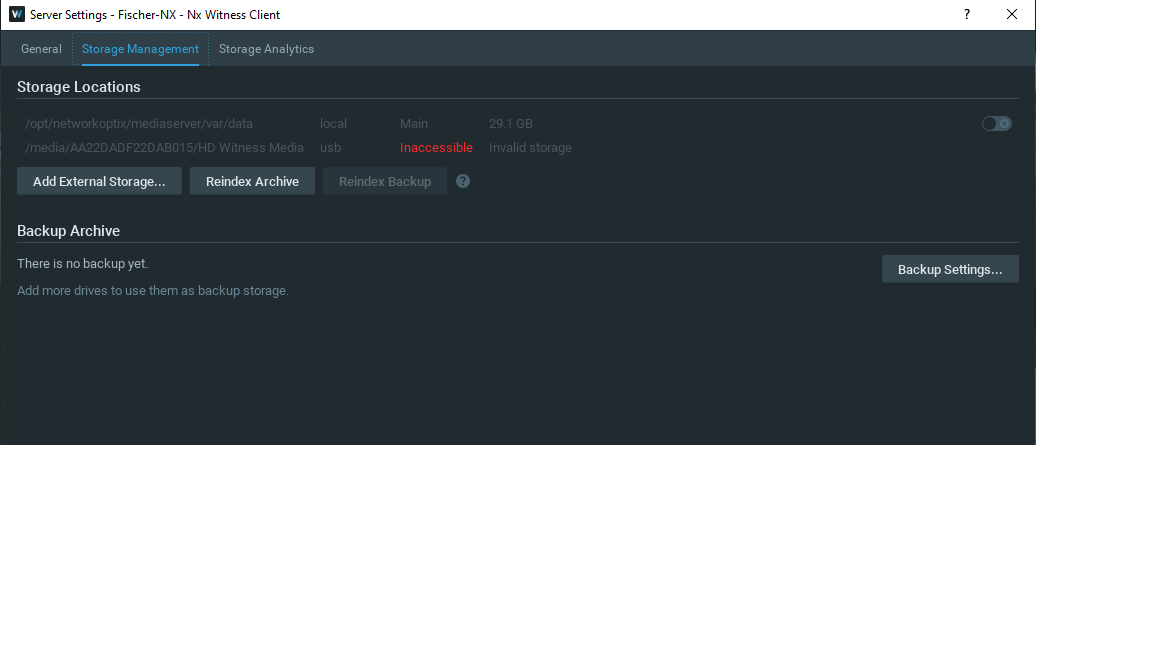
-

Hello Gerhard Kosira,
To determine the reason for this behavior, we will need additional information from you.
Could you please provide the following information:The outputs of the following commands.
1) df -h
2) cat /proc/mounts
3) ls -l /media
4) ls -l /media/AA22DADF22DAB015. And if there is something there, then the listing of the subfolder.Server logs with the DEBUG logging level may also be required. They can be obtained in the following way:
1) Open vi editor and modify the server config file:
/opt/networkoptix/mediaserver/etc/mediaserver.conf
2) Add logLevel string, and set the desired value (e.g., DEBUG2). Save the modified file.
3) Restart the Media Server to apply changes.
4) Logs will be available at:/opt/networkoptix/mediaserver/var/log
0 -

Hi Gerhard Kosira,
Based on my experience, I assume you didn't mount the disk.
If you add the USB drive it will be mounted, but as soon as the devices reboots it is likely to disconnect the USB drive. To avoid this, you should permanently mount the USB drive as described HERE.If you did mount the drive, please follow the steps my colleague @... provided.
0 -
We have not heard back from you in a while, so we are going to assume your question has been resolved and set this topic to 'Answered'.
0
Please sign in to leave a comment.
Comments
3 comments