Dahua analytics (detecting and bounding boxes)
Answered
Hi - in my trial window right now, but loving NxWitness and plan to purchase licenses in the next few weeks.
I'm running into two issues:
1) Dahua has started releasing official firmware that covers many of their camera models. When they do this, they set the camera model to "IP Camera" and NxWitness doesn't load the analytics plugin. Is there a way in the database or a configuration file to specify that a given camera ID (serial number or ip address) is a particular vendor/model number? It would be great if there was a UI where you could load the correct driver for a camera, but I'm at least hoping for a database/configuration file workaround.
2) The bounding boxes on Dahua camera analytics don't show up in NX Witness. Is this a problem with my setup, or working as designed? I know that NxW has the metadata needed to show bounding boxes because the events generated have a thumbnail of a detected face or an abandoned object. It's just that those boxes don't show up in the video feed.
Thanks for the great software. I'm looking forward to building my system around it (and including Frigate, Home Assistant, Deepstack, and DoubleTake)
-

Hi @...,
Thank you for your kind words.
- Most likely we can offer a solution. To do that, we need screenshots of each model that shows the Vendor name, Model name, and firmware version. With this information we might be able to offer you a temporary solution and after your confirmation we can make it final in the upcoming monthly patch.
- Bounding boxes are irrelevant for the analytics, in general, the only purpose is to alert the users. Personally I find them annoying. The most likely case is that the bounding boxes are on the third stream, which isn't used by Nx Witness, we only use the Primary and Secondary streams.
If you want bounding boxes, you also could use the OpenVino plugin. This plugin enables analytics for devices without on-board analytics and has the option to display bounding boxes.
0 -
Ok, sounds like the bounding boxes aren't supposed to show up, which is cool. I just wanted to make sure I wasn't missing something.
For the model numbers, here's an example:

That's really a Dahua ipc-hdw5442t-ze. I'm also buying ~15 more dahua cameras with some different models in the next couple of weeks, so I was hoping to find a generic solution that didn't require you hardcoding something. One idea could be a json file that maps camera IDs, or mac addresses, or even IP addresses to a particular driver. For example:
deviceMapping {["192.168.2.41": "dahua ipc-hdw5442t-ze",
"192.168.2.42": "dahua N84CL52"
]}
Then we could self-manage the mappings. A UI for that would be a bonus, but having SOME way to force the right driver to load would be great. Alternatively, I'm assuming I can change it in the database, but that's obviously not a great idea either.
Thanks for the help!
0 -
Norman - just tagging you here.
0 -
Hi @...,
For multiple reasons, support is a major one, we require such integration in our source code.
Unfortunately we cannot add the device you shared the screenshot to our source code, since the Vendor and Model name aren't generic enough and are use by other manufacturers as well. It surprises me a bit, since in the past most often the Vendor name was generic, but the model name was unique, which makes it possible to let these cameras behave as the original vendor, Dahua in this case.
Nevertheless, I created a file, which you can download HERE, which should make the cameras behave like a Dahua camera for the analytics part, but we cannot offer a permanent solution. But, without any promises, I created the fix in such way it should remain working as long as you use the latest released version. Most likely it will fail after the next release (v5.0).
After you downloaded the file, please follow the steps as described below:
- Remove the device from the system.
- Stop the mediaserver application and paste the resource_data.json file in the attachment at the following location:
For Windows: C:\Program Files\Network Optix\Nx Witness\MediaServer
For Linux: /opt/networkoptix/mediaserver/bin/
- Now start the mediaserver application again.
- Add the device again.
To stop and start the media server, please do it as follows:
For Windows:
- Open the Task Manager
- Select tab Services find the Mediaserver application,
- Right-click and select; Stop or Start.
For Linux:
- Open the terminal (Ctrl+Alt+T)
- Enter the following command;
sudo service networkoptix-mediaserver stop
or
sudo service networkoptix-mediaserver start
After this, the request should be fulfilled, and the device should have the ability to use the Dahua analytics.
0 -

Hi Norman,
The downloadlink isn't working anymore. Can you please make a new one?
Kind Regards,
Dennis
0 -
Hi Dennis Wouters ,
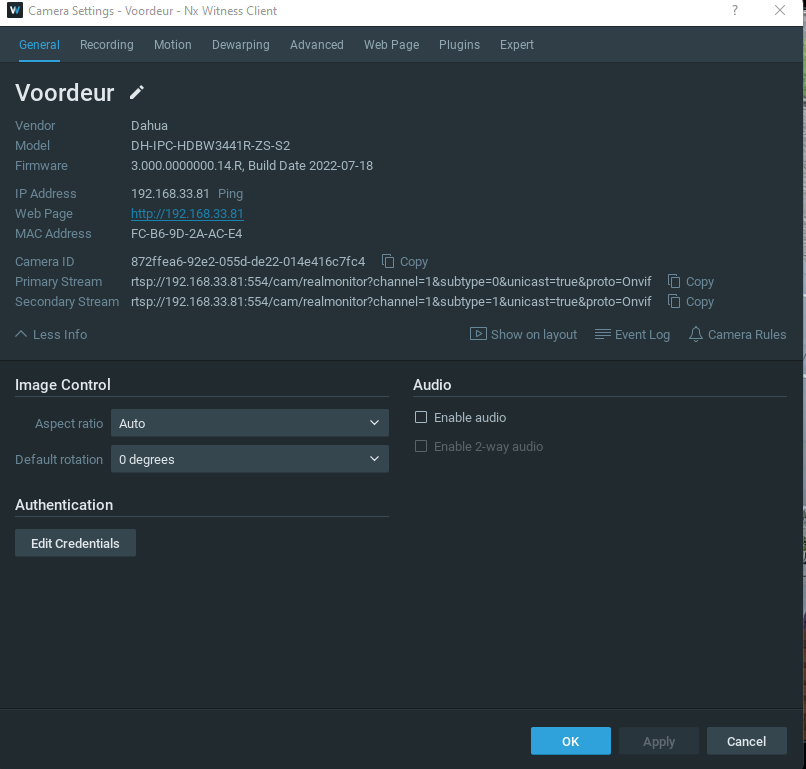
Please share a screenshot of the Camera Settings menu, tab General in a way the Vendor and Model names are visible.0 -
Hi Norman,
Hereby the Screenshot. We're also gonna use the Dahua IPC-HFW3441T-ZS and Dahua SD1A404XB-GNR, but these are not connected right now.
 0
0 -
Hi Dennis Wouters,
That screenshot does not correspond with the original issue (Dahua supplying firmware with generic names like IP Camera) that was reported in the starting topic, since your screenshot clearly show the original Vendor name Dahua.
Please open a new topic, explaining the issue you encounter, and as many details as possible of the system as a whole, as mentioned in THIS support article.
0
Please sign in to leave a comment.
Comments
8 comments