Dahua XVR Audio Support
Answered
Hi,
I'm having some issues with Audio on a few different Dahua XVRs. The models are: DH-XVR5116H-I, DH-XVR4108C-X1 and DH-XVR5104HS-X1. Looking at the Nx witness supported devices page they support audio.
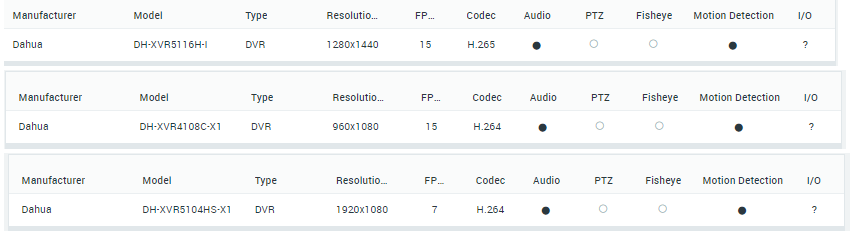
I escalated the issue to Nx Witness and Ichiro who assisted me. He recommended that I escalate the issue to Dahua as the issue is on their side. Johan Christiani from the Dahua team informed me that the above XVR models does not support audio intercom mode via ONVIF. Will it be possible to then send audio to one of the cameras and connect a speaker rather than sending it to the XVR? Is there any way that we can validate the audio intercom functionality before hand?
Regards,
Reynard
-

Hi @...,
That's surprising. The audio function will report itself through an Onvif API call and when it is confirmed by the Dahua devices to the Nx Witness server, and this happened with 3 different Dahua devices on 3 different Nx Witness servers, the device will be autopopulated onto our IPVD supported device list as such.
Regarding:
Will it be possible to then send audio to one of the cameras and connect a speaker rather than sending it to the XVR?
As in, connecting the output of the XVR to an input of a camera and using the enable audio in Nx for that specific device? You probably are able to do that, but it won't make the system easier to use.
Regarding:
Is there any way that we can validate the audio intercom functionality before hand?
Although the IPVD support device list is a decent starting point it comes without any warranties since we do not control the devices and functions might break or change over time due to firmware updates.
The most easy thing is to run the Nx Witness mediaserver and client on a laptop, connect it to the desired device and verify, but I understand that is difficult sometimes.
0 -
Hi
Has the problem been resolved somehow?
I have the same with the cameraDAHUA IPC-HFW3541T-ZAS
0
Please sign in to leave a comment.
Comments
2 comments