How to call /api/ptz in order to make the camera do ptz with pre-set position.
Answered
May I know concrete arguments of calling /api/ptz to do ptz with pre-set position?
-

Hi @...,
Please check out server API in the WebAdmin:
- Click onm the For Developers tab and select API Testing Tool (new).
- Navigate to ptz.
- Enter the cameraId of the applicable PTZ camera.
- Select the proper command at the command enum.
- Call the GetPresetsPtzCommand to get the list of available presets and select the one you want to trigger.
- Call the ActivatePresetPtzCommand + presetId + speed parameters to move to the selected preset position.
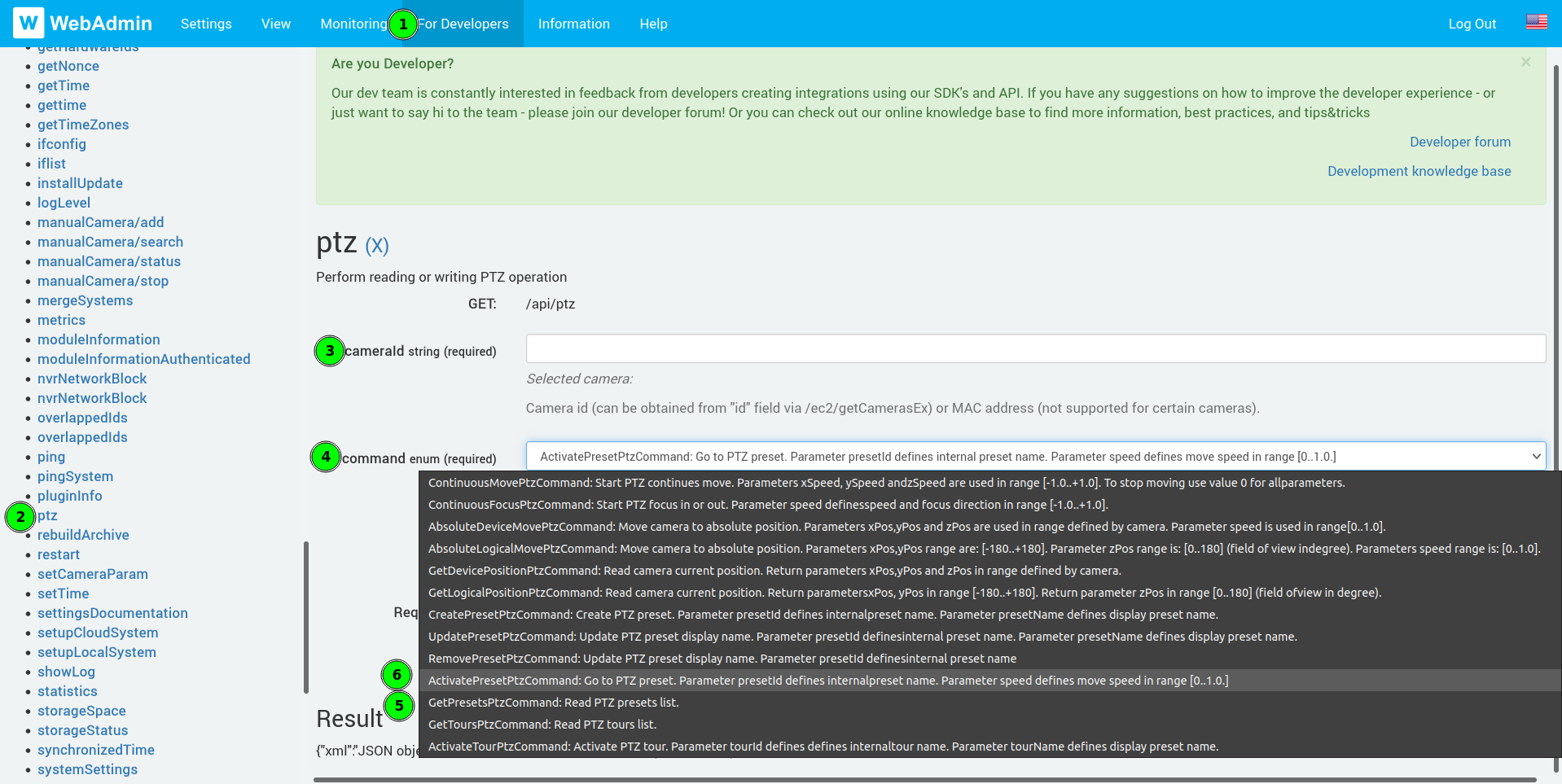
The URL would look like something like this:
https://localhost:7001/api/ptz?cameraId=<cameraId>&command=ActivatePresetPtzCommand&presetId=<presetId>&speed=1
0 -
Hi Norman Graafsma,
Thank you very much for the prompt reply! Let me try it as you commented.
0 -
Hi Norman Graafsma,
I have tried to activate the preset PTZ through the API, and API looks to return "successfully done", however it didn't work (not move to preset position). May I know any possibilities why it did not work?
Camera: Panasonic WV-S6110
// get a list of presets.
curl 'http://admin:Demo1234@192.168.1.254:7011/api/ptz?cameraId=2bc31e89-d842-6f68-5da5-3b16b25fa00e&command=GetPresetsPtzCommand'
{
  "error": "0",
  "errorString": "",
  "reply": [
    {
      "id": "{3ceb4385-9eb6-4a1a-8f91-88f365636814}",
      "name": "MTG"
    },
    {
      "id": "{7f721fc2-e98a-4a20-90b1-4f984b5c3d40}",
      "name": "Top"
    },
    {
      "id": "{10a81ba7-945d-4561-ad43-2f6b0154869e}",
      "name": "Home"
    }
  ]
}
// activate preset PTZ.
curl 'http://admin:Demo1234@localhost:7011/api/ptz?cameraId=2bc31e89-d842-6f68-5da5-3b16b25fa00e&command=ActivatePresetPtzCommand&presetId=7f721fc2-e98a-4a20-90b1-4f984b5c3d40&speed=1'
{"error":"0","errorString":"","reply":null} // looks OK.
0 -
Hi @...,
Can you paste the URL in the web browser and capture this event in Wireshark and share the Wireshark capture file with us?
0 -
Thank you for your support. Okay, let capture packets between browser and Nx Witness Media Server. Or do you need the captured packets between Nx Witness Media Server and IP Camera?
0 -
Hi @...,
Browser and server, since the browser sends the command to the server.
We would expect an HTTP 200 OK reply.Besides that, we would like a capture between server and the applicable PTZ camera, to check the response there.
Also, it might be useful if we can have the reply to the following API call:
http://<serverIpAddress>:7001/ec2/getCamerasEx
0 -
Thanks a lot. I have captured packets between browser and server, an authentication error and an internal server error happened. Could you give me any further instruction?

(Pasted URL to browser)
http://admin:Demo1234@192.168.1.254:7011/api/ptz?cameraId=2bc31e89-d842-6f68-5da5-3b16b25fa00e&command=ActivatePresetPtzCommand&presetId=7f721fc2-e98a-4a20-90b1-4f984b5c3d40&speed=1
If you need entire captured packets, please let me know.
0 -

Hello Keisuke Sawada ,
Please, use httpS in all the API requests.
Please, let us know if it helped.
0 -
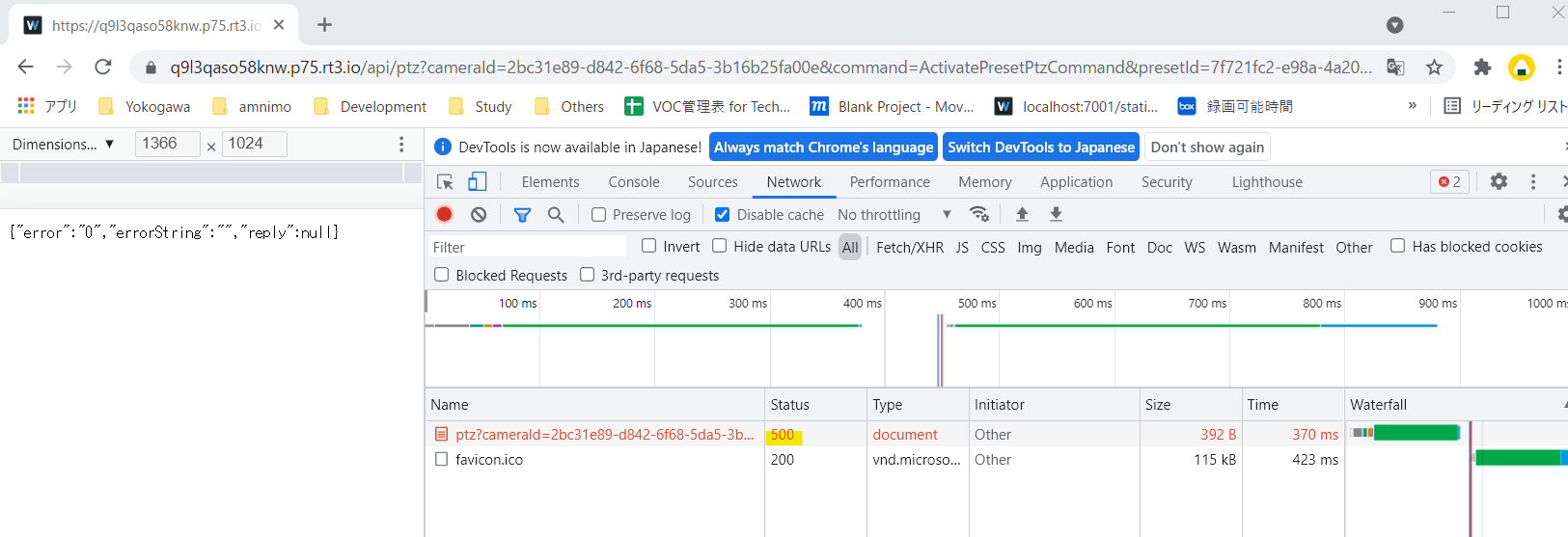
Okay, I have tried with "HTTPS", then still same internal error (500) occurred. (Capture packed were encrypted due to using HTTPS.)
 0
0 -
Hello Keisuke Sawada,
I'm sorry, I have not read attentively enough. No need in HTTPS in this case.
What is the build number of the server, you are using?
Could you please redo the test with capturing packets and share this network dump with us?
0 -
Hi Andrey,
No problem. I have captured packets btw client and server as following. At 39 & 41, successfully got a list of preset PTZ, but at 78 & 79, internal error occurred at activating PTZ. Could you take a look at this?
34	2021-11-04 08:51:41.585565429	192.168.1.254	192.168.1.150	TCP	66	7011 → 63192 [SYN, ACK] Seq=0 Ack=1 Win=64240 Len=0 MSS=1460 SACK_PERM=1 WS=128
35	2021-11-04 08:51:41.585709517	192.168.1.150	192.168.1.254	TCP	66	63193 → 7011 [SYN] Seq=0 Win=64240 Len=0 MSS=1460 WS=256 SACK_PERM=1
36	2021-11-04 08:51:41.585943050	192.168.1.254	192.168.1.150	TCP	66	7011 → 63193 [SYN, ACK] Seq=0 Ack=1 Win=64240 Len=0 MSS=1460 SACK_PERM=1 WS=128
37	2021-11-04 08:51:41.586851819	192.168.1.150	192.168.1.254	TCP	54	63192 → 7011 [ACK] Seq=1 Ack=1 Win=131328 Len=0
38	2021-11-04 08:51:41.586868460	192.168.1.150	192.168.1.254	TCP	54	63193 → 7011 [ACK] Seq=1 Ack=1 Win=131328 Len=0
39	2021-11-04 08:51:41.587385208	192.168.1.150	192.168.1.254	HTTP	808	GET /api/ptz?cameraId=2bc31e89-d842-6f68-5da5-3b16b25fa00e&command=GetPresetsPtzCommand HTTP/1.1
40	2021-11-04 08:51:41.587587379	192.168.1.254	192.168.1.150	TCP	54	7011 → 63192 [ACK] Seq=1 Ack=755 Win=63488 Len=0
41	2021-11-04 08:51:41.597327265	192.168.1.254	192.168.1.150	HTTP/JSON	636	HTTP/1.1 200 OK , JavaScript Object Notation (application/json)
42	2021-11-04 08:51:41.650693589	192.168.1.150	192.168.1.254	TCP	54	63192 → 7011 [ACK] Seq=755 Ack=583 Win=130816 Len=0
43	2021-11-04 08:51:41.754246546	192.168.1.254	192.168.1.150	TCP	56	7011 → 56324 [PSH, ACK] Seq=1 Ack=1 Win=501 Len=2
44	2021-11-04 08:51:41.769900832	192.168.1.254	192.168.1.150	SSH	106	Server: Encrypted packet (len=52)
45	2021-11-04 08:51:41.805358428	192.168.1.150	192.168.1.254	TCP	54	56324 → 7011 [ACK] Seq=1 Ack=3 Win=509 Len=0
46	2021-11-04 08:51:41.821368334	192.168.1.150	192.168.1.254	TCP	54	61172 → 22 [ACK] Seq=1 Ack=313 Win=509 Len=0
47	2021-11-04 08:51:42.282319087	192.168.1.254	192.168.1.150	SSH	106	Server: Encrypted packet (len=52)
48	2021-11-04 08:51:42.333487692	192.168.1.150	192.168.1.254	TCP	54	61172 → 22 [ACK] Seq=1 Ack=365 Win=509 Len=0
49	2021-11-04 08:51:42.518959476	amnimo_00:42:81	Broadcast	ARP	42	Who has 192.168.1.90? Tell 192.168.1.254
50	2021-11-04 08:51:42.552003342	amnimo_00:42:81	Broadcast	ARP	42	Who has 192.168.1.44? Tell 192.168.1.254
51	2021-11-04 08:51:42.794659337	192.168.1.254	192.168.1.150	SSH	106	Server: Encrypted packet (len=52)
52	2021-11-04 08:51:42.841114168	192.168.1.150	192.168.1.254	TCP	54	61172 → 22 [ACK] Seq=1 Ack=417 Win=509 Len=0
53	2021-11-04 08:51:43.306654689	192.168.1.254	192.168.1.150	SSH	106	Server: Encrypted packet (len=52)
54	2021-11-04 08:51:43.321020025	192.168.1.150	192.168.1.254	TCP	55	7001 → 49068 [ACK] Seq=1 Ack=1 Win=512 Len=1
55	2021-11-04 08:51:43.321421247	192.168.1.254	192.168.1.150	TCP	66	49068 → 7001 [ACK] Seq=1 Ack=2 Win=501 Len=0 SLE=1 SRE=2
56	2021-11-04 08:51:43.321061067	192.168.1.150	192.168.1.254	TCP	56	7001 → 49068 [PSH, ACK] Seq=2 Ack=1 Win=512 Len=2
57	2021-11-04 08:51:43.321669660	192.168.1.254	192.168.1.150	TCP	54	49068 → 7001 [ACK] Seq=1 Ack=4 Win=501 Len=0
58	2021-11-04 08:51:43.352052582	192.168.1.150	192.168.1.254	TCP	54	61172 → 22 [ACK] Seq=1 Ack=469 Win=509 Len=0
59	2021-11-04 08:51:43.505829533	192.168.1.150	239.255.11.11	UDP	801	56778 → 5008 Len=759
60	2021-11-04 08:51:43.512045389	192.168.1.254	239.255.255.250	SSDP	158	M-SEARCH * HTTP/1.1
61	2021-11-04 08:51:43.512653342	192.168.1.254	239.255.255.250	SSDP	158	M-SEARCH * HTTP/1.1
62	2021-11-04 08:51:43.542893616	amnimo_00:42:81	Broadcast	ARP	42	Who has 192.168.1.90? Tell 192.168.1.254
63	2021-11-04 08:51:43.574993191	amnimo_00:42:81	Broadcast	ARP	42	Who has 192.168.1.44? Tell 192.168.1.254
64	2021-11-04 08:51:43.818767727	192.168.1.254	192.168.1.150	SSH	106	Server: Encrypted packet (len=52)
65	2021-11-04 08:51:43.874510339	192.168.1.150	192.168.1.254	TCP	54	61172 → 22 [ACK] Seq=1 Ack=521 Win=509 Len=0
66	2021-11-04 08:51:44.283198507	192.168.1.150	239.255.255.250	SSDP	158	M-SEARCH * HTTP/1.1
67	2021-11-04 08:51:44.283237230	192.168.1.150	239.255.255.250	SSDP	158	M-SEARCH * HTTP/1.1
68	2021-11-04 08:51:44.283610370	192.168.1.150	239.255.255.250	SSDP	174	M-SEARCH * HTTP/1.1
69	2021-11-04 08:51:44.283623490	192.168.1.150	239.255.255.250	SSDP	162	M-SEARCH * HTTP/1.1
70	2021-11-04 08:51:44.330307374	192.168.1.254	192.168.1.150	SSH	106	Server: Encrypted packet (len=52)
71	2021-11-04 08:51:44.386069267	192.168.1.150	192.168.1.254	TCP	54	61172 → 22 [ACK] Seq=1 Ack=573 Win=508 Len=0
72	2021-11-04 08:51:44.567827971	amnimo_00:42:81	Broadcast	ARP	42	Who has 192.168.1.90? Tell 192.168.1.254
73	2021-11-04 08:51:44.598977414	amnimo_00:42:81	Broadcast	ARP	42	Who has 192.168.1.44? Tell 192.168.1.254
74	2021-11-04 08:51:44.842655304	192.168.1.254	192.168.1.150	SSH	106	Server: Encrypted packet (len=52)
75	2021-11-04 08:51:44.887117627	192.168.1.150	192.168.1.254	TCP	54	61172 → 22 [ACK] Seq=1 Ack=625 Win=508 Len=0
76	2021-11-04 08:51:45.354401362	192.168.1.254	192.168.1.150	SSH	106	Server: Encrypted packet (len=52)
77	2021-11-04 08:51:45.399881901	192.168.1.150	192.168.1.254	TCP	54	61172 → 22 [ACK] Seq=1 Ack=677 Win=508 Len=0
78	2021-11-04 08:51:45.468818106	192.168.1.150	192.168.1.254	HTTP	981	GET /api/ptz?cameraId=2bc31e89-d842-6f68-5da5-3b16b25fa00e&command=ActivatePresetPtzCommand&presetId=7f721fc2-e98a-4a20-90b1-4f984b5c3d40&speed=1 HTTP/1.1
79	2021-11-04 08:51:45.477156637	192.168.1.254	192.168.1.150	HTTP/JSON	497	HTTP/1.1 500 Internal Server Error , JavaScript Object Notation (application/json)
80	2021-11-04 08:51:45.523122481	192.168.1.150	192.168.1.254	TCP	54	63192 → 7011 [ACK] Seq=1682 Ack=1026 Win=130304 Len=0
81	2021-11-04 08:51:45.530381114	192.168.1.150	192.168.1.254	HTTP	643	GET /favicon.ico HTTP/1.1
82	2021-11-04 08:51:45.535644038	192.168.1.254	192.168.1.150	TCP	2974	7011 → 63192 [ACK] Seq=1026 Ack=2271 Win=64128 Len=2920 [TCP segment of a reassembled PDU]
83	2021-11-04 08:51:45.535813167	192.168.1.254	192.168.1.150	TCP	2974	7011 → 63192 [ACK] Seq=3946 Ack=2271 Win=64128 Len=2920 [TCP segment of a reassembled PDU]
84	2021-11-04 08:51:45.535876131	192.168.1.254	192.168.1.150	TCP	2974	7011 → 63192 [ACK] Seq=6866 Ack=2271 Win=64128 Len=2920 [TCP segment of a reassembled PDU]
85	2021-11-04 08:51:45.535930133	192.168.1.254	192.168.1.150	TCP	2974	7011 → 63192 [ACK] Seq=9786 Ack=2271 Win=64128 Len=2920 [TCP segment of a reassembled PDU]
86	2021-11-04 08:51:45.535980616	192.168.1.254	192.168.1.150	TCP	2974	701
0 -
Hello Andrey Terentyev,
May I know current progress of handling this query? Now our customer is evaluating Nx Witness how to activate preset PTZ with an external application. If you need further information, please let me know.
0 -
A support ticket had been crated to investigate behavior or the camera in question.
Here is the result.
Thank you for handling my request.
Unfortunately, the camera (Panasonic) caused the issue has already been returned back to a vendor. So I cannot set up the investigation environment for you.
On the other hand, the PTZ activation through API of another camera (Axis) worked very fine. Now we have updated current situation to the customer and waiting for the reply.
If we need to have further investigation of the Panasonic camera, then let me request you to have detail investigation again.0
Please sign in to leave a comment.
Comments
13 comments