Remote archive sync assertion std::is_sorted(deviceTimePeriods) crashes recording loop; camera flips Online/Offline after wrong→correct credentials (v6.1.2, ARM64)

Hello everyone,
I'm developing a VMS agent that integrates with Nx Witness via the REST API. On one of our edge devices, this server-side assertion in the remote archive synchronization task has occurred twice so far, each time putting a camera into a continuous Online/Offline oscillation. I have not been able to reproduce it intentionally, but since I captured it in the mediaserver logs both times, I'd like to report what I observed and ask whether it's a known issue.
Environment
- Nx Witness Version: v6.1.2.42921
- OS: Ubuntu 24.04 (ARM64)
- Camera: Hikvision DS-2CD2123G2-IU (ONVIF), scheduled recording ON
Issue Description
While the camera is recording, the mediaserver repeatedly logs this assertion:
ERROR ASSERT: ASSERTION FAILED:
  .../nx_vms_server/src/recorder/base_remote_archive_synchronization_task.cpp:122
  (std::is_sorted(deviceTimePeriods->cbegin(), deviceTimePeriods->cend()))
In sync with it, recording stop/start repeats every ~5s and the camera status flips Online/Offline continuously, never settling. There are no authentication (401) or RTSP errors — the stored credentials are correct, and the deviceTimePeriods assertion is the only error logged.
Observed trigger (from logs)
Both occurrences lined up with the same sequence:
- Camera recording with some archive accumulated.
- Credentials were set to a wrong value → camera Unauthorized → recording stopped for several minutes.
- Credentials were set back to correct → recording resumed.
- From the moment recording resumed, the assertion started firing and status began oscillating.
The first occurrence lined up exactly with a recording resume after a ~6m43s gap:
18:40:23  Recording stopped   (gap begins)
18:47:07  Recording started   (resume after ~6m43s gap, then stop/start every ~5s)
18:50:17  ERROR ASSERT ... base_remote_archive_synchronization_task.cpp:122
This is what the logs showed on both occurrences; I could not reproduce it on demand. The trigger appears to be recording resuming after an interruption gap, not the credential values themselves. A long gap (several minutes) plus some accumulated archive seems to be involved — a single wrong→correct credential cycle on a freshly restarted server did not trigger it.
Isolation (verified on the device)
- Recording ON → assertion fires repeatedly → status oscillates Online/Offline
- Recording OFF → assertion stops → status stays stable Online
- mediaserver restart (recording ON) → assertion stops → status stable (
Recording)
Workaround: restarting the mediaserver reliably restores a stable Recording state.
Questions
- Is this assertion (
base_remote_archive_synchronization_task.cpp:122,std::is_sorted(deviceTimePeriods)) a known issue in v6.1.2, and is there a fix or target version? - Can resuming recording after a multi-minute gap leave
deviceTimePeriodsunsorted?
Thank you!
-

Hi Atsushi,
Thanks for the detailed report. The isolation tests and timeline made this much easier to track down.
Is this a known issue?
Potentially affirm. Our crash monitoring has caught this assertion before, and it's tracked internally. A fix has been merged into the 6.1 patch branch and will ship in an upcoming 6.1.4+ patch release. I can't give an exact release date yet, but please an eye on this latest download page.What's happening
For each camera, the Server keeps a list of time periods when the device was offline. The remote archive synchronization task uses that list to decide which ranges to fetch from the camera's own storage.When a camera goes offline, the Server can't tell exactly when the stream stopped. So it moves the start of each offline period back by a fixed margin. If the camera flaps between Online and Offline (for example, while it's rejecting credentials, or right after they're corrected), those adjusted periods can overlap. The list is then no longer sorted, which triggers the assertion you're seeing at
base_remote_archive_synchronization_task.cpp:122.So to answer your second question: your scenario highly likely lead to an unsorted
deviceTimePeriodslist. The root cause isn't the recording gap itself. It's the overlapping offline periods recorded while the device was flapping.Workaround until the patch is available
- Restarting the mediaserver clears the condition, as you found.
- If you don't rely on importing footage from the camera's onboard storage (SD card), disabling remote archive synchronization for that camera should also avoid this code path.
Could you also share:
- A mediaserver log at DEBUG level that covers the whole sequence: credentials changed to wrong, credentials restored, and the Online/Offline oscillation. We'd like to confirm whether the ~5-second oscillation is fully explained by this issue or whether something else is also involved.
- Whether the camera has an SD card with local recording enabled.
Thanks again for the clear write-up.
0 -
Thank you for the detailed explanation of the root cause — the overlapping offline-period mechanism makes sense and matches what we observed. Good to hear the fix is already merged for the 6.1.4+ patch.
To answer your two follow-up requests:
1. DEBUG-level log covering the whole sequence
Unfortunately I can't provide this right now. The issue is intermittent and I haven't been able to reproduce it on demand — it has only occurred twice so far, and both times the server was running at the normal log level, not DEBUG. So I don't have a DEBUG-level capture of the full sequence. If it happens again, I'll try to capture DEBUG logs during the occurrence and share them.
2. SD card / local recording on the camera
I checked the camera directly and confirmed:
- No SD card is present, so there is no onboard/edge recording on this camera.
- NX reports the device with the
remoteArchivecapability, but that reflects the camera model's capability rather than any actual edge archive to import.
Camera: Hikvision DS-2CD2123G2-IU, firmware V5.7.2 build 211109, ONVIF. Server-side scheduled recording is enabled 24/7 and status is
Recording.Since we don't rely on SD-card/edge import for this camera, your second workaround — disabling remote archive synchronization for this device — looks viable for us until the 6.1.4+ patch is available. Could you confirm the exact setting / REST field to disable it?
0 -
Hi Matsuda-san,
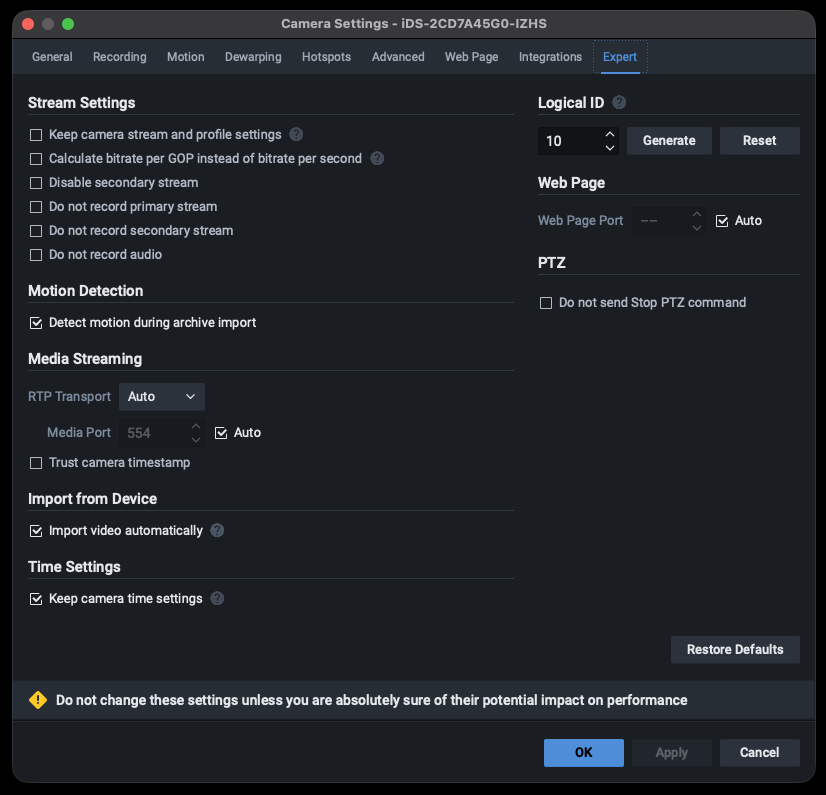
You may try the option shown below. Please help to uncheck it.
An option to enable the Import from Device service will appear in the Camera Settings > Expert tab for supported devices.
 0
0 -
Hi Ichiro,
Thank you for the clear pointer. I found the Import from Device > Import video automatically checkbox under the Expert tab in Camera Settings for the affected camera, and I'll uncheck it to disable the automatic import and avoid the assertion until the 6.1.4+ patch is available. As confirmed earlier, this camera has no SD card / onboard recording, so disabling it won't cause any loss of footage.
I'll report back if the oscillation no longer occurs with this option disabled.
Thanks again for your help.
0
Please sign in to leave a comment.
Comments
4 comments