Nx Meta playback time different to recording time
Answered
I'm trying to understand a difference I'm seeing in the timestamp of recorded video between when it was recorded and the time shown on the Nx Meta Flex Timeline when playing back the recording. I'm consistently seeing the playback time being 14 to 15 seconds later than when the event in the recording actually occurred. Nx Meta server and desktop client are both running on the same PC.
For example, I used the time shown in the bottom-left of the timeline and waved at the PC's USB camera at 3:18:00pm (which agreed with the Windows desktop clock)
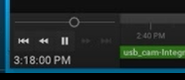
A minute or so later I played the recorded video, and the wave showed at 3:18:14pm
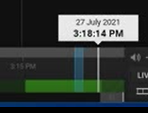
This delay also shows when I request recordedTimePeriods for the camera via the API. Any ideas on what might be causing this?
Thanks, Jamie.
-
Official comment

Hi @...,
Thanks for your information.
The content of the response represents the reason that you are looking for.
Here you will find around 14 seconds gap between vmsTime and osTime(1628021902754 - 1628021888170 = 14584 milliseconds since epoch). The osTime is what you were checking in the bottom left corner of the client interface, whereas the VMS will follow vmsTime to adjust the timestamp of incoming footage.
If you hope to get the consistent timestamp for both osTime and vmsTime, you could disable the sync Time with the Internet option from System Administration > Time Synchronization page. Then the vmsTime will follow the OS time of the selected server. Remember to let your server OS sync its time with a time-server over the Internet to avoid further time deviation.
Thank you. -

Moved from "Developer forum" to "Nx Witness Desktop and Server"
0 -
Hi @...,
You may misunderstand the displayed time that is showing in your picture 1:
- The displayed time of the bottom left corner is your client's OS time(Picture 1).
- The timestamp recording footage will be corrected based on the server's OS time(Picture 2).
Try to compare the OS time between your server and client. It should be around 14-15 seconds gap.
Let me know if you have further questions.
Thank you.0 -
Hi Wendy Chuang.
Thanks for your reply.
Both server and client are running on the same PC, this is why I am puzzled by the time difference.
Thanks,
Jamie.
0 -
Hi @...,
Sorry for missing the information in your post.
Could you provide the API response when running the /api/getTime on your server?
Thank you.
0 -
Hi Wendy Chuang,
Request is
https://192.168.142.1:7001/api/getTime
Response is
{
"error": "0",
"errorString": "",
"reply": {
"osTime": "1628021888170",
"realm": "VMS",
"timeZoneId": "Pacific/Auckland",
"timeZoneOffset": "43200000",
"vmsTime": "1628021902754"
}
}Thanks,
Jamie.
0 -
Thanks Wendy Chuang.
0
Please sign in to leave a comment.
Comments
7 comments