Erreur démarrage NX Witeness "Pilotes non installé"
Answered
Bonjour,
J’ai le message d’erreur « pilote non installé ou trop ancien » lorsque j’exécute NX.
J’ai pourtant mis à jour le serveur dell (PowerEdge R540) et les pilotes de la carte graphique « Matrox G200eW3 WDDM 2.0 »
Je voulais savoir si il y a une solution à ce problème ou si il est impossible de faire fonctionner NX sur cette carte graphique.
Cordialement
-

Hi Lucas Couvillers,
Please submit your tickets in English, since that is the chosen language for this community.
I had 1 year French in school when the dinosaurs still walked through the streets, so that is not sufficient to have a conversation.I assume you have issues with opening the Nx Witness Desktop client?
All drivers are up-to-date and Windows had all updates. Am I right?
If that is the case, please check if OpenGL 2.1 or newer is available on your system.
If that is the case as well, you could open the application in High Performance mode.
Instructions for Windows can be found HERE.0 -
Sorry about the French
--> Drivers are update
--> "High performance" mode is enabled on NX client
I will put an internet access on the server and checked the OPENGL version, but it seems to me that it is OpenGL 4I come back to you quickly
Thank you0 -
The OpenGL 1.2 version appears to be installed on the server.
Do you have a document with OpenGL update instructions ?Thank You
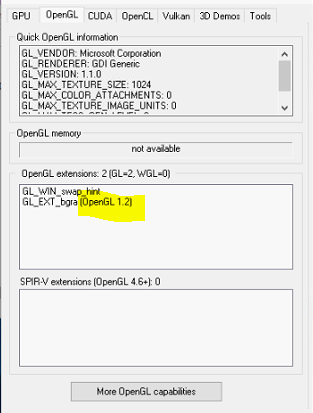 0
0 -
Hi Lucas Couvillers,
You are using Windows 10 or Windows server 2019+?
You wrote you updated the drivers for the GPU. Did you do that via Windows update, or did you use the latest available version on the website of the manufacturer of the GPU?
The latest version I found was 5.96.004 of May. 08, 2006, which is the same year OpenGL 2.1 was introduced. So you might be lucky with the latest driver or unlucky when OpenGL 2.1 wasn't part of the driver update.
Otherwise, I'm afraid you have to replace the GPU or use the possibly available on-board graphics card.
0 -
Hello,
I am on windows server 2019 and I have updated the components with the drivers of the manufacturer’s site.0 -
Hi Lucas Couvillers,
If that is that the case, I'm afraid the only option is to replace the GPU or force the use of the on-board GPU if applicable. Since you are using Windows Server 2019, it might be that the server CPU only has limited GPU capabilities.
0
Please sign in to leave a comment.
Comments
6 comments