VIVOTEK Speed Dome camera goes offline after updating firmware
Answered
Manufacturer: VIVOTEK
Model: SD9364-EHL-v2
Firmware: 2.2002.22.01e
Diagnostics for camera SD9364-EHL-v2
Confirming target camera provides media stream.
FAILED: Camera request "AddConfiguration" failed with error "Fault info. Reason: Invalid Args. Additional: SOAP-ENV:Sender. Sub info: "http://www.onvif.org/ver10/error":InvalidArgs. ". Please try to reboot the camera, then restore factory defaults on the web-page. Finally, try to update firmware. If the problem persists, please contact support.
Diagnostics complete
-

Hi @...,
This issue may relate to the ONVIF request/response between Nx and Vivotek issue, which several users have reported to us.
We suggest upgrading your Nx Server to 4.2 patch and configuring the media option, please follow the steps below:
1. Upgrade Nx Server to 4.2.0.33117
Check MONTHLY PATCH page on: https://my.networkoptix.com/#/download
For Nx Witness In-Client Upgrade:
Build Number: 33117
Password: pjpe0h2. Modify the Media2 setting
Go to Camera Settings > Expert tab, select Never in the Use Media2 to fetch profiles dropdown menu, then click OK to save the setting.
Please give the system 1-2 minutes to initialize the profile.
If you found the issue persists after you have done all the above, it is likely we need to have direct access to your devices to have further investigation.
If you agree to provide direct access for us, I will convert this post into our ticket system for you to provide sensitive information.By the way, in order to save time, please refer to this support ARTICLE for providing useful and essential information for us, so we can help to solve the issue as soon as possible.
Thank you.
0 -
Hi @...,
Just checking in to make sure you received our response as it has been a while since we have heard from you. Please let us know if you still need help by responding to this post. We are eager to resolve your question as soon as possible.
Thank you.0 -

The problem with this camera is still relevant.
NX Witness version 4.2.0.32840Cam SD9364-EHL Firm. Version: 0114a
0 -
Since the original issue reporter did not come back to us, we still do not find out the cause of the issue.
Currently, I can only suggest similar things: Please follow the steps below to upgrade your Nx Server to 4.2 patch and configure the media option.
1. Upgrade Nx Server to 4.2.0.34125
Check MONTHLY PATCH page on: https://my.networkoptix.com/#/download
For Nx Witness In-Client Upgrade:
Build Number: 34125
Password: pjb33u2. Modify the Media2 setting
Go to Camera Settings > Expert tab, select Never in the Use Media2 to fetch profiles dropdown menu, then click OK to save the setting.
Please give the system 1-2 minutes to initialize the profile.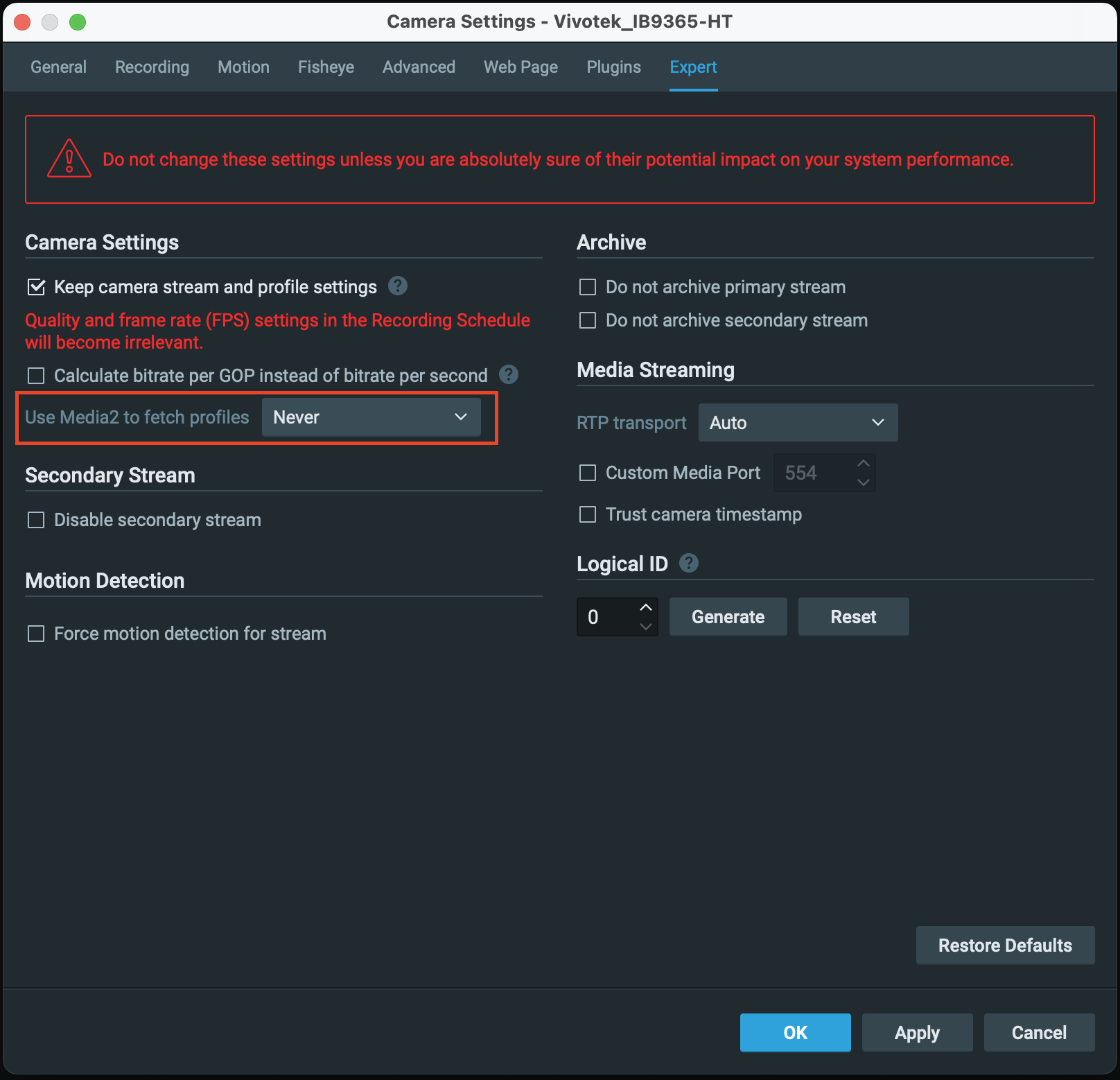
If you found the issue persists after you have done all the above, it is likely we need to have direct access to your devices to have further investigation.
If you agree to provide direct access for us, I will convert this post into our ticket system for you to provide sensitive information.Thank you.
0 -
Thanks.
It looks like this solved my problem.
I will update the firmware on another camera and check.1 -
This update solved my problem.
0 -
It is good to hear the issue has been solved.
We appreciate the updating and confirming this issue.
Thank you.
0
Please sign in to leave a comment.
Comments
7 comments