NX Client Problem AMD WX2100
Answered
Hello,
we have installed a new server with a graphics card AMD Radeon WX2100. Unfortunately, the NX client does not run, it does not recognize a graphics card (Open GL device), as on a virtual machine (so we know the problem). We can replace the DLL and then the machine runs, but then everything works on the CPU. The graphics card was recognized correctly by Windows and all drivers are up to date.
Do you know of a problem here?
-

Hi Andreas,
First thing to check is the version of OpenGL you use.
After that, it is important to check for the latest drivers as you did, but please try to use the latest download of the manufacturer and not the default drivers of Windows.
If this fails, a possible solution might be to set the Nx Witness desktop application to High Performance.
To do this, head to the Windows Graphics Settings:
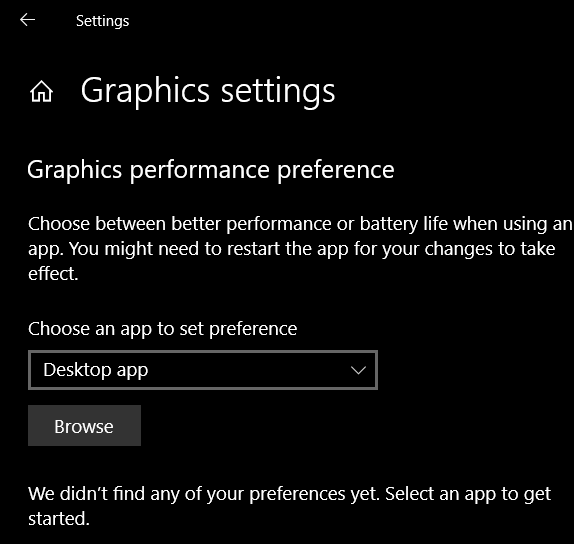
Select Browse and navigate to:
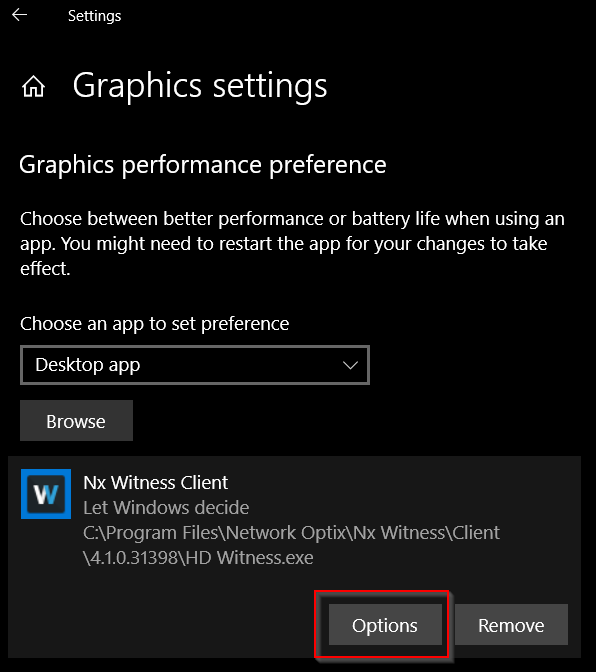
C:\Program Files\Network Optix\Nx Witness\Client\<version>\HD Witness
Select Options:
And select High Performance. In your case, most likely the AMD Radeon WX2100 is suggested.
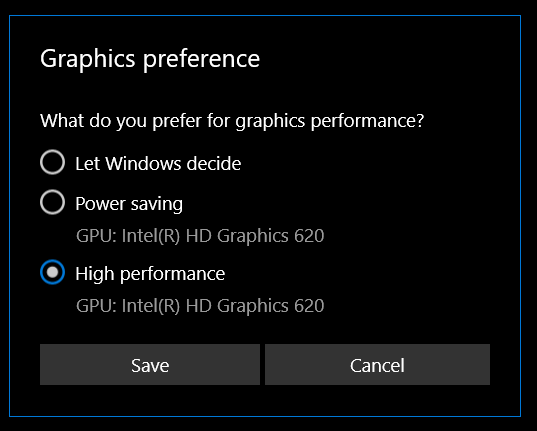
Start the Nx Witness Desktop Client again and let us know if this resolved the issue.
If it didn't resolve the issue, we like to investigate the issue a bit more, and we can transfer this topic into a support ticket if you can provide TeamViewer access to the affected computer.
0 -
Hi Norman,
Thanks for the quick help, the problem was not with the NX or windows. The server still has an Aspeed onboard graphics card and the customer connected the screen to the graphics card and not to the WX2100. So he always tried to use the Aspeed graphics (which can't do anything). We changed that and immediately it worked.
0
Please sign in to leave a comment.
Comments
2 comments