Intermittent Connection issue usng Hanwha Wave Cloud proxy

We have issues below as best I can describe and are looking for some suggestion and ideas where or what might be the issue.
We have integrated Hanwha into our CMS platform and connect via the cloud proxy link https://xxx-xxx-xxxx-xxxxxxx.relay.vmsproxy.com for example.
The API we have been using until very recently was V2 but have added support for V3 and V4 where possible and that is being released in the next few days. To connect to the systems and get all cameras, the NVR is added to our Azure environment, and connection tests can be carried out from there.
The NVR ‘s on site are 99% v6.05 with a couple on 6.03 and 6.02.
The issue appears in the following 2 scenarios.
- Verified Connection Loss
- We create a generic alarm every 2 mins from a windows task that posts the word “ Heartbeat “ as the caption , and we then send an email via our secure SMTP to our dedicated receiver and process in our backend as a “keep alive / Heartbeat”
- When we fall to get heartbeats for 5 min , we start a process of checking 3 times with a interval and then raise this as verified connection loss to our specialists.
- So at that point we have not heard from the box , nor can we connect in via the API .
- When specialist then tries to connect using out from our platform we fail to connect , when I then try from our Azure integration , that fails , when I add the Url to a local web browser on my PC it fails with a error 502.
- Alarms come but are blank meaning we cannot reach back and get images.
So what we know and can test currently are
- When we stop getting Heartbeat alarms , this starts the check system and this lasts for between 5-10 mins
- During this point it seems we cannot connect via the cloud proxy on our Azure integration , Postman tests, web browser .
- The connection always restores itself after several minutes .
I did see s p2p failure notice on one of the NVR logs this morning , we did also run the test tool to show open ports . I have attached a before and after .
I am wondering if there are any known improvements that might explain this in either firmware 6.1.2 or the V4 API
-

Hi Garry,
Thanks for the detailed write-up. A few clarifications before we can dig in:
1.Generic alarm
Could you clarify what this refers to? It isn't a term we use in the VMS, so we're not sure whether it originates from the OS side or from the VMS itself. If it is a VMS feature, please describe exactly what you're configuring and how it's triggered.2. VMS version, are you saying the VMS or the Hanwha NVR Firmware version?We're not certain which Hanwha WAVE builds are currently published on their site, but any further investigation on our side would need to be on 6.1.2. Versions 6.0 and earlier are outside the supported scope here, as back-porting from the newer version isn't an option in this case.
3. The 502 error
Which exact URL were you loading in the browser when this appeared?Regarding to attachments, I did not see them came through with your message, so we weren't able to review the before/after captures. Could you resend them?
Thanks.
0 -
Hi Ichiro
- Generic event
- We simply create a heartbeat every 2 mins via a http post messages , that send an email alert to you.
- Yes our versions are 6.03 and 6.05 .
- We have just implemented changes to our receiver inline with the format changes in the smtp messages when going to 6.01.
-
https://0c90767e-dad3-4075-b103-31ec01822722.relay.vmsproxy.com/static/index.html#
- This produced the error 502 from web browser and postman.
Regards
Garry
0 - Generic event
-
Hi Garry
Thanks, is that possible you can provide the debug log of the VMS for us?
https://support.networkoptix.com/hc/en-us/articles/236033688-How-to-change-software-logging-level-and-how-to-get-logs
If possible, the debug log can include the period of the 502 issue.0 -
Hi support , the problem I have is the issue does not always repeat on the same site, so can you tell me the effect turning the logs on has on the performance of the NVR ?
thanks
please tell me how to upload log files .
0 -
Hi
It may increase the I/O on the system drive (not the recording drive, but the system drive) and take up some extra space for logging. You can use the parameter below to control log retention and splitting: https://resources.vmsproxy.com/nx_vms_help/collecting_logs.html
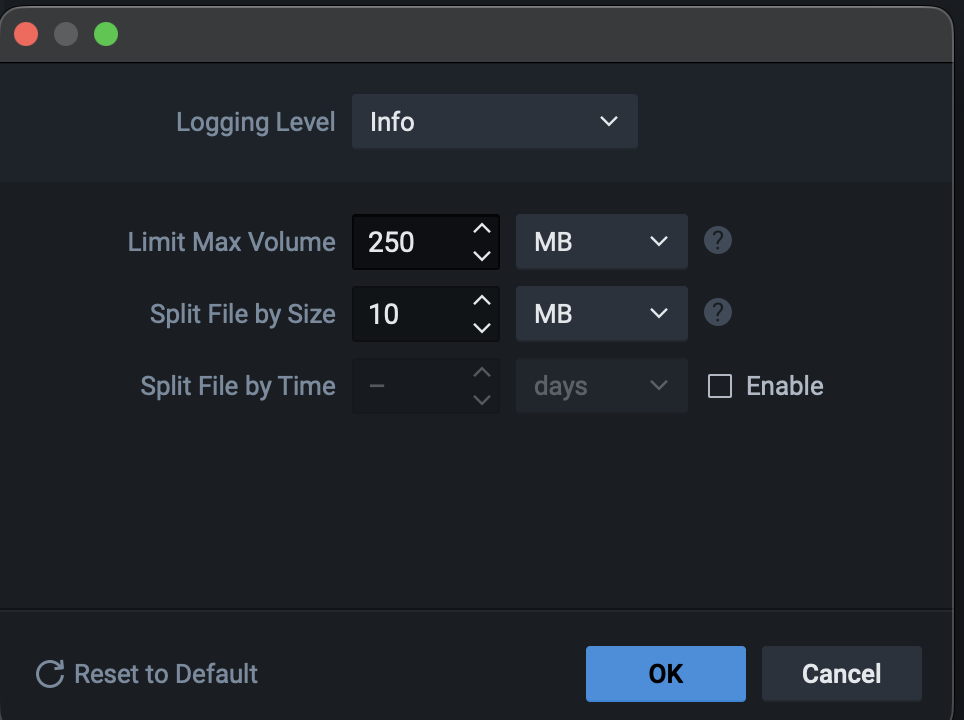
Since you've mentioned that you can't predict when the issue will occur, continuous collection is the practical option here. It's a trade-off: debug-level logging gives you the detail needed to understand what happened, while keeping logging at the default level (INFO) keeps the system lighter with less impact. That said, based on what we're seeing so far, debug logging is likely necessary in this case, but it is still your decision.
Once you have the logs, please upload them to a shared drive of your choice and share the link with us.
Thanks.
0
Please sign in to leave a comment.
Comments
5 comments