Event rules triggered by false positive

Good morning community.
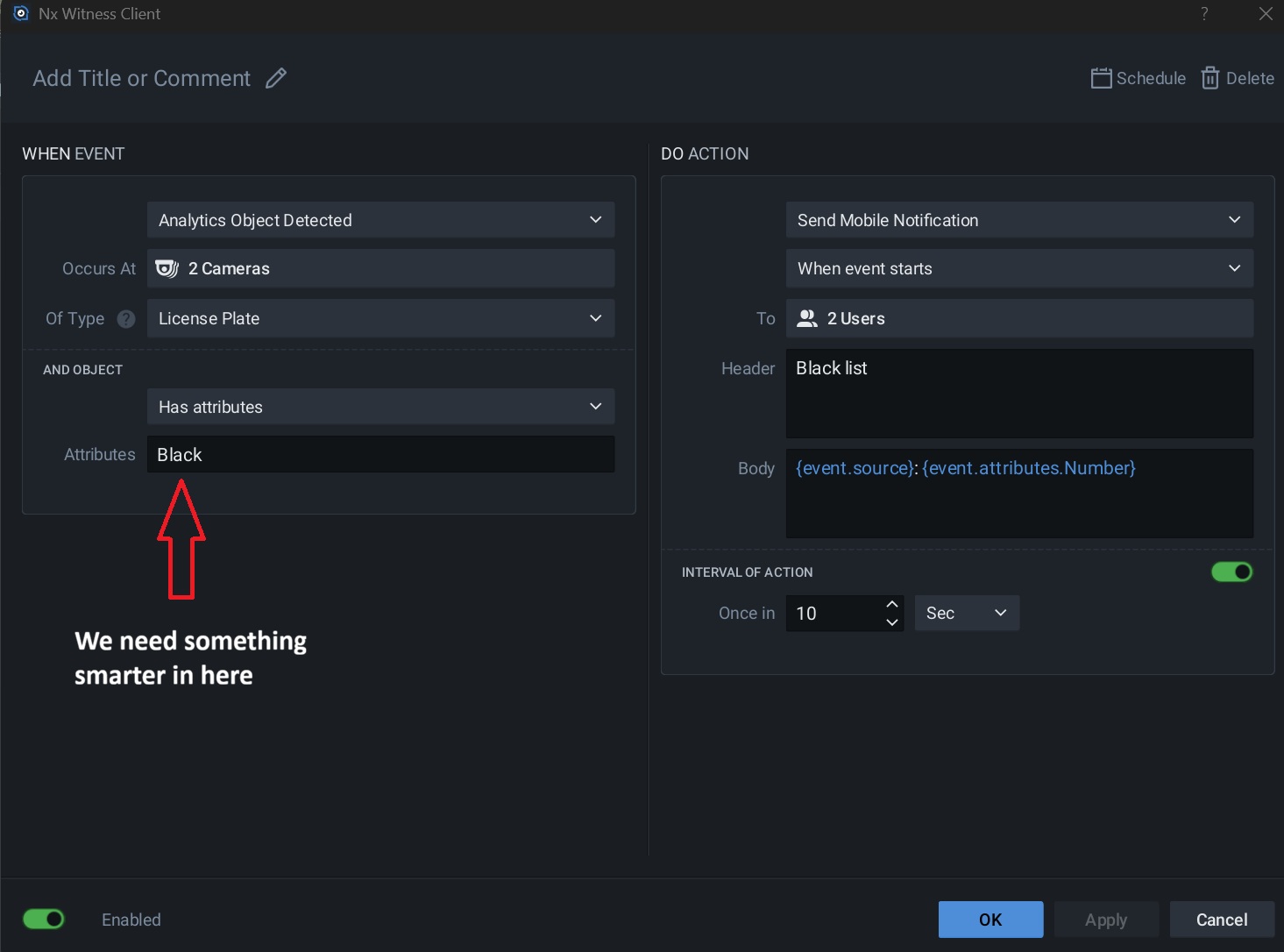
NX version 6.1.2.42921. Our Milesight license plate recognition (LPR) cameras report various attributes to NX when a license plate is read, including plate color, vehicle color, country/region, direction of travel, etc. Each licence plate is categorised as “White” (allow entry), “Visitor” (do not allow entry), or “Black” (known intruder). Unfortunately some vehicle colors are triggering our event rule meant for black-listed vehicles, indicating a false positive for an intruder and setting off alarms! For example, a black license plate or black vehicle triggers intruder alarms!
Is there something we can put in our event rule so that instead of just looking for the word “Black” (which might be a vehicle or plate color) it actually looks for the plate classification (white, visitor, or black)?
-

Thank you for your post.
To better assist you, can you elaborate more on the “color” delineation for the LPR? Based on your description it appears you're utilizing a list, can you elaborate more on how that is configured?
From there I should be able to better assist with your concern.
Thank you.
0 -
Hi Michael. Thanks for replying.
We have Milesight TS2866-X4TPE licence plate recognition cameras that feed into our NX Witness system. These cameras have settings that allow them to pass on various attributes about vehicles that appear in front of them. These include Plate Color, Vehicle Colour, Detection Region, Country, Vehicle Type, Vehicle Brand and Direction of travel. Every plate recorded in the system has been categorised as either in a White List (entry allowed) or Black List (entry not allowed). Whenever a vehicle in the black list appears in front of our camera it triggers an NX event to send us a mobile notification. This is working fine. However, whenever a black coloured vehicle or a black coloured licence plate appears in the camera, it's triggering a black list intruder alert, even though the plate is known and in the white list.
We need help ensuring that the event is triggered only when a vehicle is in the black list and not because the vehicle or plate is coloured black!
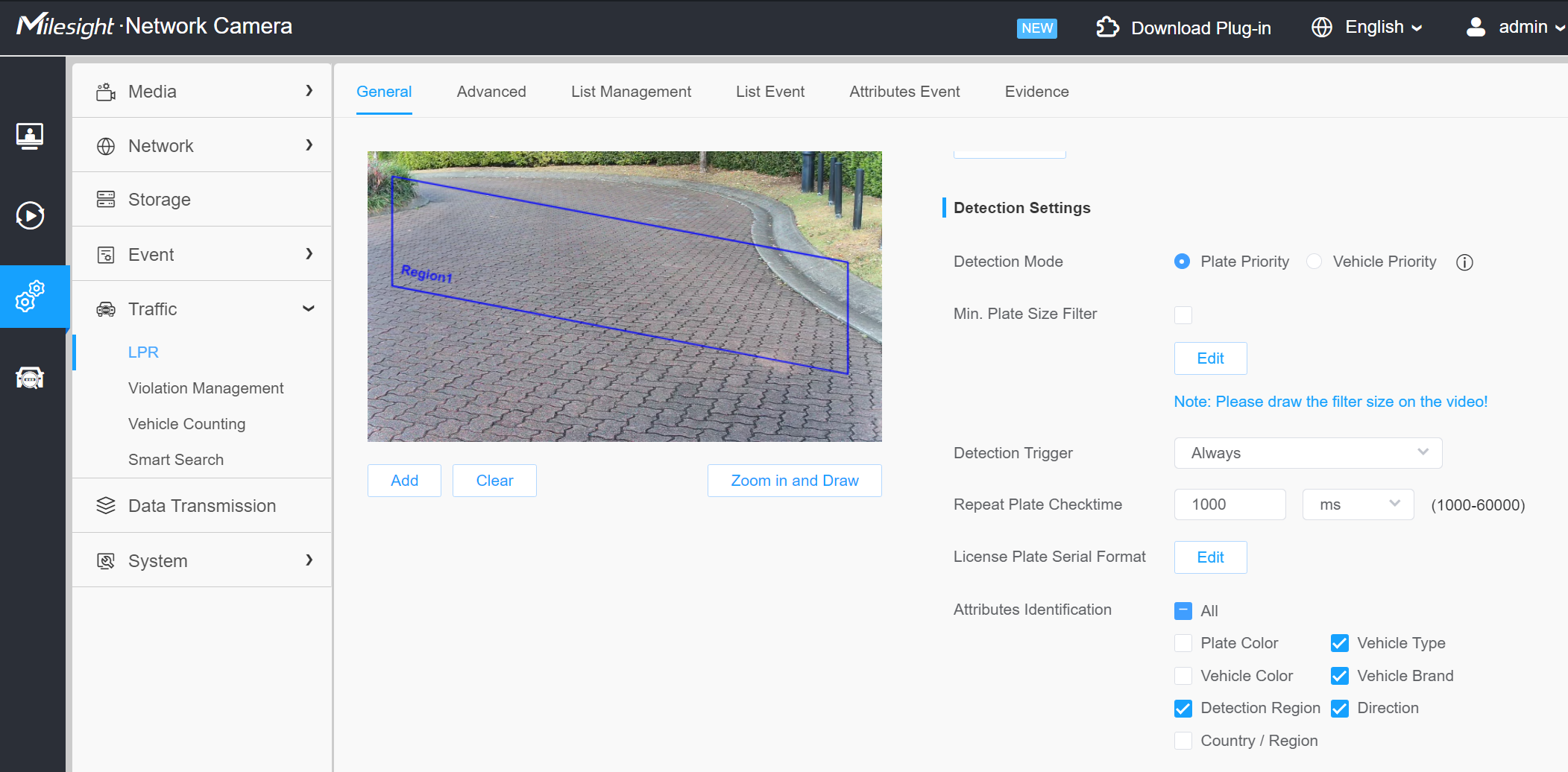
The following image shows the attributes that are passed to NX Witness. If Plate Color or Vehicle Color are selected, we get false black list alarms on our phones!
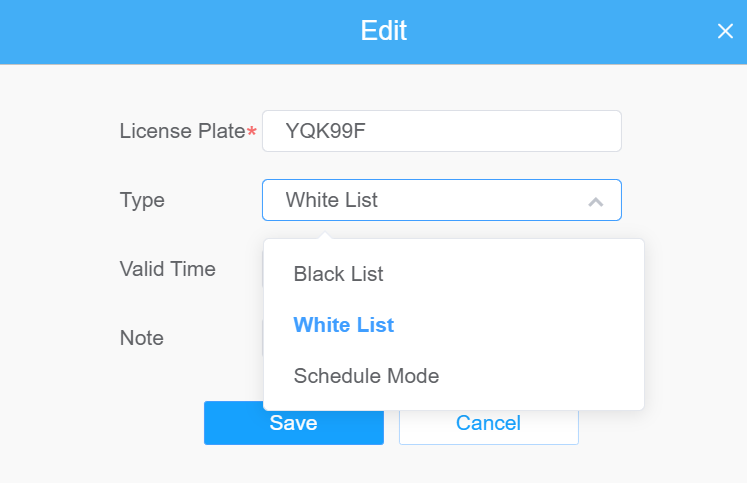
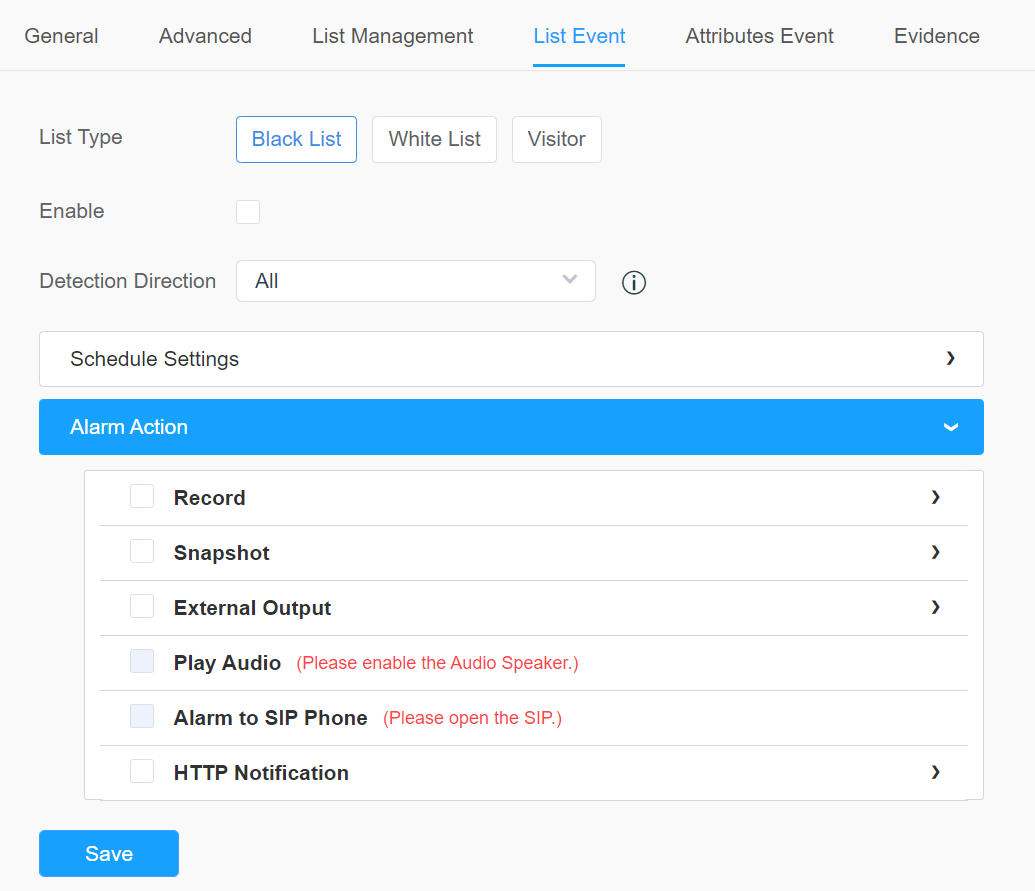
The next image shows how a known plate is put into the White or Black list:
The following image shows what should happen when a vehicle on the white list appears. You can see that “Enable” and “External Output” are checked. This opens the gate.
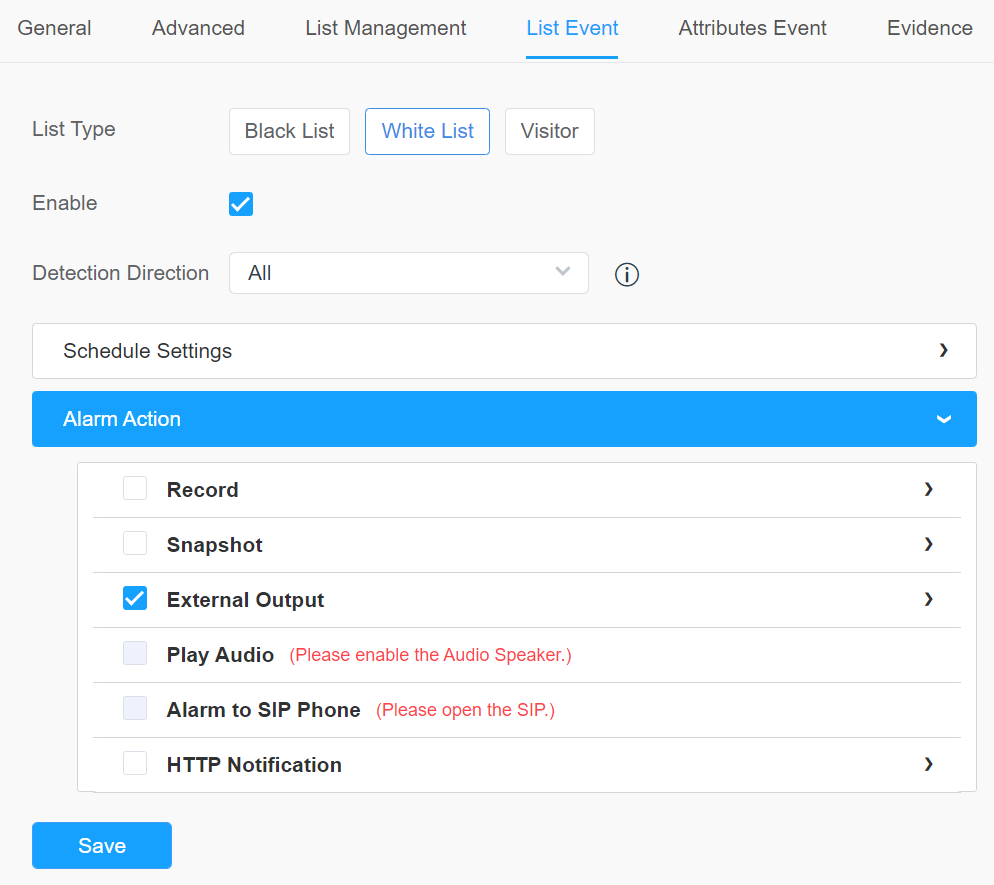
The following image shows what should happen when a vehicle on the black list appears. You can see that “Enable” and “External Output” are NOT checked. This does not open the gate.
Here's the event rule again:
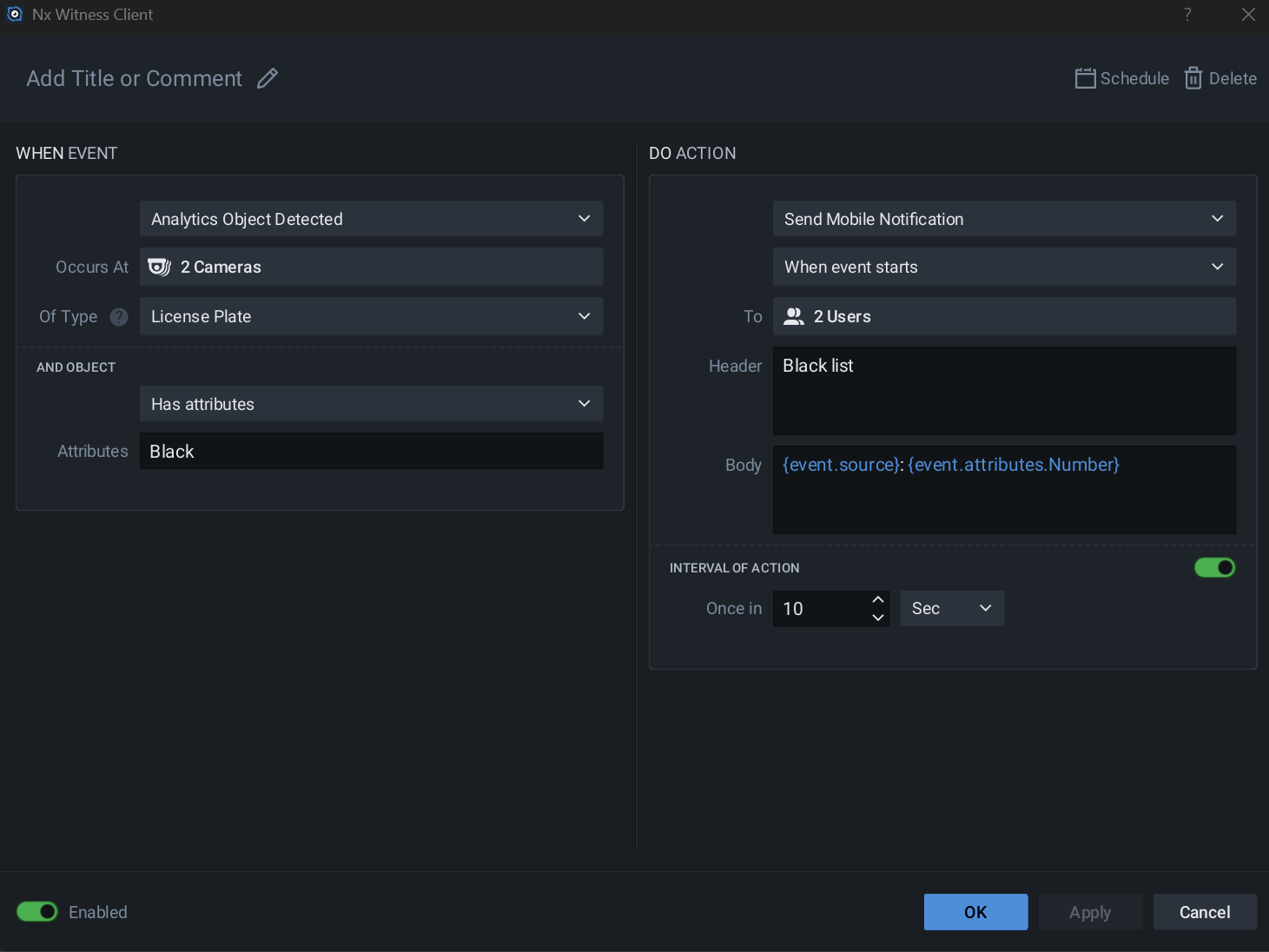
To clarify, the gate works fine. It opens when a vehicle on the white list appears and it does not open when a vehicle on the black list appears. When a black list vehicle appears, the event is triggered correctly and we're notified. But if a black coloured vehicle or black coloured plate arrives, NX thinks it's on the black list and triggers a false positive event settings off alarms!
I'm sure it's just because “Black” appears in the Attributes field above. If we could somehow narrow it down to a specific attribute sent by the camera this should fix it but I've tried putting various attributes in there and it doesn't work. Here's a full list of attributes the camera is sending NX:
{device.name}
{device.logicalId}
{device.mac}
{device.type}
{device.ip}
{event.type}
{event.description}
{event.attributes}
{event.attributes.Color}
{event.attributes.Number}
{event.attributes.Type}
{event.attributes.Country}
{event.time}
{event.time.end}
{event.time.start}
{event.name}
{event.timestamp}
{event.timestampMs}
{event.caption}
{event.source}
{event.timestampUs}
{server.name}
{site.name}I don't know which one has the list name (white or black) in it.
Any ideas?
Thanks very much in advance.
0 -
UPDATE: I've found the correct attribute. It's {event.attributes.Type}. That is always “White”, “Black” or “Visitor” (unknown plate). If we could leverage off that specifically, instead of just looking for the word “Black”, that would fix it. What can I put in the event rule Attributes field to limit it to that attribute?
0 -

- Authorized Reseller
Getting the exact “attributes” syntax is always a challenge, but something like;
Type=VisitororDirection=Incomingis what I found previously.
The objects panel generally shows the attribute names.
spacein the Nx Rules Engine fields can sometimes act as a delimiter (OR) or an AND condition, depending whether it is the Source Contains, Caption Contains, Attributes = etc. I think attributes is space = AND.
Therefore attributes that display asLicense Plate Type Visitormay have a syntax ofLicense.Plate.Type=VisitorIt would be worthy of a Nx approved article outlining it a bit better.
Frustratingly Milesight often use different words for “direction” depending if it is a license plate analytic or vehicle analytic , e.g., Incoming vs Approach.
0
Please sign in to leave a comment.
Comments
4 comments