Maps (backgrounds in jpeg, png, other formats) feature missing in Nx Witness 6.1 (Demo license)
Completed
Version: 6.1.1.42624
- License: Demo
- User role: Admin
- Issue: Maps menu not visible
Question: Is Maps feature restricted in demo or disabled by default?
-

Hi Aleksandrs,
Thank you for reaching out.
The standard maps feature remains fully available in the default Nx Witness system, allowing you to use any JPG or PNG image as a background for your layouts.
If you are looking for advanced mapping capabilities, the new Nx Maps integration is available exclusively as an Nx Witness Enterprise feature. To explore these advanced tools, please contact your local authorized reseller, and they will be happy to provide you with a demo license key.
Best regards.
0 -
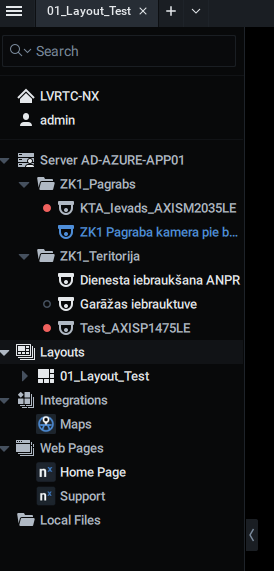
Thanks for your response. Where can I find the Maps field in my interface? I find Nx Maps 3D in integration part only. Pls check the printscreen.
 0
0 -
Hi Aleksandrs,
What you are looking at is the Nx Maps integration, which is exclusive to the Enterprise version of Nx.
If you would like to set up standard maps as a layout background, please refer to THIS section of the in-client manual.
Best regards.
0 -
Great, thanks! I can't find standard maps as a layout background before, but now all is fine.
0
Post is closed for comments.
Comments
4 comments