How do I check the current number of TCP connections for a cluster or a single server in a cluster?
Completed
Referring to the article "https://support.networkoptix.com/hc/en-us/articles/360000292188-How-many-Nx-Desktop-clients-can-connect-to-Nx-Server", the question arises whether the Nx administrator has the ability to check how many TCP connections are currently used in the system?
1
-

Hi Piotr Wnęk,
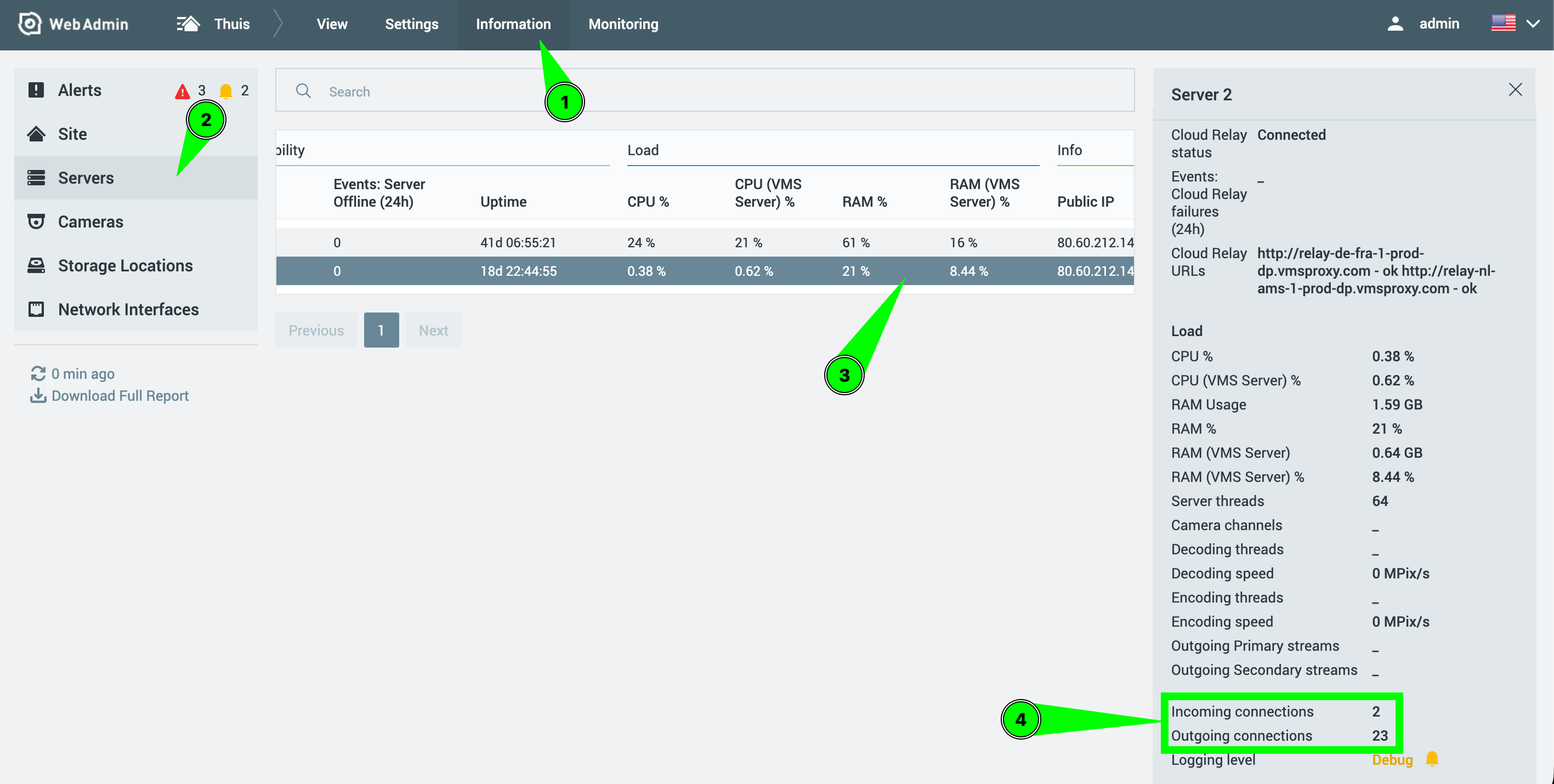
You can check the number of TCP connection per server through the WebAdmin:
- First you navigate to the Information tab.
- Select Servers
- Select the desired Server
- Scoll a bit down to see the number of Incoming connections, and the number of Outgoing connections. Together the count as the total number of TCP connections for that moment.
Ps. The suport article you linked to, does require an update, which I just created a task for. Besides the Client Server connection, the devices, also the plugins, and API requests create a TCP connection.
With kind regards.
0
Post is closed for comments.
Comments
1 comment