Memory usage
Answered
Hello. I migrated from Raspberry Pi 4 (Bookworm) to Raspberry Pi 5 (Trixie). Before migration I made several screenshots of resource usage of server, so, I was confused:
- RP4 uses 15% of 8Gb RAM
- RP5 uses 40% of 8Gb RAM
I investigated this issue and saw, that total memory usage of RP5 is approx 2.9Gb why NX Witness shows
- RAM Usage = 3.48 GB
- RAM % = 44 %
- RAM (VMS Server) = 0.43 GB
- RAM (VMS Server) % = 5.41 %
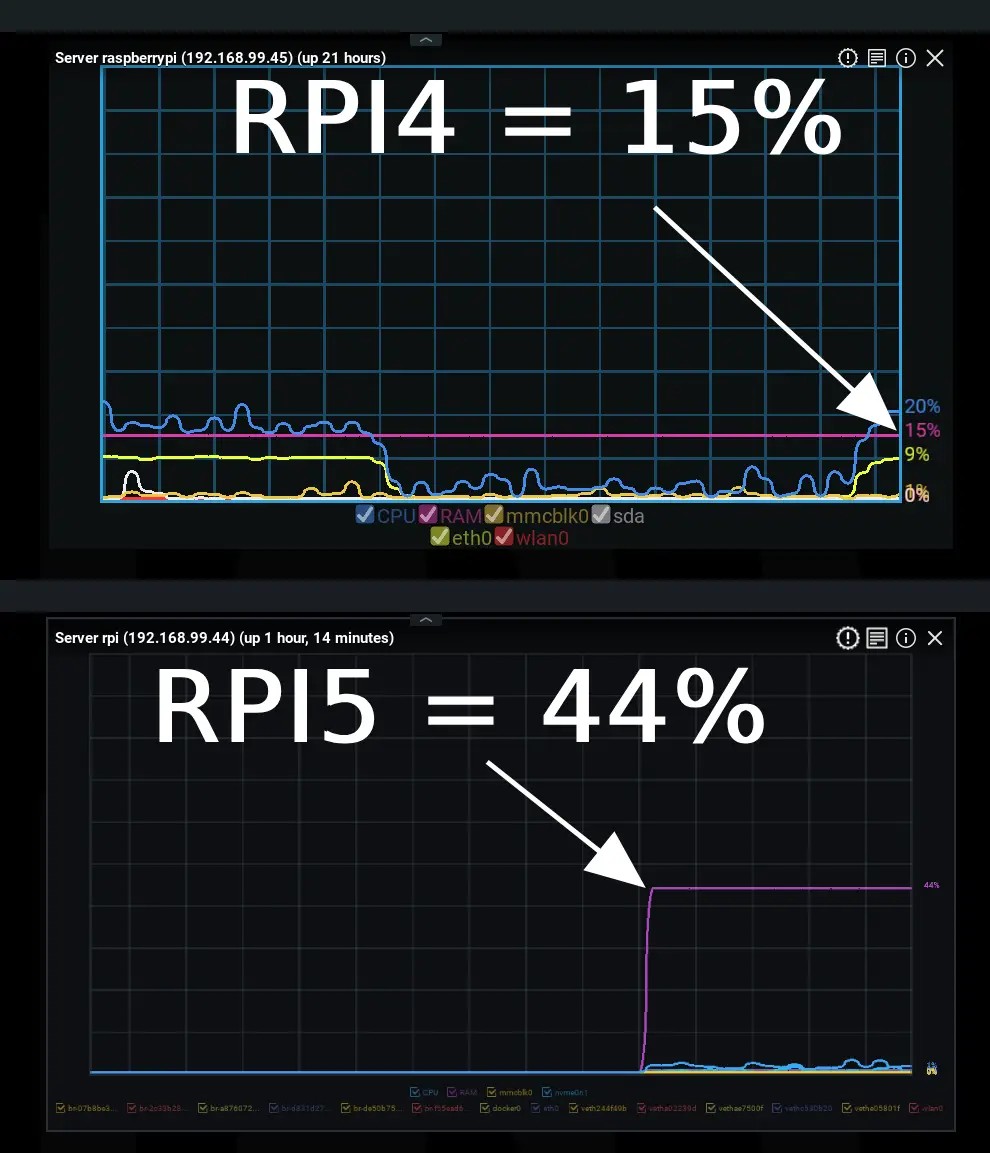
But RPI 4 has similar settings and shows different result! Why?
-

Hi Konstantin,
Thank you for your question. I believe there are a few misunderstandings that are worth clarifying.
1) Environment differences
Your environments are significantly different, and unfortunately they cannot be considered “similar.”
For example, Docker is running on the Raspberry Pi 5, while it is not present on the Raspberry Pi 4. This alone can have a major impact on system behavior and resource usage.2) Server health vs application usage
The Server Health information you referenced reflects OS-level memory usage, not memory consumption specific to the Nx Media Server application. Based on the system details shared so far, it’s unclear which part may have occupy more memory which causes your confusion.
3) Resource chart definition
The definitions and explanations for server resource charts can be found in User Manual:
-
Server Health & Resource Monitoring (Desktop Client):
https://resources.vmsproxy.com/nx_vms_help/monitoring_media_servers.html
-
Detailed Server Metrics (Web Admin):
https://resources.vmsproxy.com/nx_vms_help/server-metrics.html
4) At this point, there is not much we can tell according to the limited information to draw a clear conclusion. The presence of Docker in the background makes direct comparison difficult, and we don’t have full visibility into what processes are running on your system.
Last, If you have already conducted some investigation, maybe you can try to summary:
- The steps you have taken
- The timeline/history of your findings
- Which applications or system processes are consuming more memory than expected if any
This structured information is essential for effective troubleshooting and will help us better understand and address your question.
Thank you for your understanding.
0 -
Please sign in to leave a comment.
Comments
1 comment