Event send notification to user how can i save details on my system
Completed
The Eevet saved by saveEventRule API send notification to user for the event how can I save these details on my system?
As there is way in Event to use "actionType" : "execHttpRequestAction", and pass the my system API in "URL" parameter. I got this but how can I send details of notification to my system API so that I can save these details in my system.
Please share details for this.
-

Hello Deep,
Could you please send me screenshot of your rule and tell me which fields you want to send to your external system? In general, you can use {event.caption} and {event.description} parameters in HTTP context section, but it would work only for Generic/Analytic event. Check my example below:
1. I've created test rule and started http echo server on 127.0.0.1:8080
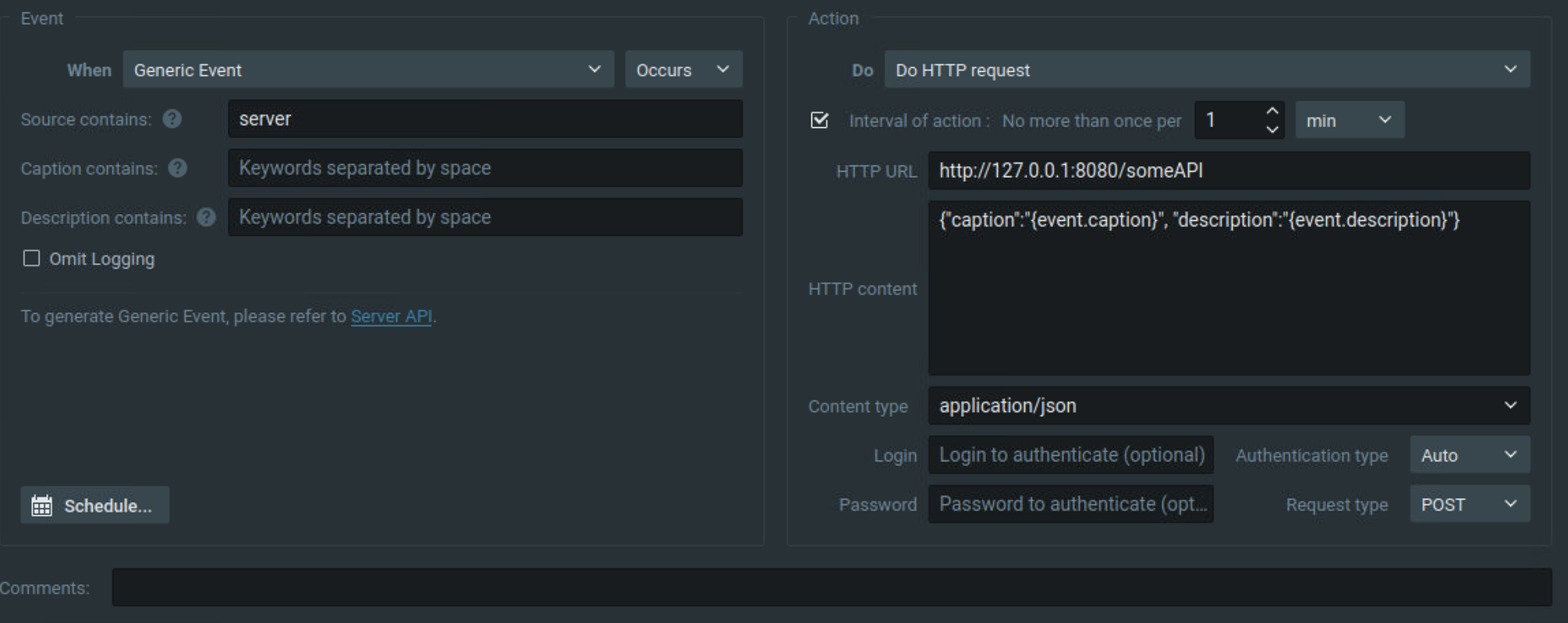
2. I use curl command to trigger an event:
curl --digest -u 'admin:Test123!' 'https://10.0.3.203:7001/api/createEvent?caption=caption_from_event&source=server&description=some_text' -k3. In the logs of my http echo server I can see caption and description:
::ffff:172.17.0.1 - - [30/Nov/2020:13:28:25 +0000] "POST /someAPI HTTP/1.1" 200 785 "-" "Nx Witness/4.3.0.1 (Network Optix) Mozilla/5.0 (X11; Ubuntu; Linux x86_64; rv:36.0)"

-----------------

{

    "path": "/someAPI",

    "headers": {

        "connection": "keep-alive",

        "content-encoding": "identity",

        "content-length": "59",

        "content-type": "application/json",

        "date": "Mon, 30 Nov 2020 13:33:04 GMT",

        "host": "127.0.0.1:8080",

        "user-agent": "Nx Witness/4.3.0.1 (Network Optix) Mozilla/5.0 (X11; Ubuntu; Linux x86_64; rv:36.0)"

    },

    "method": "POST",

    "body": "{\"caption\":\"caption_from_event\", \"description\":\"some_text\"}",

    "fresh": false,

    "hostname": "127.0.0.1",

    "ip": "::ffff:172.17.0.1",

    "ips": [],

    "protocol": "http",

    "query": {},

    "subdomains": [],

    "xhr": false,

    "os": {

        "hostname": "6a9606cbfa5e"

    },

    "connection": {},

    "json": {

        "caption": "caption_from_event",

        "description": "some_text"

    }

}
0 -
Hi Anton,
Above you have created event with UI but I am creating with the rest API.
how can I pass in parameters for the HTTP context section in API?
And I want to send eventResourceIds & eventType to my external system.
This is Body Parameter I am using
"actionParams":"{\"allUsers\":false,\"authType\":\"authBasicAndDigest\",\"durationMs\":5000,\"forced\":true,\"fps\":10,\"needConfirmation\":false,\"playToClient\":true,\"recordAfter\":0,\"recordBeforeMs\":1000,\"requestType\":\"\",\"streamQuality\":\"highest\",\"url\":\"https://3527cf917aa0582b58491d964012a01b.m.pipedream.net\",\"useSource\":false}","actionResourceIds": [],"actionType":"execHttpRequestAction","aggregationPeriod":2,"comment":"","disabled":false,"eventCondition":"{\"eventTimestampUsec\":\"0\",\"eventType\":\"undefinedEvent\",\"metadata\":{\"allUsers\":false,\"level\":\"0\"},\"omitDbLogging\":false,\"reasonCode\":\"none\"}","eventResourceIds": [],"eventState":"Undefined","eventType":"cameraMotionEvent"
,"schedule":"","system":false0 -
Hi Deep,
could you please share more details about your scenario? Do you want to create an event rule via API which would be triggered by motion detection on camera? As event action you want to send http request to an external system, containing eventResourceIds and eventType?
You can pass HTTP context into actionParams as "text" parameter, check my example below:
"actionParams":"{\"allUsers\":false,\"authType\":\"authBasicAndDigest\",\"contentType\":\"application/json\",\"durationMs\":5000,\"forced\":true,\"fps\":10,\"needConfirmation\":false,\"playToClient\":true,\"recordAfter\":0,\"recordBeforeMs\":1000,\"streamQuality\":\"highest\",\"text\":\"{\\\"alarm\\\":true}\",\"url\":\"https://admin:admin@127.0.0.1:8443/api/someAPI?param1=value1¶m2=value2\",\"useSource\":false}"In my example request will be sent to https://admin:admin@127.0.0.1:8443/api/someAPI?param1=value1¶m2=value2 with request body {"alarm":true}
As a first step, you can create an example of your event in desktop UI and then use /ec2/getEventRules to check the event's parameters. This way you'll be able to use the response of getEventRules as a template for your saveEventRule request.
0
Please sign in to leave a comment.
Comments
3 comments