How to specify a negative value for the coordinates to open the window when the NxWitness CLI is launched
Answered
Is it possible to launch the NxWitness CLI and set the x and y coordinates to negative values as shown below?
・example
"C: \ Program Files \ Network Optix \ Nx Witness \ Client \ 4.1.0.31398 \ HD Witness.exe" --window-geometry = -300, -90,1920x1080
When the display setting is an image (main display is 1)
I want to be able to start NxWitness from the upper left of display 2.
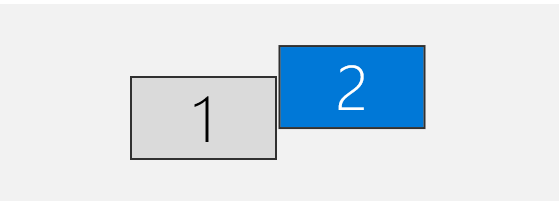
Do you have any good ideas?
Thank you.
-

Hi @...,
There is no need to use negative numbers.
The --window-geometry parameter considers all monitors as one 'canvas'. The following example is based on the assumption that both monitors have a resolution of 1920x1080.
These two monitors would make a canvas of 1920x2160 when they are on top of each other or 3840x1080 when there are next to each other. In your case it is slightly different since there is an offset, but with some trying you should be able to position the Nx Witness Desktop client anywhere on the 'canvas'.The following format applies:
--window-geometry=<horizontal_axis>,<vertical_axis>,<displayed_resolution>
So in order to display the Nx Witness Desktop client on the second screen in the top left corner, you would use the following format:
--window-geometry=1920,0,960x540
0 -
Hi @...,
Just checking in to make sure you received our response as it has been a while since we have heard from you. Please let us know if you still need help by responding to this message.
0
Please sign in to leave a comment.
Comments
2 comments