Mobotix M73 - Licenses Issues
Answered
Hi Norman
When I add the Mobotix M73 in NX, this device have 2 sensor but when I want enable recording in NX client... he tells me that I need 2 licenses for this camera..

Can you find a solution please ?
Best regards,
-

Hi Jordan IUNCKER,
We might have a solution. Please share a screenshot of the Camera Settings menu, tab General that shows the Vendor and Modelname, and I'll try to create a fix for you.
0 -
Hi Norman
Yes :
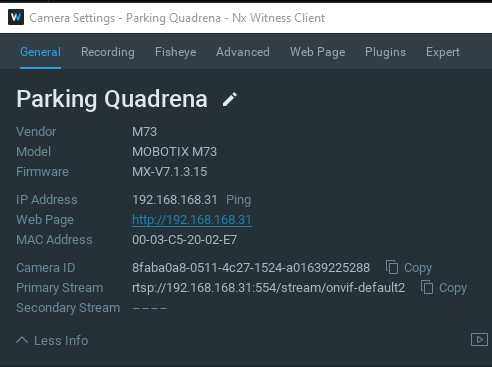
And I have other issues about this device, Nx don't request a secondary stream...
0 -
Hi Jordan IUNCKER,
Please follow the steps as described below:
-
Remove the device from the system)
-
Stop the mediaserver application and paste the resource_data.json file in this LINK at the following location:
-
For Windows: C:\Program Files\Network Optix\Nx Witness\MediaServer
For Linux: /opt/networkoptix/mediaserver/bin/ -
Now start the mediaserver application again.
-
Add the device again.
To stop and start the media server, please do it as follows:
For Windows: Open the task manager, select tab ‘Services’ find the mediaserver application, right-click and select; Stop or Start
For Linux: Open the terminal (Ctrl+Alt+T) and enter the following command; sudo service networkoptix-mediaserver stop or sudo service networkoptix-mediaserver start.
After this, the request should be fulfilled.
Please confirm, and we will add it to a future patch.Regarding the secondary stream: via Onvif, Mobotix doesn't provide a second stream.
0 -
-
Hi Norman
It's not working :
 0
0 -
Hi Jordan,
Can you share the json output of the /ec2/getFullInfo api call?
You call this via:http://<serverIp>:<serverPort>/ec2/getFullInfo
0 -
Thanks Jordan IUNCKER,
I noticed you had a previous version of such file on your system, so I changed it a bit.
Please repeat the steps mentioned above with the file in this LINK, and it should work.If it doesn't, we need access to the device instead via port forwarding.
0 -
Hi Norman
It's work !!!! Thanks a lot
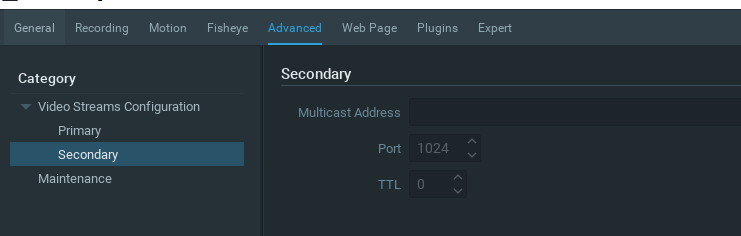
But now, I have other issues :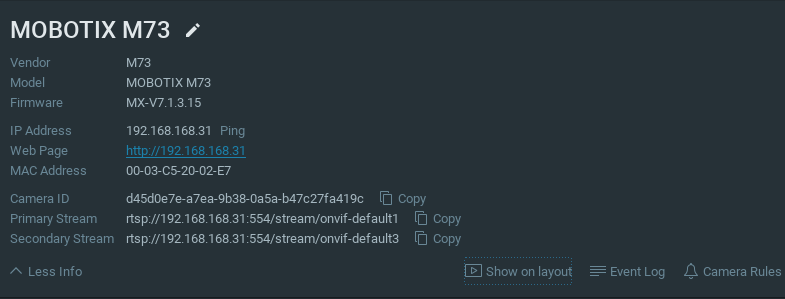 I have 2 stream available, but in "Advanced" I can't setup secondary stream etc...
 0
0 -
Hi Jordan,
How is it displayed?
You still can drag both sensors into the grid?
Or was it added as a single camera with the primary stream being sensor 1 and secondary stream sensor 2?It does make sense you can't set up secondary streams since for the secondary stream: via Onvif, Mobotix doesn't provide a second stream. This is a limitation of the Mobotix Onvif implementation.
0 -
Hi Norman
Yes I can drag both sensors into the grid
The sensor 1 have only primary stream, and sensor 2 have primare & secondary stream but secondary stream don't work.
Mobotix M73 can have only 3 stream at same time, but no problem for me if only 1 sensor have only 1 stream and the sensor 2 have 2 stream.
But I don't understand why it's don't work in NX.. Stream1/2/3 work well in VLC, and I see each profile in ODM0 -
Hi Jordan IUNCKER,
You can also see all streams in Nx if you add them manually. In that way you can add the primary stream as RTSP or HTTP stream, and after it is added, you can add the secondary stream. Downside is that it would require 2 licenses.
When adding the camera in the default way, the secondary stream won't be discovered. This is a limitation of the Mobotix Onvif implementation.
0
Please sign in to leave a comment.
Comments
10 comments