Problems with Hanhwa cameras after windows 10 update
Completed
Hello there, big problem here
I have a DW spectrum system v. 4.1.0.31401 with around 30 cameras. Most of them are DW, but I have 5 Hanhwa cameras.
Suddenly, yesterday evening all 5 stoped working with following error message in diagnostic window:
Confirming server availability.
OK
Confirming camera is accessible.
OK
Confirming target camera provides media stream.
FAILED: Camera request "CreateProfile" failed with error "Fault info. Reason: Server fault. Additional: SOAP-ENV:Sender. ". Please try to reboot the camera, then restore factory defaults on the web-page. Finally, try to update firmware. If the problem persists, please contact support.
Diagnostics complete
All DW camera works ok. Nothing was done on the system in the last month. DW Spectrum was updated in the first month after release, nothing after, not even the display wasnt moved.
I tried everything imaginable, deleted camera and readd, reset camera factory default, reauthorize cameras, firmware upgrade cameras, absolutely nothing works. Tried also the expert setting to keep camera settings, nothing.
All I can see chnaged on the system, yesterday windows 10 updated itself, installed 2 KB updates. I tried to uninstall those KB but didnt worked. Just to mention, all 5 camera work very well, I can access them thru chrome or edge browsers.
thanks for any idea, must solve this faster, it's a live important system.
-

Experienced the same issues yesterday among many systems. Check to ensure you have the "Allow System to Optimize Camera Setting" and update to the patch 4.1.0.32045 ( Digital Watchdog will have to provide you the Patch exe or a Build # and Password. But this patch fixed my Hanwha Issues related to the sudden Drop of All Hanwha Cameras yesterday also. Actually occurred Tuesday Evening or around 6am CST on Wednesday. Major Hanwha Issues happening with their X series and P Series Cameras in Powered-by-Nx Systems like DW Spectrum. Hanwha would not assist me either with the issue. ;-(
There PNM- series of Quad Cameras are Malfunctioning as well across the board, pulling the incorrect channels\Profile# and causing conflicts because the RTSP Streams are wrong channels and non-existent profiles. Thank Hanwha for Not Supporting any of their cameras in Powered-By-Nx Platforms.0 -
You'll Have to Get the Patch above, only thing that fixed 90% of the 100 Clients Systems at once for me yesterday.
0 -
yeah, this is for you in USA; fast support and solutions
unfortunately for us in Canada is a different story with DW; opened two tickets on DW site support section and no answer;
the local support have no idea about, they don't offer support for Hanhwa or other non DW cameras; like the licences I paid are for nothing.
have this problems here for years now .....
sent NVR for warranty repair, arrived after 3 month, like a client who need video security can wait 3 months without it, sent dome camera to repair or exchange, received a bullet, ....
0 -
any way to have some help from NX here? DW support are probably working from home, none answer the emails and tickets.
0 -
finally today I managed to obtain the famous patch;
unfortunately this doesn't work for me;
the error message on diagnostic has changed:
Confirming server availability.
OKConfirming camera is accessible.
OKConfirming target camera provides media stream.
FAILED: No supported media tracks at URL rtsp://192.168.91.172:554/onvif/profile4/media.smp. Please try to reboot the camera, then restore factory defaults on the web-page. Finally, try to update firmware. If the problem persists, please contact support.Diagnostics complete
however, the camera log looks like an authentication problem:
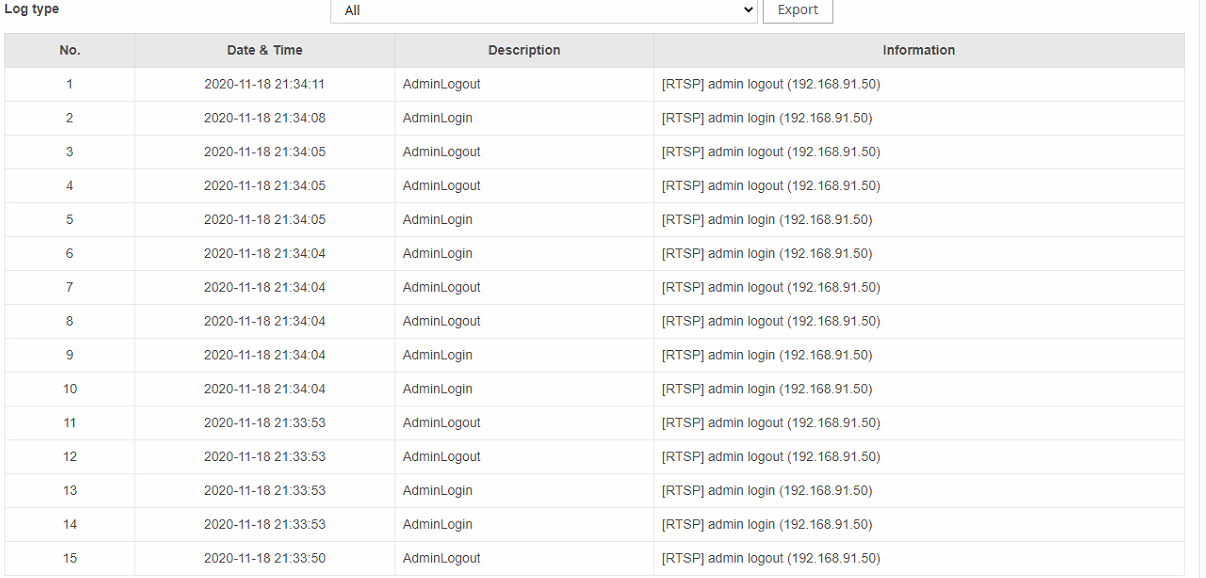
is someone investigating this?
having so many cameras not working is not beneficial not for us neither for the clients.
0 -

Hi Catalin Apopei,
Sorry for the delayed response.
Could you help us to follow the steps and collect the Wireshark packet for us?
1. Remove the camera from the VMS
2. Follow the instruction here to start a new packet capture on the server machine.
3. Add the camera back again. Wait for camera initialization finished and check the issue happens again.
4. Stop packet capturing and share the information with us:
- Wireshark packet file
- IP of the cameraThank you for your help.
0 -
Can you send me a private message, so I can share the infos needed so you can remotely access the system thru team viewer?
and from there you can do whatever you want, well almost, the system has to be on all time with the remaining cameras.
thanks
0 -
Hi Catalin Apopei,
I've created the ticket for this case. You should receive the mail from our ticket system.
Please check your mailbox and provide the required information by mail.
Thank you for your cooperation.
0 -
17 days later and no resolution to this problem.
not even an explication how this could happened.
All hanhwa cameras stopping working at the same time even it was working for more than a year before.
0
Please sign in to leave a comment.
Comments
9 comments