No DB backup file ecs_31038_0.backup in var directory after upgrading from 4.0.31038 to 4.1.31398
Answered
Is it normal that we don't have DB backup file ecs_31038_0.backup in var directory after upgrading from 4.0.0.31038 to 4.1.0.31398?
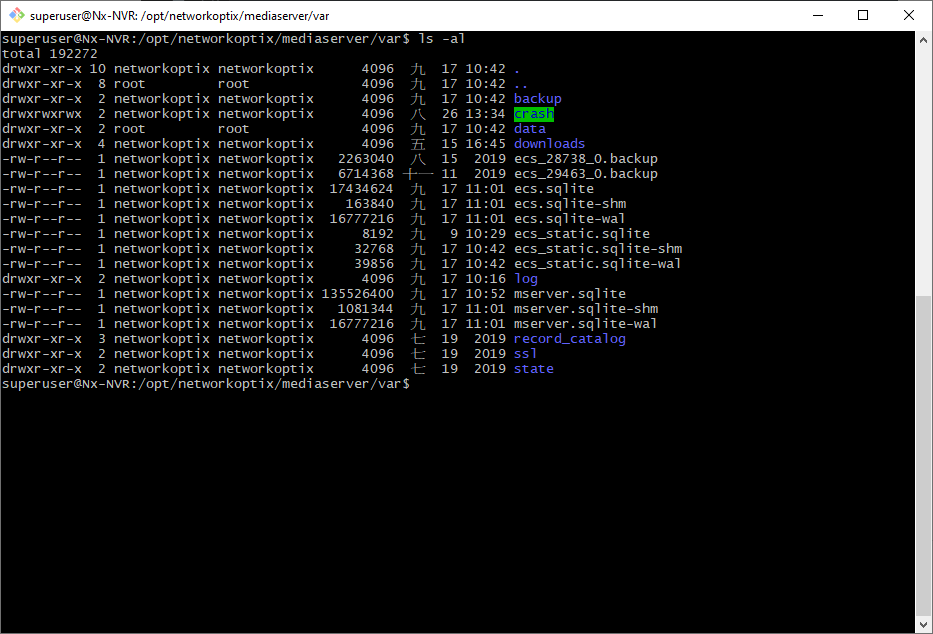 Nx Witness 4.0.0.31038 All Chinese
Client: Windows 10 64bit client 4.1.0.31398
Server: Ubuntu 16.04 LTS
-

Hi Jim Chang,
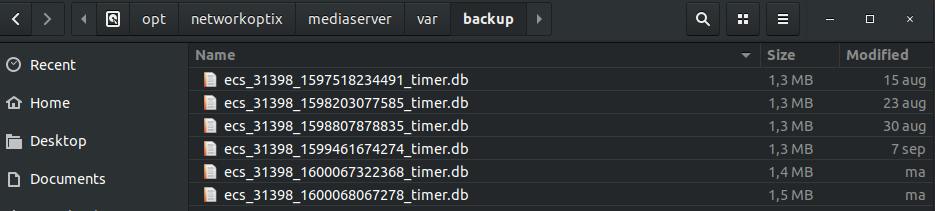
You can find the automatic backups in the following location:
/opt/networkoptix/mediaserver/var/backup
Here you can find all available backup files.
 0
0 -
Hi Norman,
I cannot find ecs.sqlite.4.0.0.31038 file as described in https://support.networkoptix.com/hc/en-us/articles/115015444907-Downgrade-to-a-Previous-Version , so I guess the downgrade process is not up to date for 4.x version, right?
Can you help show me the downgrade process page for 4.x version?
0 -
Hi Jim Chang,
You can follow the process as mentioned in the article you linked to.
You should not look for ecs.sqlite.4.0.0.31038, but for something like ecs_<buildnumber>_<timestamp>_timer.db (e.g. ecs_31398_1598807878835_timer.db). This last file should be moved and renamed to ecs.sqlite.
0 -
got it, thanks Norman
BTW, Nx should revise the downgrade process page also.
0 -
Hi Jim Chang,
That is noted, but only so many things to do and so limited time. ;-)
0
Please sign in to leave a comment.
Comments
5 comments