MetaSDK Events issue
Completed
Hi,
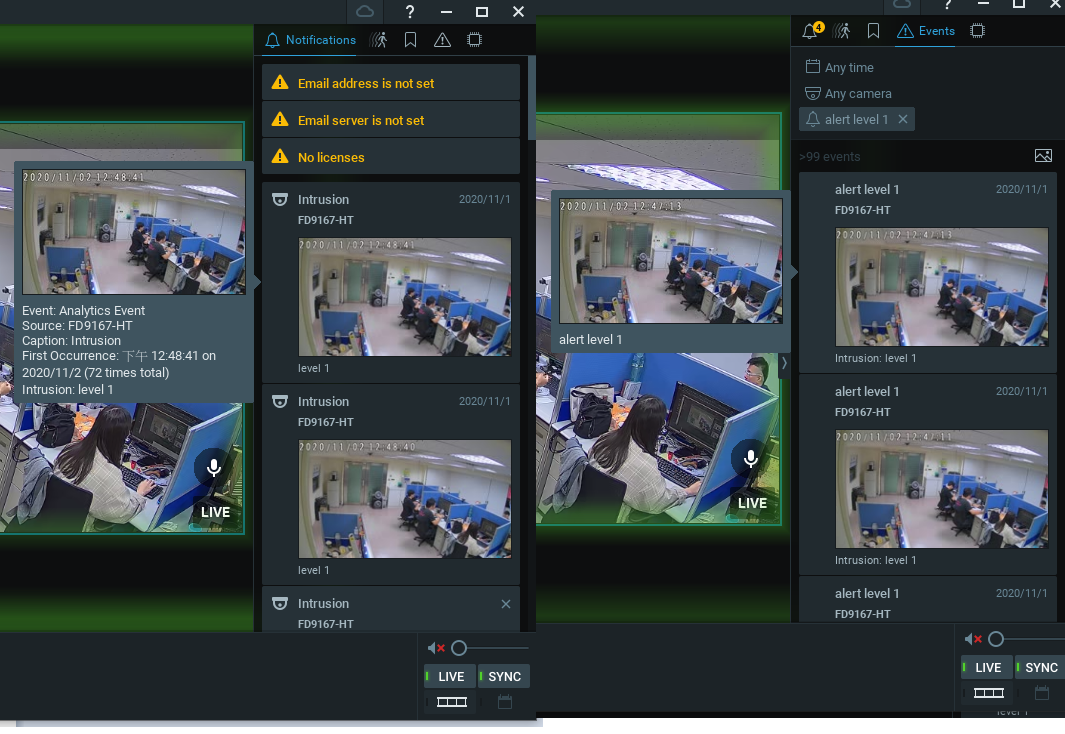
I have some “Events” questions with Nx client. I have found events field display which was not refreshed immediately like notifications.
It will always be delayed for about five seconds, sometimes even a few minutes, but notifications still work normally.
I send eventMetadataPacket every frame when the object is detected, is that the
wherefore cause it to refresh slowly or any other reason for the delay ?
-

Hi @...,
Can you capture the event from the moment it happens till the moment it appears in the desktop client with Wireshark?
HERE you can find the instructions how to create a capture file.
Please share the pcap file to amsterdam@networkoptix.com.
0 -
Hi @...,
We have not heard back from you in a while, so we are going to assume your question has been answered and set this topic to 'Completed'.
0 -
Hi,
I have already sent the email to you by this mail address Aqua.hsu@touchcloud.com.tw
0 -
Hi @...,
Can you send them again?
0 -
Hi,
I already resent the mail. Could you please help me confirm the mail is received , thank you.
0 -
Hi @...,
For some reason it ended up in the SPAM box.
Unfortunately you haven't set up a capture filter, and it is searching a needle in the haystack, without knowing if there is a needle.
Can you set up a capture filer, reproduce the issue, and then share the smaller Wireshark file?
Please check THIS support article about how to set up a capture filter in Wireshark.
0 -
Hi @...,
Just checking in to make sure you received our response as it has been a while since we have heard from you. Please let us know if you still need help by responding to this message.
0 -
Hi,
I set wireshark filter like this "host 192.168.2.31 or host 192.168.2.6" . 31 is server IP and 6 is camera IP ,is that correct?
0 -
Hi @...,
Just 'host 192.168.2.6' should be fine. By adding 'host 192.168.2.31' still a lot of clutter will be present in the capture file.
0 -
Hi,
I have already recorded the new files, and resent the mail to you ~
Could you help me check the files are correct, thank you.
0 -
Hi @...,
I'll move this topic into a support ticket, so our experts can help you.
0 -

Hi,
Events in the "Events" tab are NOT displayed as quick as "Notifications".
Notifications are intended exactly to handle events in realtime.
"Events" tab is an event log polled periodically to fetch new events.
That's why events are displayed with a delay.This hopefully will be fixed in future versions.
0 -
Hi,
Okay, I got it. Thanks for your reply ~
0
Please sign in to leave a comment.
Comments
13 comments