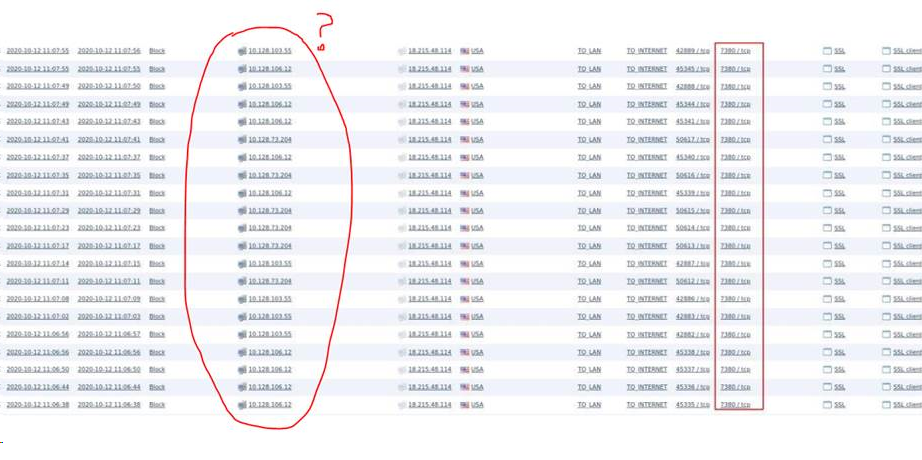
Flood to 18.215.48.114: 7380
Answered
Good afternoon.
About a year ago, our client, purchased Wave software, which is essentially a rebranding of your product. A couple of weeks ago, the client noticed abnormal network activity from the system. This raises questions from the security team.
Therefore, you need to understand the nature of this activity and how to eliminate it.
TCP packets are generated from the server to the address 18.215.48.114: 7380. The address shows that he lives on Amazon.
Cloud sync disabled.
Configuration backup from the link:
https://drive.google.com/file/d/1pYpI4NzVWio6m1ntNrqD6oNJAgTuo5Lt/view?usp=sharing
Pass
awrw8yvmhMAy6LB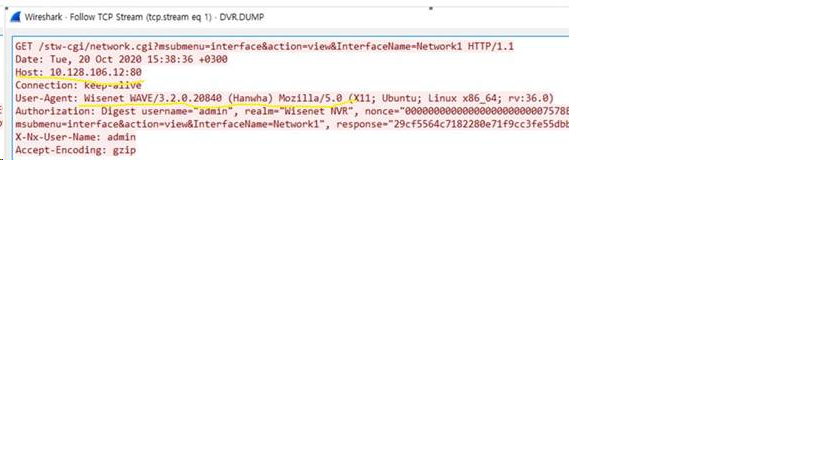
-

Hi Dmitriy,
Even though you did not enable the cloud sync, the system would send heartbeat message to the Nx mediator regularly.
It is due to the Nx Cloud needs to listen if the system is going to connect.
The simplest way is just to use the firewall and block outbound traffic.WAVE
Required to connect/disconnect Systems from Nx Cloud and maintain connections.
your-cloud-address.com (i.e. https://sync.wavevms.com/)
TCP - ports: 80, 443
----------
For Cloud Connect (NAT Traversal, Data Proxy services)
Option 1: Non-Region Specific
*.vmsproxy.com
Option 2: Region-Specific
relay.vmsproxy.com
relay-ny.vmsproxy.com (185.59.223.85)
relay-fr.vmsproxy.com (195.181.174.35)
relay-la.vmsproxy.com (185.152.67.150)
relay-sy.vmsproxy.com (207.148.86.247)
relay-si.vmsproxy.com (139.180.221.39)
mediator.vmsproxy.com (52.7.195.88)
cloud_db, portal (34.233.82.124)
speedtest:
 - 18.196.46.87
 - 54.193.97.109
 - 54.255.218.20
 - 13.211.129.121
TCP Port : 80, 443
UDP Port: 3345
You can block the domain name/URL.Thank you.
0
Please sign in to leave a comment.
Comments
1 comment