[Bug] Network Shared Resource Storage Location
Answered
I believe I have a regression/bug. I get those errors:
Sep 14 06:03:55 nx-witness kernel: [ 485.527128] CIFS: Attempting to mount //192.168.129.99/nvr/nx-witness
Sep 14 06:03:55 nx-witness kernel: [ 485.527148] CIFS VFS: Unknown vers= option specified: 3.1
Sep 14 06:03:55 nx-witness kernel: [ 485.527196] CIFS: Attempting to mount //192.168.129.99/nvr/nx-witness
Sep 14 06:03:55 nx-witness kernel: [ 485.535309] CIFS VFS: \\192.168.129.99 Dialect not supported by server. Consider specifying vers=1.0 or vers=2.0 on mount for accessing older servers
Sep 14 06:03:55 nx-witness kernel: [ 485.535332] CIFS VFS: cifs_mount failed w/return code = -95
Sep 14 06:03:55 nx-witness kernel: [ 485.535383] CIFS: Attempting to mount //192.168.129.99/nvr/nx-witness
Sep 14 06:03:55 nx-witness kernel: [ 485.549819] CIFS VFS: \\192.168.129.99 Dialect not supported by server. Consider specifying vers=1.0 or vers=2.0 on mount for accessing older servers
Sep 14 06:03:55 nx-witness kernel: [ 485.549847] CIFS VFS: cifs_mount failed w/return code = -95
Sep 14 06:03:55 nx-witness kernel: [ 485.549927] CIFS: Attempting to mount //192.168.129.99/nvr/nx-witness
Sep 14 06:03:55 nx-witness kernel: [ 485.556932] CIFS VFS: \\192.168.129.99 Dialect not supported by server. Consider specifying vers=1.0 or vers=2.0 on mount for accessing older servers
Sep 14 06:03:55 nx-witness kernel: [ 485.556950] CIFS VFS: cifs_mount failed w/return code = -95
Sep 14 06:03:55 nx-witness kernel: [ 485.557012] CIFS: Attempting to mount //192.168.129.99/nvr/nx-witness
Sep 14 06:03:55 nx-witness root-tool-bin[634]: mount '//192.168.129.99/nvr/nx-witness' '/tmp/hdwitness_temp_folder_cdc3fdfe' 'nvr1' '<removed password>' --> -2
Sep 14 06:03:55 nx-witness kernel: [ 485.564638] CIFS VFS: cifs_mount failed w/return code = -95
Server 4.1.0.31398
on Ubuntu 20.04.1 LTS
I believe the newest SMB dialect my network share supports is 3.0, not 3.1. I can't find a way in NX Witness to configure 3.0 dialect. This breaks our video recording.
I first noticed this problem after updating the server and NX Witness from 4.0 to 4.1 branch.
Please advise!
-

Hi Markus Krainz,
It might be a bug, but unlikely a Nx related bug.
We have checked the source code and it should be able to add dialect 3.1.
This is the relevant section in the source code:{
"3.1",
"2.1",
"3.0",
"2.0",
"1.0"
};What it does is first tries 3.1, then 2.1, 3.0, 2.0, and finally 1.0.
Basically what the software tries is:mount.cifs <remote_shared_folder> <local_folder> -o options
Also, we checked if it actually did add it like dialect 3.1 and it worked as intended on our side.
We recommend to manually try the command mentioned above and check the results.
Can you also tell us a bit more about how you tried to add the storage? Via the Add External Storage... button in the Server Settings menu, tab Storage Management?
0 -
Hi Norman,
thanks for the support!
I have tried to add via command line without specifying protocol version and it works fine:
root@nx-witness:/home/markus# mount.cifs //192.168.129.23/nvr /mnt -o user=nvr1
Password for nvr1@//192.168.129.23/nvr: **************
root@nx-witness:/home/markus# ls -la /mnt
total 1806340
drwxr-xr-x 2 root root 0 Mai 30 04:00 .
drwxr-xr-x 20 root root 4096 Mai 29 18:18 ..
drwxr-xr-x 2 root root 0 Mai 29 06:21 BlueIris
drwxr-xr-x 2 root root 0 Sep 13 06:34 nx-witness

root@nx-witness:/home/markus# umount /mnt
Yes, I am trying to add via Server Settings - Storage Management - Add External Storage button.
Before:
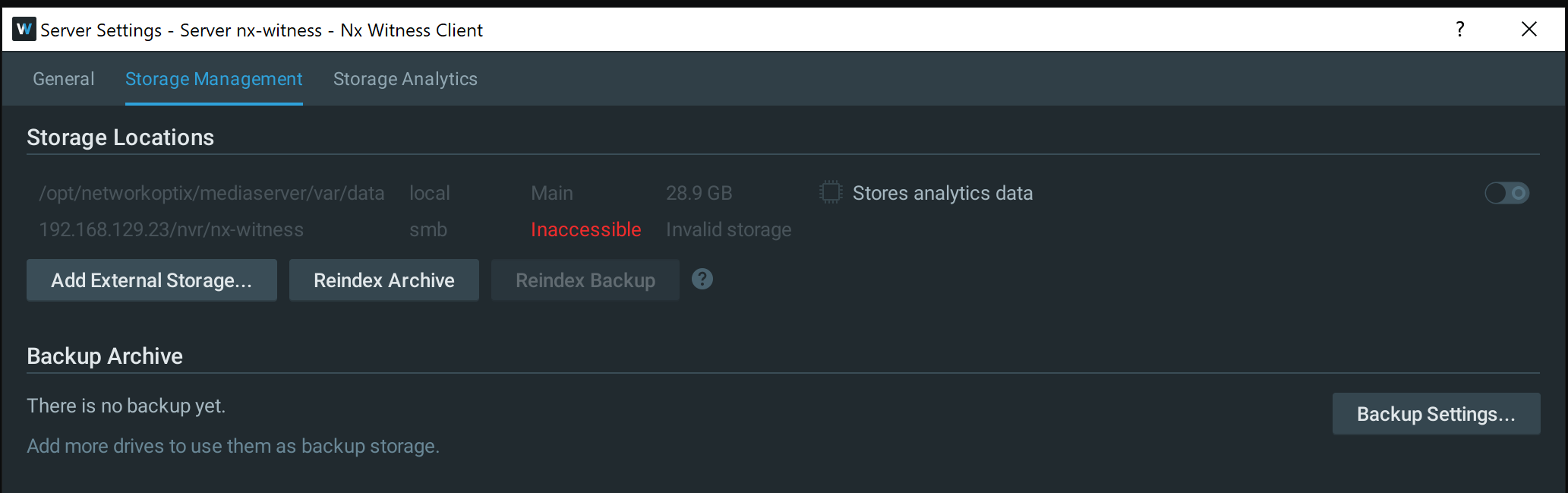
I tried deleting it again and recreating it and now I get "Invalid storage path"
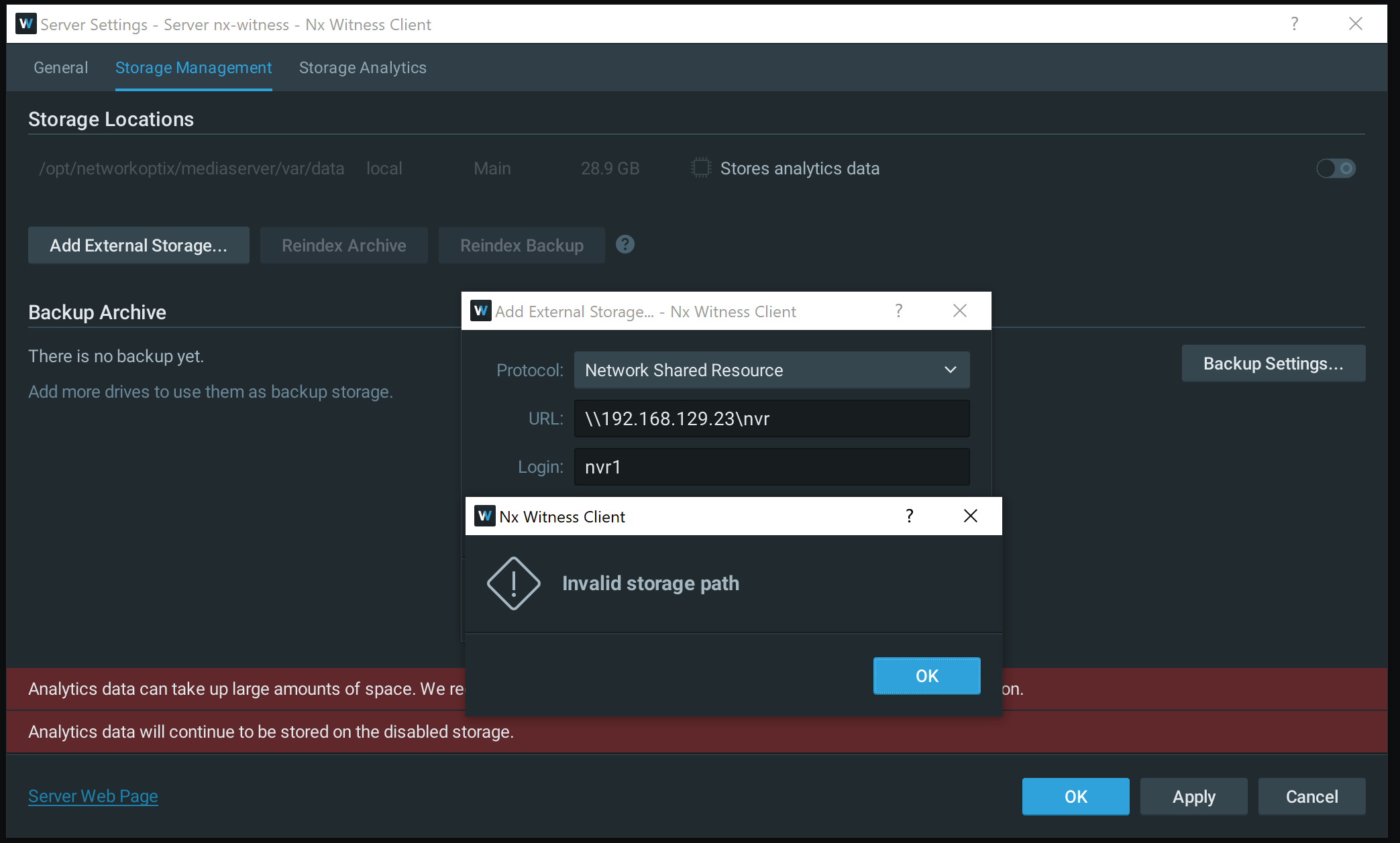
I tried both \\192.168.129.23\nvr\nx-witness and \\192.168.129.23\nvr
When I try to apply the new settings from the GUI I get this log output again:
Sep 14 16:03:07 nx-witness kernel: [ 3926.607961] CIFS VFS: cifs_mount failed w/return code = -95
Sep 14 16:03:07 nx-witness kernel: [ 3926.608063] CIFS: Attempting to mount //192.168.129.23/nvr/nx-witness
Sep 14 16:03:07 nx-witness kernel: [ 3926.615658] CIFS VFS: \\192.168.129.23 Dialect not supported by server. Consider specifying vers=1.0 or vers=2.0 on mount for accessing older servers
Sep 14 16:03:07 nx-witness kernel: [ 3926.615692] CIFS VFS: cifs_mount failed w/return code = -95
Sep 14 16:03:07 nx-witness kernel: [ 3926.615775] CIFS: Attempting to mount //192.168.129.23/nvr/nx-witness
Sep 14 16:03:07 nx-witness kernel: [ 3926.622706] CIFS VFS: \\192.168.129.23 Dialect not supported by server. Consider specifying vers=1.0 or vers=2.0 on mount for accessing older servers
Sep 14 16:03:07 nx-witness kernel: [ 3926.622744] CIFS VFS: cifs_mount failed w/return code = -95
Sep 14 16:03:07 nx-witness kernel: [ 3926.622840] CIFS: Attempting to mount //192.168.129.23/nvr/nx-witness
Sep 14 16:03:07 nx-witness root-tool-bin[658]: mount '//192.168.129.23/nvr/nx-witness' '/tmp/hdwitness_temp_folder_cdc3fdfe' 'nvr1' '<removed>' --> -2
Not sure what seems to be the problem. It recorded fine for the last few months.
0 -
Hi Markus Krainz,
Please try the following when you manually add the NAS to your system:
mount.cifs //192.168.129.23/nvr /mnt -o vers=3.1
In this way, the storage will be added in the same way Nx would add it.
Obviously you can use the same command when you want another dialect when you change 3.1 in one of the other dialects.
0 -
root@nx-witness:/home/markus# mount.cifs //192.168.129.23/nvr /mnt -o user=nvr1;vers=3.1
Password for nvr1@//192.168.129.23/nvr: **************
root@nx-witness:/home/markus# ls -la /mnt
total 1806340
drwxr-xr-x 2 root root 0 Sep 14 15:45 .
drwxr-xr-x 20 root root 4096 Mai 29 18:18 ..
drwxr-xr-x  2 root root  0 Sep 13 06:34  nx-witness
[...]
Again from command line it works.
0 -
Sorry I used the wrong syntax. With the correct one
mount.cifs //192.168.129.23/nvr /mnt -o user=nvr1,vers=3.1I get:
Sep 14 16:38:47 nx-witness kernel: [ 6067.031453] CIFS: Attempting to mount //192.168.129.23/nvr
Sep 14 16:38:47 nx-witness kernel: [ 6067.031488] CIFS VFS: Unknown vers= option specified: 3.1
And fails to mount from command line.0 -
Did the attempt pass?
0 -
Ok, the file share server's smbd.conf had this line:
min protocol = SMB3
after removing this line on the file share server I now get on the nx-witness vm:mount.cifs //192.168.129.23/nvr /mnt -o user=nvr1,vers=3.1,password=<removed>
Sep 14 16:48:56 nx-witness kernel: [ 6675.930254] CIFS: Attempting to mount //192.168.129.23/nvr
Sep 14 16:48:56 nx-witness kernel: [ 6675.930316] CIFS VFS: Unknown vers= option specified: 3.1In other words SMB3.1 still fails. But
mount.cifs //192.168.129.23/nvr /mnt -o user=nvr1,vers=3.0,password=<removed>
works!
And the GUI works now too. I am still puzzled why it won't work with min protocol = SMB3 on the fileserver. And why it worked with the same fileserver until now. I don't like removing min protocol from the fileserver as it's a security risk. But I can work with this for now.
0 -
Hi Markus Krainz,
A minor update. I have encountered the same issue on my home system when I connected my server to an ancient low-spec NAS (Synology DS112j). We will try to work on the server+NAS to find the root cause.
Please can you share the brand and model of the NAS you connected to your system?
1 -
Hi Norman,
thanks for keeping us up to date! The NAS is an Ubuntu Server 18.04 with the latest Samba release for that OS on a Dell r630 server. It is backed by our SAN, but that should not be relevant to the issue.
What confuses me is that this configuration worked well for the last 6 months and only recently the issue with NX Witness emerged. Other clients are fine. I wanted to test what happens if I roll back to 4.0 but didn't have time yet.
0 -

Have the same problem. It seems that the dialects that are supported on Ubuntu 18.04 is 3.1.1 and 3.11 and not 3.1. According to what I can see from the SAMBA specifications it should be 3.1.1 and not 3.1
Using a dialect of just 3.1 give the error of incorrect version.
This command work:
mount.cifs //192.168.1.26/data /mnt/recordings -o vers=3.1.1,user=xxxxx
Do not work:
mount.cifs //192.168.1.26/data /mnt/recordings -o vers=3.1,user=xxxxx
Is there a way to change the dialect that is sent when the mount is created?
1
Please sign in to leave a comment.
Comments
10 comments