Plugins from NXVMS.COM
Answered
Hi!
I came across the new integrations (beta) on nxvms.com. I saw a sample plugin from Intel OpenVINO but I can't get the plugin to show up in the camera settings.
I extracted the .zip file to C:\Program Files\Network Optix\Nx Witness\MediaServer\plugins
In this folder there I can see al .dll files and a folder named "openvino_object_detection_analytics_plugin". When I restart the NX mediaserver the plugin doesn't show up in the camera settings. I can see only the standard Axis plugin. If I move the plugins from the folder "plugins optional" and restart the mediaserver, the plugins show up in the camera settings.
What could be the problem? Is the plugin just a sample that doesn't work?
-

Hi Jasper,
Good question. In general, I would recommend you to use the Get in touch button on the integration page, but since this was created in-house, I'll ask around since I encounter the same issue under Linux.
Can you be a bit more specific about what you mean with:
If I move the plugins from the folder "plugins optional" and restart the mediaserver, the plugins show up in the camera settings.
I followed the instructions and got the plugin installed in:
/opt/networkoptix/mediaserver/plugins/openvino_object_detection_analytics_plugin/
I'll update this thread as soon as I know more.
0 -

I attempted to install this plugin last night as well on Ubuntu 20 with Intel 64bit system and NxWitness 4.1.0.3xx without any success. The plugin menu would not show in either system administration or camera settings. I then installed NxMeta 4.1.0.3x and tried again and the plugins appear in the menus but there was an alert with an error,
Error Loading Plugin OpenVINO Object Detection, Error loading XML file pedestrian-and-vehicle-detector-adas-0001.xml:1:0: File was not found.
I tried in both the /opt/networkoptix-metavms/mediaserver/plugins folder as well as /opt/networkoptix-metavms/mediaserver/bin/plugins folder, inside the meta plugins root folder and in the openvino_object_detection_analytics_plugin folder. I messed with permissions, installed the OpenVINO runtime toolkit, but I couldn't get it to work, nor did it work on Raspbian Buster RPI ARM32 build (not that I expected it to).
I'm really eager to get this running and am really glad to see this being attempted natively inside NX!!!
0 -
Hi @...,
I have requested our team to look into it and inform me or engage directly in this topic.
As soon as I know more, I'll update the topic.Regarding:
>>> nor did it work on Raspbian Buster RPI ARM32 build (not that I expected it to).
OpenVino solely works in an Intel architecture. Maybe in the future we also will have an OpenCV plugin which runs on multiple architectures including ARM.
0 -
Hi @... and @...,
I tried to install this plugin as well and encountered the same issue.
Eventually I moved the content of the following directory:
/opt/networkoptix/mediaserver/plugins/openvino_object_detection_analytics_plugin/
one level up and restarted the Nx server daemon and after that it was possible to make it work.
/opt/networkoptix/mediaserver/plugins/
I have requested the developers to check and update the instructions so anyone is able to install and use it.
0 -
Ahh you've actually seen the plugin working on a video stream? As I mentioned I did use the same folder location and did have the menus appear in NX. However, after enabling the OpenVINO on a live stream, after hitting apply it immediately shows an alert and the enabled toggle remains on. The alert...
Error Loading Plugin OpenVINO Object Detection, Error loading XML file pedestrian-and-vehicle-detector-adas-0001.xml:1:0: File was not found.
Also, you mentioned there were instructions.. I didn't see any instructions other than what the author of the plugin wrote in the text of the original blog post. Am I missing something?
0 -
Hi Matt Barber,
For the instructions, please use the Get in Touch button.
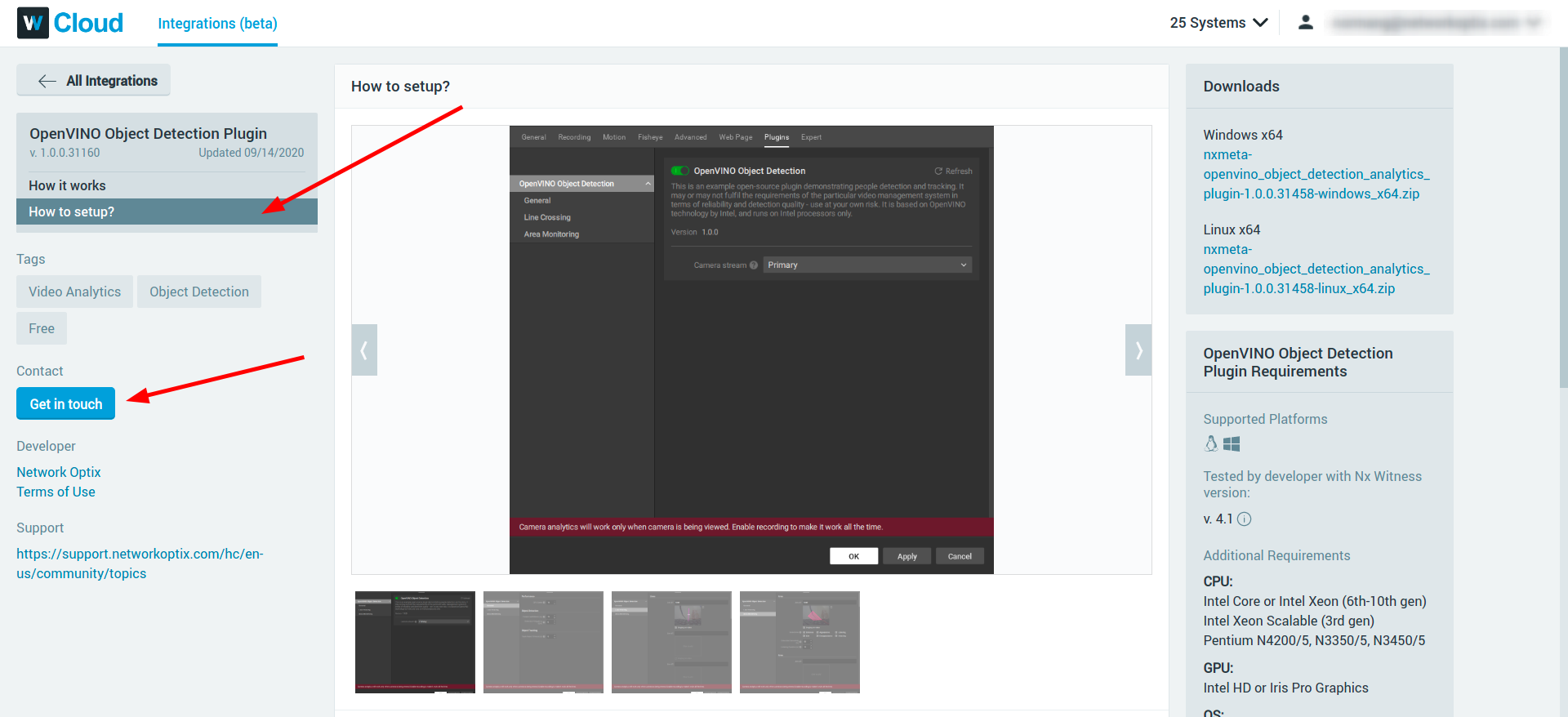
The instructions I referred to can be found at How to setup?
 0
0
Please sign in to leave a comment.
Comments
6 comments