New Experimental PTZ Contols available in the latest patch - Feedback is welcome.
Completed
A new experimental feature in the Nx Witness VMS v4.1 September 2020 Monthly Patch (Build 31767), new PTZ controls remove the PTZ overlay and make controlling ONVIF PTZ cameras easier for remote operators.
To enable the new PTZ user interface go to Local Settings in the Desktop Client and uncheck the "Show aim overlay for PTZ cameras" checkbox.
We would encourage anyone to try out his new controls and provide feedback for our product team.
A video about this new feature can be seen HERE.
-

- Authorized Reseller
The new PTZ controls are better than the old :)
In the mac client the bar with icons on top of the camera will disappear after some time if I enable the new controls.
So instead of this:
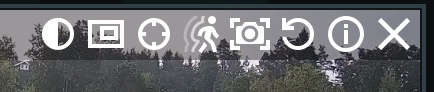
I just get a gray line with no icons.
0 -

Thanks, Fredrik =)
Do you experience this only in the PTZ mode and when you have new controls enabled? If so, can you please send video or screenshot – I currently cannot reproduce it.
0
Please sign in to leave a comment.
Comments
2 comments