TFTP broadcast on 255.255.255.255
Answered
Hi all
My IT manager has just called and advised that the NX is broadcasting every 20 seconds or so via TFTP on 255.255.255.255
I thought it may be something to do with the Cloud connection and have disabled that but it is still broadcasting. Would anyone be able to shed some light at all?
Thanks
Paul
-
Official comment

Hi Paul Pisani,
This is for the discovery of a specific camerabrand called ArecontVision.
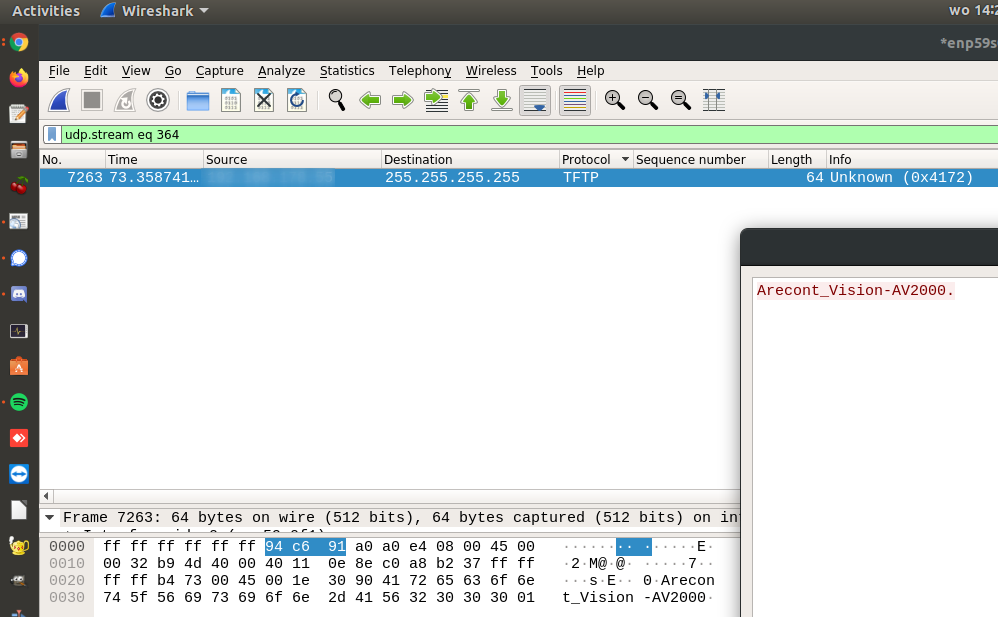
If you like I most likely can disable it in your system, obviously the consequence is that you cannot connect to cameras of that brand anymore. In order to do this I need remote access via the Nx WebClient with admin level credentials.
This can be done via forwarding port 7001 (default) or via our cloud. In case of the last I need the cloud ID and local admin credentials.
You can find the cloud ID as follows:
- Open your browser and navigate to the Nx Cloud Portal (http://nxvms.com)
- Login to your Nx Cloud Account.
- You will see the portal and the system tiles on your screen.
- Click on the System that you want the Cloud System ID of.
- The Cloud System ID is found in the URL and appended to “systems/”
Example: https://nxvms.com/systems/3770508e-569a-423b-a61a-a85abb0ffff2
Cloud System ID is : 3770508e-569a-423b-a61a-a85abb0ffff2
-
Good morning Norman
We do not use Arecont cameras so if you can, please disable this feature (It will keep IT happy :))
System ID is 9f8d1175-64f9-4d6d-8d76-c0fbf323c929
Thanks
Paul
0 -
Hi Paul Pisani,
Issue is resolved. You can remove my account.
When you enable the AutoDiscovery again, the TFTP capture should still be gone.
In a hidden menu I added ArecontVision to the DisabledVendors field and that prevents Nx from searching for Arecont Vision cameras in the network.0
Please sign in to leave a comment.
Comments
3 comments