'NO DATA' on several cameras
Answered
I'm running 4.1.0.31398 in Docker
When I look back at recent time points, I see 'NO DATA' for two cameras for long periods
The timeline shows green which I believe means it should be recording ?
There are no issues listed in the event log for these (or any cameras) that correspond with the time periods of 'NO DATA'
Any other suggestions on how to troubleshoot this ?
-
Official comment

Hi @...,
You wrote:
> I see 'NO DATA' for two cameras for long periods
Does that mean that there are more cameras that don't have any issues?
> Any other suggestions on how to troubleshoot this ?
I would check the event logs and server logs to start with and for details I would use Wireshark to analyze the packages between camera and servers application.
-
It was just 2 of 6 cameras, but it's now all of them at various times, and I'm now getting 'no data received during last xx seconds' events.
Some log warnings are below; can we convert this to a support ticket ?
2020-08-27 03:58:10.293    454 WARNING QnMulticodecRtpReader(0x7f53b00ca2b0): Can not read RTP frame for camera QnThirdPartyResource(0x7f53c03e0580, c78845152ca93efcd3dee5ae7ac5b400) during 13181 ms, m_role=1
2020-08-27 03:58:10.297    442 WARNING QnMulticodecRtpReader(0x7f5374072110): Can not read RTP frame for camera QnThirdPartyResource(0x7f53c03dca40, 425ff90f5a03e727659b2dd1a3c36c3a) during 9999 ms, m_role=1
2020-08-27 03:58:10.309    434 WARNING QnMulticodecRtpReader(0x7f535404b010): Can not read RTP frame for camera QnThirdPartyResource(0x7f53c03ea470, 79428a851f7695b080f0dc960c6efc1d) during 9999 ms, m_role=1
2020-08-27 03:58:10.320    450 WARNING QnMulticodecRtpReader(0x7f5394133480): Can not read RTP frame for camera QnThirdPartyResource(0x7f53c03e1ce0, b681a01295c7cc2aaa4d3804202fa75e) during 13201 ms, m_role=1
2020-08-27 03:58:10.323    446 WARNING QnMulticodecRtpReader(0x7f5384083b50): Can not read RTP frame for camera QnThirdPartyResource(0x7f53c03dde00, 7f8e91ae634844b729639e24171f93a2) during 13193 ms, m_role=1
2020-08-27 03:58:10.324    438 WARNING QnMulticodecRtpReader(0x7f5370004ba0): Can not read RTP frame for camera QnThirdPartyResource(0x7f53c03df1c0, 16297adc72a34a62b58620eba46c0dcd) during 13189 ms, m_role=1


and
2020-08-27 04:40:10.975 3557 WARNING QnRtspConnectionProcessorPrivate(0x7f53a01e5260): Called send(@0x7f53a0d7ee40, 14546 bytes) -> ok, timestamp 1598467197804000 us, duration 12452988 us, since last send 23 us 2020-08-27 04:40:10.975 3557 WARNING QnRtspDataConsumer(0x7f53a0522100): Called sendBuffer(@0x7f53a0d7ee40, 14546 bytes): success, timestamp 1598467197804000 us, duration 12453319 us, since last send 23 us, frame queue size 21 2020-08-27 04:50:47.889 3552 WARNING QnRtspConnectionProcessorPrivate(0x7f5388868e00): Called send(@0x7f5388880f20, 239 bytes) -> 162, timestamp 1598467265122001 us, duration 582259047 us, since last send 116848 us 2020-08-27 04:50:47.889 3556 WARNING QnRtspConnectionProcessorPrivate(0x7f5394022cf0): Called send(@0x7f53941d45a0, 24174 bytes) -> 23466, timestamp 1598467228385999 us, duration 619238509 us, since last send 126252 us 2020-08-27 04:50:47.889 3552 WARNING QnRtspDataConsumer(0x7f5388846120): Called sendBuffer(@0x7f5388880f20, 239 bytes): FAILURE, timestamp 1598467265122001 us, duration 582259281 us, since last send 116844 us, frame queue size 56 2020-08-27 04:50:47.889 3557 WARNING QnRtspConnectionProcessorPrivate(0x7f53a01e5260): Called send(@0x7f53a0d7ee40, 32768 bytes) -> 5554, timestamp 1598467215805000 us, duration 631171373 us, since last send 118016 us 2020-08-27 04:50:47.889 3556 WARNING QnRtspDataConsumer(0x7f53940e4120): Called sendBuffer(@0x7f53941d45a0, 24174 bytes): FAILURE, timestamp 1598467228385999 us, duration 619238732 us, since last send 126247 us, frame queue size 60 2020-08-27 04:50:47.889 3553 WARNING QnRtspConnectionProcessorPrivate(0x7f538413efd0): Called send(@0x7f5384d101c0, 280 bytes) -> 15, timestamp 1598467213185001 us, duration 634460517 us, since last send 37 us 2020-08-27 04:50:47.889 3557 WARNING QnRtspDataConsumer(0x7f53a0522100): Called sendBuffer(@0x7f53a0d7ee40, 32768 bytes): FAILURE, timestamp 1598467215805000 us, duration 631171770 us, since last send 118012 us, frame queue size 59 2020-08-27 04:50:47.890 3553 WARNING QnRtspDataConsumer(0x7f53843c6b10): Called sendBuffer(@0x7f5384d101c0, 280 bytes): FAILURE, timestamp 1598467213185001 us, duration 634461068 us, since last send 43 us, frame queue size 62 2020-08-27 04:52:04.358 396 INFO QnMServerResourceDiscoveryManager(0x7f53c0061b30): Mark resource Network resource url: , ip: , mac: 00-00-00-00-00-00, uniqueId: {6436e4f2-e669-458d-a32b-f6c28b9f0b04}{0684adb1-64bc-8a38-cb37-e66efdd686b5} as offline because it doesn't response to discovery any more. 2020-08-27 04:52:49.352 396 INFO QnMServerResourceDiscoveryManager(0x7f53c0061b30): Mark resource Network resource url: , ip: , mac: 00-00-00-00-00-00, uniqueId: {6436e4f2-e669-458d-a32b-f6c28b9f0b04}{0684adb1-64bc-8a38-cb37-e66efdd686b5} as offline because it doesn't response to discovery any more. 2020-08-27 04:53:27.220 389 WARNING nx::vms::server::metrics::CameraController(0x7f53c03240e8): Skip missing resource aea097a8-8bd1-6506-1af2-e8f194ac0b7b 2020-08-27 04:54:26.813 389 WARNING ec2::detail::ServerQueryProcessor(0x7f53c077ec20): Remove resource access status failed2020-08-27 08:35:14.212 5129 WARNING QnRtspConnectionProcessorPrivate(0x7f5380035ea0): Called send(@0x7f53801db680, 23464 bytes) -> ok, timestamp 1598477800897000 us, duration 10277118 us, since last send 25 us 2020-08-27 08:35:14.212 5129 WARNING QnRtspDataConsumer(0x7f53800de2e0): Called sendBuffer(@0x7f53801db680, 23464 bytes): FAILURE, timestamp 1598477800897000 us, duration 10277322 us, since last send 26 us, frame queue size 12 2020-08-27 08:38:19.341 396 INFO QnMServerResourceDiscoveryManager(0x7f53c0061b30): Mark resource Network resource url: , ip: , mac: 00-00-00-00-00-00, uniqueId: {ca6f0f9b-b02f-462d-a0da-714dbdbd58ec}{0684adb1-64bc-8a38-cb37-e66efdd686b5} as offline because it doesn't response to discovery any more. 2020-08-27 08:39:04.353 396 INFO QnMServerResourceDiscoveryManager(0x7f53c0061b30): Mark resource Network resource url: , ip: , mac: 00-00-00-00-00-00, uniqueId: {ca6f0f9b-b02f-462d-a0da-714dbdbd58ec}{0684adb1-64bc-8a38-cb37-e66efdd686b5} as offline because it doesn't response to discovery any more. 2020-08-27 08:39:27.320 389 WARNING nx::vms::server::metrics::CameraController(0x7f53c03240e8): Skip missing resource 7a46fed8-fd12-5e87-db89-31594e4860e9 2020-08-27 08:40:26.812 389 WARNING ec2::detail::ServerQueryProcessor(0x7f53c0147d00): Remove resource access status failed2020-08-27 10:48:34.291 6109 WARNING nx::camera_id_helper::FunctionsTag: Bad request: No 'cameraId' params specified 2020-08-27 10:48:37.594 6068 WARNING QnRtspConnectionProcessorPrivate(0x7f535c58e840): Called send(@0x7f535cad6140, 10687 bytes) -> ok, timestamp 1598355359001000 us, duration 16378188 us, since last send 112 us 2020-08-27 10:48:37.594 6068 WARNING QnRtspDataConsumer(0x7f535c02e670): Called sendBuffer(@0x7f535cad6140, 10687 bytes): success, timestamp 1598355359001000 us, duration 16378390 us, since last send 113 us, frame queue size 12
0 -
Hi @...,
The following comment makes me assume that the cameras can keep up with the requested information of the server to the cameras.
Can not read RTP frame for camera
So before diving in deeper, I would reduce the load on the cameras by reducing the bandwidth and or the framerate to give the camera a bit more time to keep up with the server requests.
In most cases this resolves the issue, sometimes it doesn't but it is always a camera issue we can't resolve and it should be resolved by the camera manufacturer.
More information can be found in THIS support article.0 -
Hi Norman
1. On the initial H265 settings I decreased max bit rate to 1024Kb/s, and dropped resolution, then fps to 15. No difference
2. I then wondered whether my server perhaps was not hardware optimised for H265, so switched to H264H. Initially thought I'd solved it as no issues for ~48h ! However then same problem recurred
3. Dropped the max bit rate, resolution and fps as above but with H264H, still receiving the same errors. Current primary stream settings are 2592x1944 H264H, VBR-6, 15fps, max bit rate 2048Kb/s. On a newly wired cat6 installation (so I don't think the networking is the issue). Same error messages as pasted above.
4. Interestingly, after switching to H264, when receiving push notifications to Nx Mobile, there is no longer any snapshot preview image in the iOS banner, only text. Is this a known issue ?
Any further suggestions on how to troubleshoot this from the Nx side ?
0 -
Hi @...
For further troubleshooting I would run tcpdump in order to capture the communication between camera and server and investigate the capture file.
Something like this:
tcpdump host <camera-ip> -i en0 -W 10 -C 300 -w <desired-filename>
For example:
tcpdump host 192.168.178.40 -i en0 -W 10 -C 300 -w cameracapture
This will create up to 10 files of 300 MB each for a specific camera with the designated IP address. In order to capture the moment, it is recommended to set up a rule to get notified when the issue occurs.
In this way you can find where it goes wrong in the communication between camera ⇽⇾ server.
0 -
I've managed to capture one error that correlates with an Nx Network Issue; there have been plenty more, but the tcpdump logs have already overwritten the corresponding time points with newer dumps...
232844 RTSP: [TCP Previous segment not captured] Continuation[Malformed Packet]261489 TCP: [TCP ZeroWindow] 58808 → 554 [ACK] Seq=15502 Ack=25278832 Win=0 Len=0 TSval=755803743 TSecr=54309579261491 TCP: [TCP ZeroWindow] 58808 → 554 [ACK] Seq=15502 Ack=25278832 Win=0 Len=0 TSval=755804003 TSecr=54309579261631 TCP: 58722 → 554 [RST, ACK] Seq=16385 Ack=189269886 Win=1424 Len=0 TSval=755805505 TSecr=54309755 SLE=189295997 SRE=189301789261633 TCP: 58722 → 554 [RST] Seq=15969 Win=0 Len=058722 → 554 [RST] Seq=15969 Win=0 Len=058722 → 554 [RST] Seq=16384 Win=0 Len=058722 → 554 [RST] Seq=16384 Win=0 Len=0So it appears to be a malformed packet, followed by a 'TCP ZeroWindow', followed by Connection Reset (which is when I get an error from Nx)There are lots of other errors relating to out of order packets, but these don't seem to correlate with a server problem.I'll try and capture some more correlated errors to make sure that they are all the same sequence of problems...0 -
Hi @...
Can you share the capture you made? I'm interested in the packets that were captured before the TCP ZeroWindow.
If you are too late when the issue occurs, you can increase the number of files to be saved by changing the value after the -W in the tcpdump capture format.
0 -
Norman can you PM or otherwise send me your email address ? I can then send you a link to the whole pcap file
0 -
Thank you @...,
I downloaded the file and will investigate them asap and let you know my results.
0 -
Hi @...
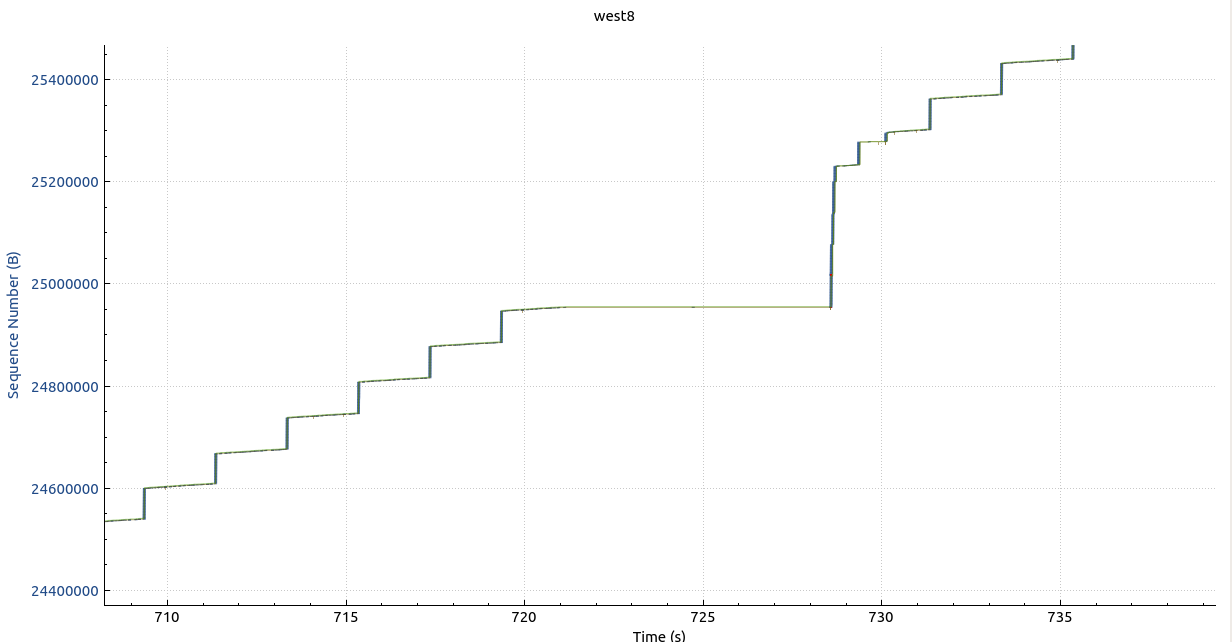
I have been checking the Wireshark / tcpdump capture file and noticed the following in west8.
At a certain moment a request from the server is sent to the camera and the device takes approx 10 sec to respond, in the meantime quite a few retransmissions were sent, causing the receive buffer to overflow. Once this buffer is full, the device cannot send any data anymore to Nx, until the buffer has been reset.
Two possible causes; the first is the network/container isn't able to handle the requests and the second is the device isn't capable the request timely due to limited hardware resources (CPU and/or RAM).
The second option is the one we see the most and can be resolved by using more powerful hardware or reducing the load by decreasing the framerate and/or the increasing the compression (=less bandwidth).
You can see it happening in the TCP trace graph below:
The other tracefile shows similar behavior.
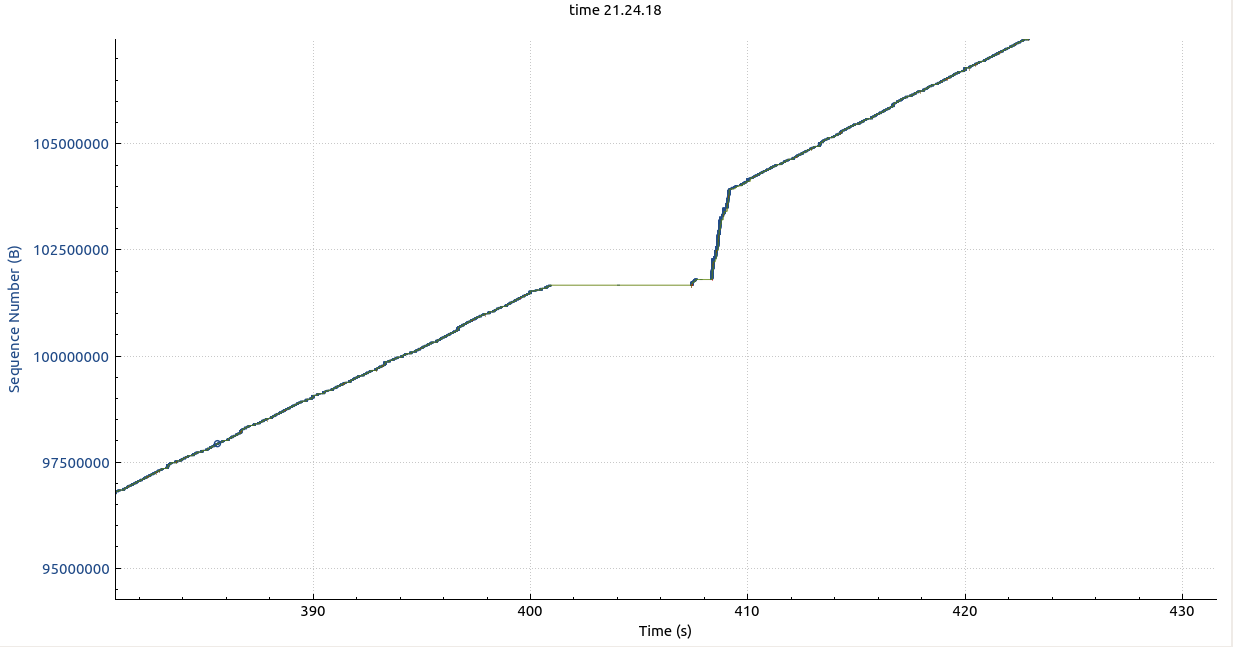
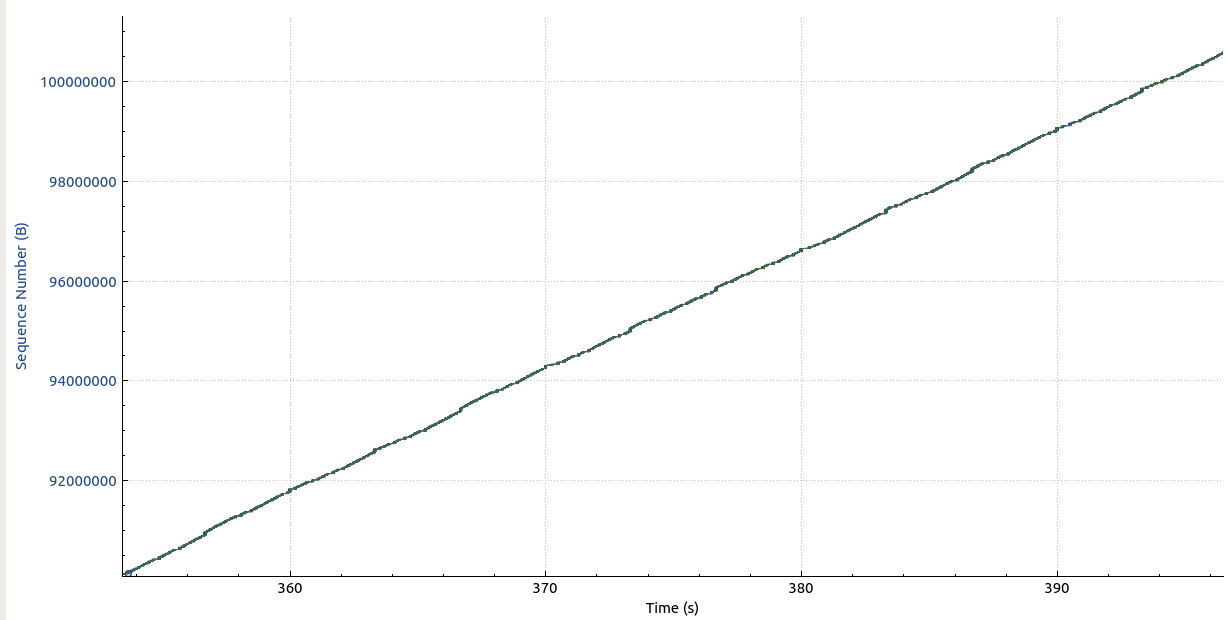
The flatspots in the graphs shouldn't be there. It should be as smooth as below.
 0
0 -
Norman when you say "The second option is the one we see the most and can be resolved by using more powerful hardware" do you mean more powerful camera hardware, or server hardware ?
0 -
Hi @...,
I mean camera or DVR hardware. Obviously this won't be possible most of the time, but it is a key differentiator between various DVR/NVR/camera brands. Our server is really lightweight and could even run on a Raspberry Pi 3 with a handful of HD cameras.
There are brands that are very tight on their hardware, and we see such issues frequently. Often this is countered by the statement that they don't see such issues on their DVR/NVR/software, but often these DVR/NVR/software reduce the frame rates and/or increase compression what we suggested as well. Our software and the major VMS software in general always tries, by default to pull the maximum framerate, and resolution and balanced compression to maximize the potential of the cameras.
You can see this happening in the DVR/NVR market as well where companies advert with really cheap 4K 16 channel NVR, but if you read the specs closely, you can only connect up to 4 x 4K camera on a 16 channel NVR often with a reduced framerate opposed to the capabilities of the camera or the compression is so high that an HD camera with minimum compression will offer you more details than the 4K camera would.
There are some really nifty tricks of specmenship in this business that confuses a lot of people.
Luckily there are also some brands that still offer honest specs and where we hardly see any network issues with.
0 -
Norman thank you for the info
I think this might actually be a networking issue after all
I initially had the cameras on their own VLAN; giving the Nx server container an ethernet interface on the same VLAN as the cameras has (for a few days now at least) fixed the
Can not read RTP frame for camera
errors.
So I suspect that inter-VLAN routing was the bottleneck. While your support article does mention simplifying the network architecture, it might be worth spelling out inter-VLAN routing as a potential troublemaker, as it's often suggested elsewhere to isolate IP cameras (usually with a VLAN)...
Looking through the logs, however, I'm still getting errors like this:
2020-09-17 06:02:34.929  28197 WARNING QnRtspDataConsumer(0x7f854c7611c0): Called sendBuffer(@0x7f854c764c80, 16156 bytes): FAILURE, timestamp 1600242366634000 us, duration 19287270 us, since last send 47 us, frame queue size 12
2020-09-17 06:02:34.930  28199 WARNING QnRtspConnectionProcessorPrivate(0x7f8554b2b4a0): Called send(@0x7f8554b69ac0, 9694 bytes) -> 1439, timestamp 1600242395204000 us, duration 19863771 us, since last send 808 us
2020-09-17 06:02:34.930  28199 WARNING QnRtspDataConsumer(0x7f8554b2b860): Called sendBuffer(@0x7f8554b69ac0, 9694 bytes): FAILURE, timestamp 1600242395204000 us, duration 19863945 us, since last send 805 us, frame queue size 12
2020-09-17 06:02:39.933  28108 WARNING QnRtspConnectionProcessorPrivate(0x7f853c880e80): Called send(@0x7f853c942160, 32768 bytes) -> ok, timestamp 1600242393256000 us, duration 83627361 us, since last send 10545 us
2020-09-17 06:02:39.934  28108 WARNING QnRtspDataConsumer(0x7f853c035840): Called sendBuffer(@0x7f853c942160, 32768 bytes): FAILURE, timestamp 1600242393256000 us, duration 83627652 us, since last send 10544 us, frame queue size 12
2020-09-17 06:03:43.429  28349 WARNING nx::camera_id_helper::FunctionsTag: Bad request: No 'cameraId' params specified
2020-09-17 06:03:45.458  28349 WARNING nx::camera_id_helper::FunctionsTag: Bad request: No 'cameraId' params specified
2020-09-17 06:03:52.693  28358 WARNING nx::camera_id_helper::FunctionsTag: Bad request: No 'cameraId' params specified
2020-09-17 06:04:00.458  28358 WARNING nx::camera_id_helper::FunctionsTag: Bad request: No 'cameraId' params specified
2020-09-17 06:04:15.460  28389 WARNING nx::camera_id_helper::FunctionsTag: Bad request: No 'cameraId' params specified
2020-09-17 06:04:19.481  28389 WARNING nx::camera_id_helper::FunctionsTag: Bad request: No 'cameraId' params specified
2020-09-17 06:04:24.181  28389 WARNING nx::camera_id_helper::FunctionsTag: Bad request: No 'cameraId' params specified
2020-09-17 06:04:30.458  28389 WARNING nx::camera_id_helper::FunctionsTag: Bad request: No 'cameraId' params specified
2020-09-17 06:04:45.459  28424 WARNING nx::camera_id_helper::FunctionsTag: Bad request: No 'cameraId' params specified
2020-09-17 06:05:48.192    395    INFO QnMServerResourceDiscoveryManager(0x7f852c061af0): Mark resource Network resource url: , ip: , mac: 00-00-00-00-00-00, uniqueId: {3ed60c38-7c67-4563-b218-818d7d206290}{0684adb1-64bc-8a38-cb37-e66efdd686b5} as offline because it doesn't response to discovery any more.
2020-09-17 06:06:32.180    395    INFO QnMServerResourceDiscoveryManager(0x7f852c061af0): Mark resource Network resource url: , ip: , mac: 00-00-00-00-00-00, uniqueId: {3ed60c38-7c67-4563-b218-818d7d206290}{0684adb1-64bc-8a38-cb37-e66efdd686b5} as offline because it doesn't response to discovery any more.
2020-09-17 06:07:17.197    395    INFO QnMServerResourceDiscoveryManager(0x7f852c061af0): Mark resource Network resource url: , ip: , mac: 00-00-00-00-00-00, uniqueId: {3ed60c38-7c67-4563-b218-818d7d206290}{0684adb1-64bc-8a38-cb37-e66efdd686b5} as offline because it doesn't response to discovery any more.
2020-09-17 06:07:21.090    387 WARNING nx::vms::server::metrics::CameraController(0x7f852c307258): Skip missing resource ba17a18b-1b42-38da-90b6-ff81a04f60a3
2020-09-17 06:08:20.641    387 WARNING ec2::detail::ServerQueryProcessor(0x7f852c7be820): Remove resource access status failed
The id referenced in 'skip missing resource' doesn't appear to correlate with a camera uuid.
What do the QnRtspDataConsumer and QnRtspConnectionProcessorPrivate errors suggest, and what would the missing network resources be ?
0 -
Hi @...
Sorry for the delay, the topic moved out of my attention zone.
VLANs can be used without issues, but the bandwidth and QoS should be suitable for the use case.Regarding you log extract; these are Warnings, no Errors, so no immediate thing to worry about, but you should keep an eye on it. Were these create before or after the VLAN issue?
More than happy to investigate your logs, please share them as txt file.
0 -
Thanks Norman I've sent you the log files
Those warnings were there before and after the VLAN issue
0 -
Hi @...,
The logs did not reveal anything related to the issue that was mentioned. Anyway to provide TeamViewer access to the system for further investigation. You can email the credentials via the email address you used for the logs.
0 -
Hi Norman I don't think the warnings are related to the original issue, as I'm no longer getting missing chunks of recording since fixing my networking issue.
I'm wondering what the warnings relate to - which is the 'missing resource', and what do the 'QnRtspDataConsumer and QnRtspConnectionProcessorPrivate' errors refer to ?
TeamViewer might be hard as I suspect we're in different time zones. Are there any specific things you'd look at that I can do for you and send the results to you to look at ?
0 -
Hi @...,
Regarding:
QnRtspDataConsumer
The message means that the client requests video data from the server but cannot display it in time. The data is dropping to a queue. Once the queue is large enough, the frames are dropped.
This can be caused if a client is installed on a weak machine (most likely, client and server are installed together limited CPU/RAM resources are available).
and:
QnRtspConnectionProcessorPrivate
This is a notification for our developers only.
Both Warnings will be moved to DEBUG level, instead the current INFO level, since they are irrelevant to the user or even our support team.
Also, be aware that these are just a WARNING. If it was an error, it would be displayed as ERROR in the logs. Warnings in the log gives direction to research certain issues, but aren't necessarily an issue by itself.
0 -
Thanks Norman
Just for my understanding of what's going on, how about the lines relating to
Mark resource Network resource url: , ip: , mac: 00-00-00-00-00-00, uniqueId: {3ed60c38-7c67-4563-b218-818d7d206290}{0684adb1-64bc-8a38-cb37-e66efdd686b5} as offline because it doesn't response to discovery any more.WARNING nx::vms::server::metrics::CameraController(0x7f852c307258): Skip missing resource ba17a18b-1b42-38da-90b6-ff81a04f60a3 2020-09-17 06:08:20.641 387 WARNING ec2::detail::ServerQueryProcessor(0x7f852c7be820): Remove resource access status failed
0 -
Hi @...,
The first line indicates that two UUID do not respond to the auto-discovery requests anymore and are considered to be offline or removed from the system.
The second line indicates that a missing UUID isn't included to the metrics of the system.
Both are irrelevant for the user, but solely intended for our support team and our developers.
0
Please sign in to leave a comment.
Comments
20 comments