Paxton Net2 Plugin Unable to Find DW Spectrum/Cameras
Answered
Hello. We recently upgraded to Paxton Net2 Pro. On the Net2 server, with Net2 client already installed, we installed the DW Spectrum Plugin (v.4.1.0.31401 for Net2 v.6). After navigating to Tools --> Options --> Camera Integration within Paxton Net2 ... and adding the IP address/port #/user credentials for our DW Spectrum server, the Net2 plugin is unable to locate any cameras. We are able to confirm that the Paxton Net2 server can ping the DW Spectrum server and that the DW Spectrum server can ping the Paxton Net2 server. How can I identify why the Paxton Net2 plugin is unable to locate any cameras?
Network details are as follows;
Paxton Net2 Server
- Paxton Net2 v. 6.0.9502.5067
- Windows 10 Pro v. 10.0.19041
- IP Address = 192.168.10.25
DW Spectrum Server 1 (Washington, D.C.)
- DW Spectrum v. 4.0.0.29990
- Windows Embedded Standard v. 6.1.7601 SP1
- NIC 1 (LAN) = 10.224.40.100
- NIC 2 (Cameras) = 10.0.40.100
DW Spectrum Server 2 (Potomac, MD)
- DW Spectrum v. 4.0.0.29990
- Windows Embedded Standard v. 6.1.7601 SP1
- NIC 1 (LAN) = 10.224.48.100
- NIC 2 (Cameras) = 10.0.48.100
-
Official comment

Hi @...,
I noticed that you use v.4.1.0.31401 for the paxton plugin and 4.0.0.29990 for the servers.
Please upgrade your servers to v.4.1.0.31401 as well and you should be fine. -
Hi Norman,
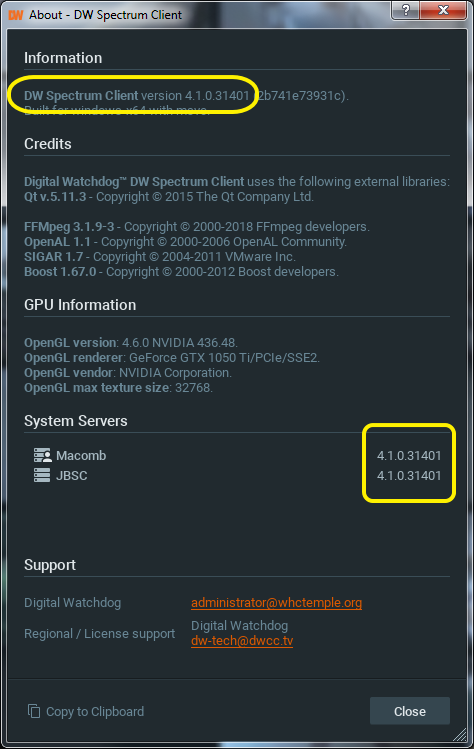
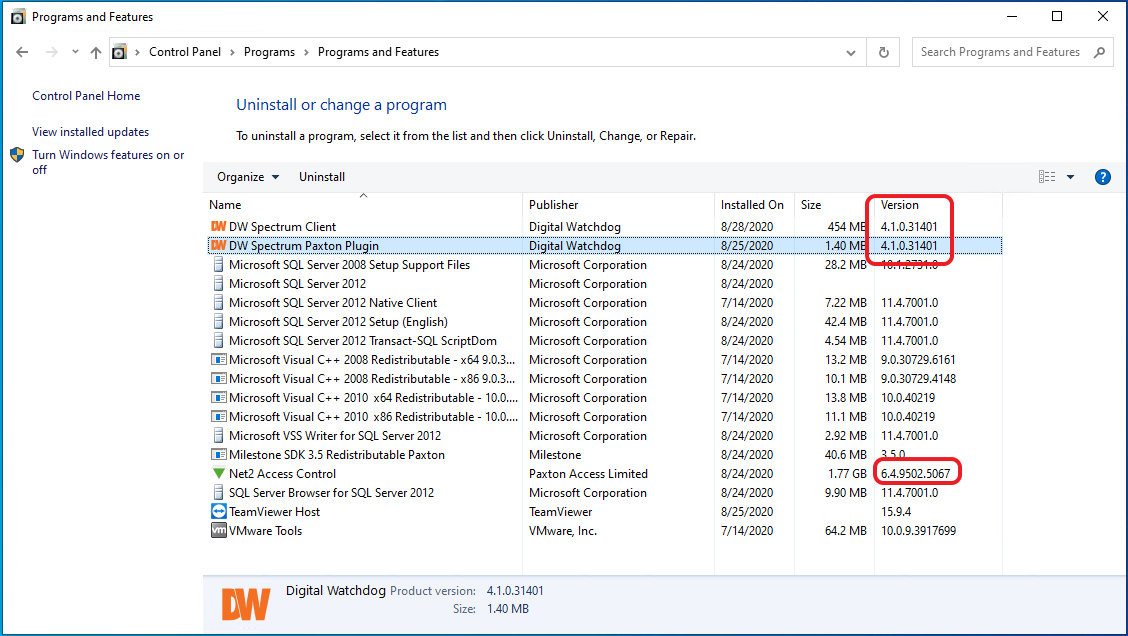
Thank you so much for the response. Interesting factoid ... if you have the Digital Watchdog Client and Server installed, and install a newer "bundled" version ... it installs the bundle alongside the existing Client/Server installations. As result, we actually had the 4.1.0.31401 bundled version installed alongside the 4.0.0.29990 client/server versions.
Anyways, I uninstalled the (older) client/server versions and rebooted the machine(s) for good measure. Didn't help. Our Paxton Net2 server, running the 4.1.0.31401 plugin still cannot see either of our Digital Watchdog servers, running 4.1.0.31401
Have any other ideas?
Thanks!
-Jordan
 0
0 -
Hi @...
This is an interesting case we would like to investigate.
Can you provide remote access via TeamViewer to the affected system?
If so, please confirm, and we will move the conversation to a support ticket so you can share confidential login information securely.0 -
Good Morning Norman,
Thank you for your continued assistance on this issue. Although I can't provide unattended TeamViewer access, I'd be happy to let you to connect to my machine, to which we can remote to the server(s) in question. We would just need to schedule a date/time.
I'll be leaving for vacation tomorrow (Thursday, 9/3), but I would have time today if that works for you? Otherwise, we can try for late next week (Sept. 10 or 11).
-Jordan
0 -
Thank you @...,
Enjoy your holiday and let't schedule something after your holiday.
Please update this ticket when you are back.0
Please sign in to leave a comment.
Comments
5 comments