Client to not run as a "Full-Screen" app.
Answered
It would be nice to have a tick box in the Local Settings of the app to treat the client as a "Full-Screen" app or not.
Reason being, the monitors never switch off after inactivity on the PC.
-
Official comment

Hi @...,
We designed the client such that it won't be closed by power saving modes, since many people use the software in an environment where they just watch the monitors and do not actively operate it.
But the good news is, that you can override this setting in Windows.
- Head to the application, either in the corresponding folder or the shortcut on your desktop.
- Right-click the application and select Properties.
- Go the Compatibilities tab and check the tick box for Disable fullscreen optimizations.
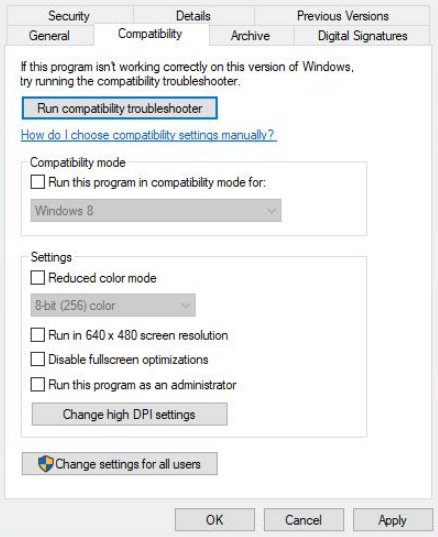
Now the power save modes will override the full screen mode of the Nx Witness Desktop application.
If you want to apply this setting for all users, you click on Change settings for all users and you repeat the steps as mentioned above.

-
Hi Jaimi,
Did you mean by "Not Full-Screen" app the app with window which, if expanded, don't cover the Windows task bar and behave like File Explorer or browser app window?
Thanks.
--
internal – VMS-16887
0 -
Hi @...,
Not sure if you were already aware, but you could create a script to open the client in each size you like.
Please check THIS support article for the applicable parameters.
This doesn't resolve your request, but might circumvent the issue for the short term.
0 -
Hi,
I was more referring to the way in which Windows treats the client.
When you've had it open for a while, then close it, Windows will pop-up near the clock saying, here's what we hid from you while you were "fullscreen". (Notifications wise).
Because Windows thinks it's a full screen app, the monitor timeout in power settings does not operate until the client is closed.0 -
Hi Norman,
I tried what you mentioned, no luck.
I set the screen off time to 1 minute.
Created a shortcut for both of the .exe files.
Added the tick in the box, ran them separately and tested, screen didn't power off.
0 -
Hi @...,
Both exe files? There is only one exe file to run the desktop application.
I verified it on a W10 Home laptop I had around and allowed the monitor to power off after 1 minute and worked like a charm.
What version of Windows are you using and what version and build of Nx Witness are you using?
0 -
Hi Norman,
HD Witness.exe
HD Witness Launcher.exeWindow 10 Pro v1909
NX v4.0.0.299870 -
Hi @...,
Although we tried we are not able to reproduce the issue you encounter.
The Disable fullscreen optimizations worked for all Windows based devices we had access to.
Not sure how to resolve this for you.I have used a newer version of Nx Witness though (4.0.0.31274), but that should not make the difference.
0
Please sign in to leave a comment.
Comments
8 comments