Storage and backup space and retention policy
Answered
How do I configure the storage space consumption and recording retention policy?
I am getting ready to move my server to new hardware, but I don't want the server to consume all the space it discovers. Same applies to the backup mount where I don't want the server to consume all the space on the NFS server.
E.g. for primary storage do not keep more than 100GB, or 7 days.
E.g. for backup storage keep at most 2TB, or 3 months.
I have not found such a setting?
-
Official comment

Hi Pieter,
In the surveillance systems, it is common to set a limit in days, not in gigabytes.
You can set up the min./max. days in the Camera Settings menu, tab Recording.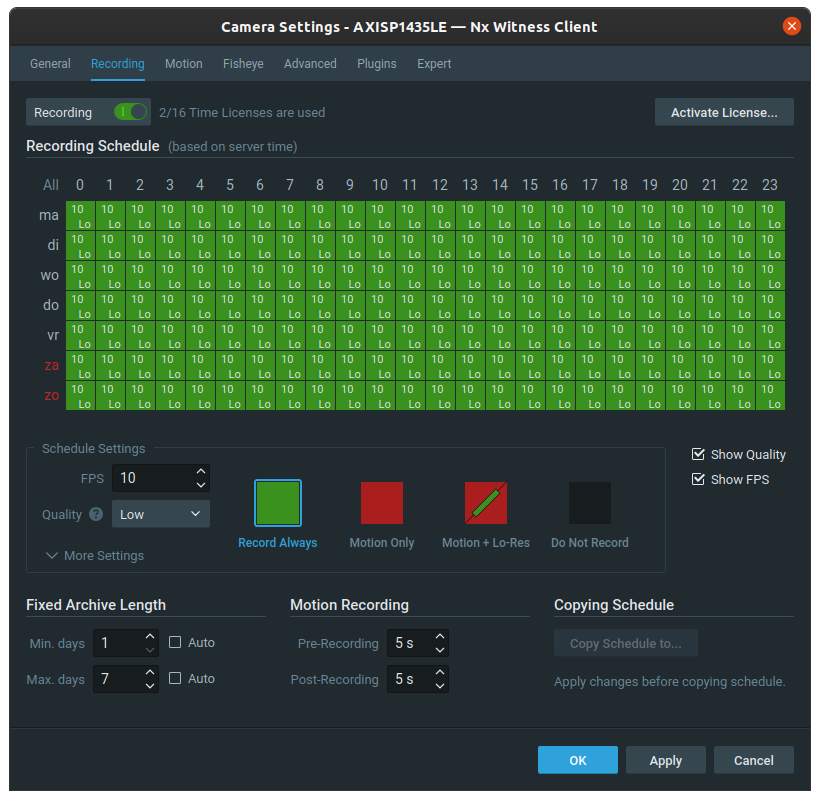
If you want you a limitation in GB, you could set up a storage location with the desired storage space allocated +10% for buffering.
-
I don't understand how I can limit the number of days, this UI lets me selected time of day and day of week to record?
Are you saying that other than available storage space there is no ability to set retention policy?
0 -
Hi Pieter,
You can select the days and hours of the week in the recording schedule.
On the bottom left you see an header marked as:
Fixed Archive Length
When you set Max. days to 7, it will overwrite the data when it is 7 days old.
When you click on the ? On the main panel and click with the ? On the required menu(section) in general the in-client manual opens in your default browser at the relevant section of the manual and all steps are described here.
You also can search for relevant information in the in-client manual through the search bar Inthe top left of the in-client manual.
0 -
Thanks, I must be blind I did not see that, I was looking at the online manual and that is not listed there: http://networkoptix.com/files/help/default/2/3/index.html?configuring_cameras.htm
Does the backup follow the primary recording settings, or is it simply a copy of whatever was recorded?
E.g. if I have two servers, both recording to local storage, set to 30 days max, and I have both server backup to NFS, will the NFS contain 30 days for 2 servers, or will backup be unrestricted in size?
0 -
The backup is a copy of whatever was recorded.
If you set the recordings to max. 30 days, the backup length will be equal, also 30 days.
If you set the recordings to indefinitely, the backup length will correspond to the available storage space.E.g. if the main storage is 1 TB and holds approx. 10 days of storage and the backup is 2 TB it will hold approx. 20 days.
0 -
Understood, too bad I can't manage backup storage space independent of local space.
It would be a good enhancement if your backup strategy could be more like Milestone, where I could specify local retention independent of backup retention.
E.g. local storage 1 week, and backup storage 1 year. This gives the local servers up to a week to copy new data to the backup server. Even on one server it is very useful to separate high speed recording media from backup media due to cost, e.g. SSD array for recording speed, and cheaper much larger storage HDD for backup.
0 -
Hi Pieter,
Thank you for the feedback. Can you please add this information to the New Feature section of this community so it is visible for our product team and they can take that request into consideration for future updates.
0
Please sign in to leave a comment.
Comments
7 comments