Enable right click of timeline flag for Mark Selection Begin/End (but clear not nec.)
Answered
Depending on the timeline zoom, selecting a precise point can be tricky without zooming in to about 60 second resolution. But... the flag time is always accurate regardless of zoom.
Screenshot shows how far i was off when fully zoomed out to about 7 days.. not bad actually.. But being able to pause the video at the spots you want then right click the flag would be help.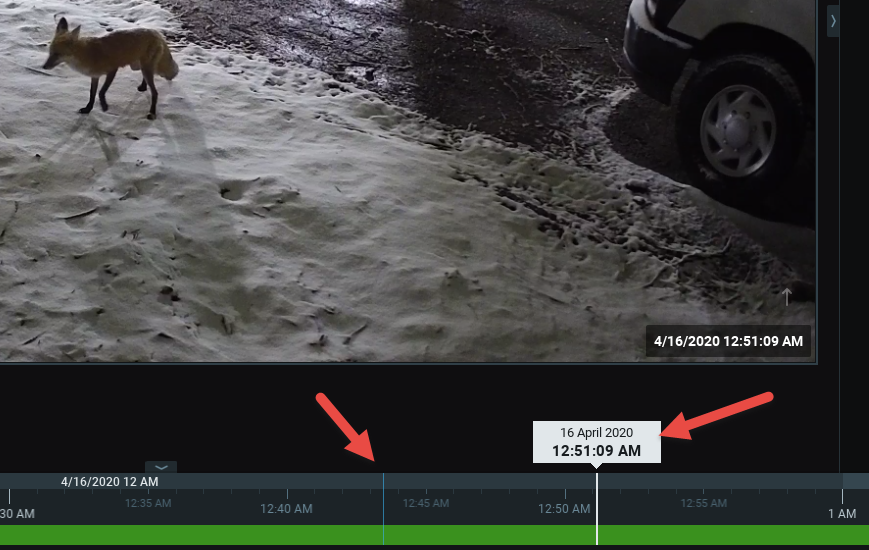
-

Hi Paul,
You still can zoom in after you click the timeline, and when you selected the end of the selection, you still can move the start of the selection before you execute the desired action.
0 -
Yes, of course... that is what I would like to avoid having to do.. Doesn't really bother me as I am used to it, but customers call wondering why their exports don't start/stop where they intended. From a UX standpoint, right clicking the flag which would give the the exact time would be more intuitive and friendly...IMO.
To add to this.. I always tell clients to double check their exports to make sure they saved what they needed... a zoomed out timeline and a shaky mouse can easily put you minutes away from your intended start/end points. Be bad to think you have saved something and didn't... I hate those calls.
"You're holding it wrong" - Steve Jobs2 -
Thank you for the clarification. Now I get what you meant. I will bring this under the attention of our UX team.
"Theory and practice sometimes clash. And when that happens, theory loses. Every single time." - Linus Torvalds
0 -

This would be great. I noticed when adding some bookmarks recently there is a fair bit of back and forth, and its hard to get the selection just right.
0 -
Please sign in to leave a comment.
Comments
4 comments