360 degree camera view fault
Answered
Current NX Mobile version: 19.6.30204 rev 8227bb34fd48
Camera: Milesite MS-C9674-PB (Firmware 43.7.0.73-r8)
Description of Fault:
360 degree de-warp is broken in the current ios software.
The desktop software works as it should. (high/low res stream switch + zoom/warping).
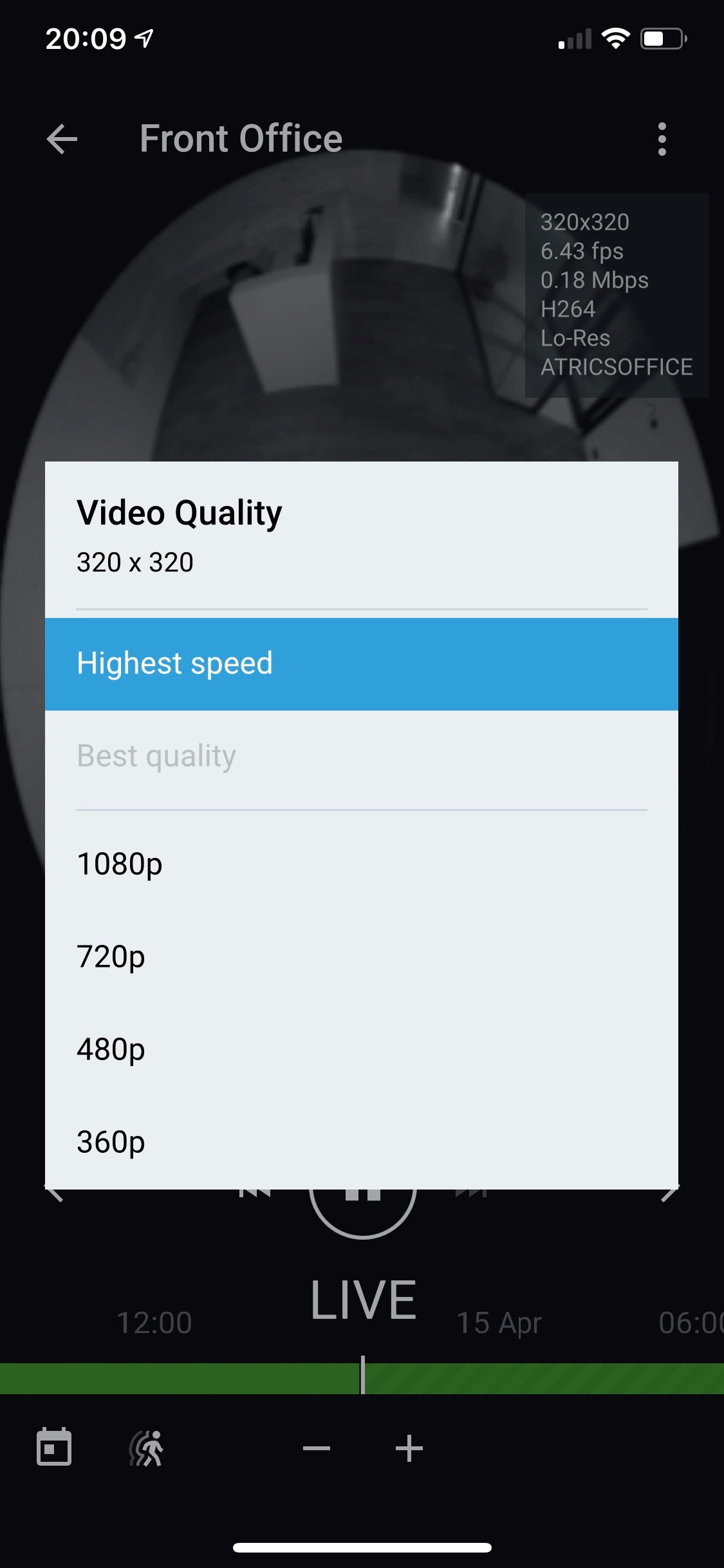
The 360 shows as low resolution only, with no option to switch to best quality, and the image is squished horizontally, and warps incorrectly when zooming in.
-
Official comment

That is my thought.
I checked your camera and on my phone (Android 10) it is squished as well in the secondary stream of 320x320 and fine in the primary stream (4000x3000). But that didn't apply to other brands which gave me the same resolutions, but the correct aspect ratios.
What I assume is that happens is that the camera has an aspect ratio of 4:3, which matches the resolution of the primary stream of 4000x3000, but in the secondary stream, the aspect ratio should be 1:1, which matches the resolution of the secondary stream, instead, it displays the secondary stream as 4:3 as well.
At this moment, there is nothing we can do about this issue. Please report this back to Milesight and in case they have any questions, they know how to reach us, but since it also appears in the Onvif Device Manager, I'm sure they can resolve this. issue.
-
Hi Alex,
Do other fisheye cameras still work in the Nx Mobile application?
Can you share a screenshot of the Fisheye Settings tab (can be found in the Camera Settings menu) in the Nx Desktop client?
Can you share a screen recording of the Nx Mobile application while using the fisheye camera?
Can you share a screen recording of the Nx Desktop application while using the fisheye camera?0 -
https://www.dropbox.com/sh/p7ynv7z7ll05w33/AACldy3I7ACuDNsfizyF5v7Qa?dl=0
See footage here for iphone / nx mobile and nx desktop (including fisheye settings).
These used to work some time back, but not working properly on nx mobile on all our sites now.
I have added you to this site.
Have not used other fisheye brand, so not sure.
0 -
Thank you Alex,
The videos clarified it.
Can you check one more thing for us?
How does the camera behave in the Onvif Device Manager? Is it stretched as well?
Also, can tell you us the iPhone model and the version of iOS?
0 -
in ODM it's showing as ok in full stream and the same squished view in sub stream (even though it's 320x320).
Could this be a fault in the manufacturer firmware?
0 -
OK, but it is strange that I cannot select the high resolution stream, as you seem to be able to do.
It is grayed out in my nx mobile when connecting to multiple sites with different firmware versions of the 360 dome.
 0
0 -
Hi Alex,
That is likely a limitation of iOS. Can you share your iOS model and iOS version?
0 -
iphone xs max, v13.4
0 -
all other cameras are ok
0 -
We have been working directly with the distributor here MGTS, and have experienced the same issue logging in to their demo/office from our phone.
Etwell tried IOS 12 and it worked ok, as did Android.
Both my IPAD Pro current model and IPHONE XS Max exhibit the same fault, running on IOS 13.4 (.1)
0 -
Hi Alex,
Are you telling me that Etwell, didn't experience the stretched image and he can switch between Highest Speed and Best Quality with iOS 12 and Android while keeping the right aspect ratio?
Which version of Android did he use?
0 -
This is what I got from Etwell:
I tested with iOS12 and Android- Samsung A20 on both low and high resolution and the issue did not occur.
I also connected to your site with iOS12 and the issue did not occur.
Also:
My colleague just got the latest samsung and will set it up over the weekend and we will run all the tests.
I will let you know the outcome.
I'm waiting on that last test, but the results are clear for me, no IOS 13 device seems to be able to switch from low to high resolution on this camera.
I can fix the aspect issue by setting the low resolution stream to a higher 4:3 ratio res
0 -
Hi Alex,
Thank you for your feedback.
Regarding:
"I'm waiting on that last test, but the results are clear for me, no IOS 13 device seems to be able to switch from low to high resolution on this camera."
I'll wait for the latest feedback with you and when shared I will submit a bug report for our developers.
0 -
Hi Norman,
Sorry, my email above was out of order, Etwell first sent me
"My colleague just got the latest samsung and will set it up over the weekend and we will run all the tests. I will let you know the outcome. I'm waiting on that last test, but the results are clear for me, no IOS 13 device seems to be able to switch from low to high resolution on this camera. "
Then followed up the test results as:
"I tested with iOS12 and Android- Samsung A20 on both low and high resolution and the issue did not occur.
I also connected to your site with iOS12 and the issue did not occur."
------------
Surely someone can test with IOS13 internally at NX?
Please submit a bug report.
The issue is that high and low resolution cannot be selected, it's just stuck on low resolution.
The 1.1/4:3 ratio issue can be fixed in the camera by setting 4:3 resolutions for both low and high res streams.
0 -
Hi Alex,
We tried to reproduce the issue but failed.
See the following screen recording we made: LINK.Since it might be related to the Milesight camera, please can you forward this camera for further investigations?
You can share the login details to <removed>. Please include external IP address, ports, username en password.0 -
The site is only enabled for NX cloud, can I associate with that email or should I use another?
Additional test I have performed include:
Setting Low res to 320x320 and high res stream to 3000x3000 - fixes aspect ratio issue, but still can't switch between high and low res streams in IOS - stuck on low res. (NX Windows Software Works).
0 -
Hi Alex,
Unfortunately, that won't help. We need to investigate the camera in our own test environment and the only way is to forward the camera so we can add it to our test environment.
0 -
Hi Alex,
We have not heard back from you in a while, so we are going to assume your question has been answered. Please update the topic if you need our assistance.
0
Please sign in to leave a comment.
Comments
18 comments