Lots of "Too long frame queue, cleanup" messages in log file
Answered
I'm on a newly-installed system (running 4.0.0.30107) with four cameras.
The log file is full of these repeating messages:
2020-01-14 06:56:34.135    472 WARNING QnRtspDataConsumer(0x7f9698014a20): Too long frame queue, cleanup
2020-01-14 06:56:35.625    472 WARNING QnRtspDataConsumer(0x7f9698014a20): Too long frame queue, cleanup
2020-01-14 06:56:35.664    471 WARNING QnRtspDataConsumer(0x7f9698014a20): Too long frame queue, drop frame
2020-01-14 06:56:35.684    472 WARNING QnRtspDataConsumer(0x7f9698014a20): Too long frame queue, drop frame
2020-01-14 06:56:35.724    471 WARNING QnRtspDataConsumer(0x7f9698014a20): Too long frame queue, drop frame
2020-01-14 06:56:35.724    472 WARNING QnRtspDataConsumer(0x7f9698014a20): Too long frame queue, drop frame
2020-01-14 06:56:35.724    472 WARNING QnRtspDataConsumer(0x7f9698014a20): Too long frame queue, drop frame
2020-01-14 06:56:35.728    471 WARNING QnRtspDataConsumer(0x7f9698014a20): Too long frame queue, drop frame
2020-01-14 06:56:35.753    471 WARNING QnRtspDataConsumer(0x7f9698014a20): Too long frame queue, drop frame
2020-01-14 06:56:35.754    472 WARNING QnRtspDataConsumer(0x7f9698014a20): Too long frame queue, drop frame
2020-01-14 06:56:35.754    472 WARNING QnRtspDataConsumer(0x7f9698014a20): Too long frame queue, drop frame
2020-01-14 06:56:35.787    471 WARNING QnRtspDataConsumer(0x7f9698014a20): TOO MANY SIMILAR MESSAGES: Too long frame queue, drop frame
2020-01-14 06:56:36.157    472 WARNING QnRtspDataConsumer(0x7f9698014a20): Too long frame queue, cleanup
2020-01-14 06:56:37.637    472 WARNING QnRtspDataConsumer(0x7f9698014a20): Too long frame queue, cleanup
2020-01-14 06:56:38.172    472 WARNING QnRtspDataConsumer(0x7f9698014a20): Too long frame queue, cleanup
2020-01-14 06:56:39.655    471 WARNING QnRtspDataConsumer(0x7f9698014a20): Too long frame queue, cleanup
2020-01-14 06:56:40.144    472 WARNING QnRtspDataConsumer(0x7f9698014a20): Too long frame queue, cleanup
2020-01-14 06:56:41.617    472 WARNING QnRtspDataConsumer(0x7f9698014a20): Too long frame queue, cleanup
2020-01-14 06:56:42.137    472 WARNING QnRtspDataConsumer(0x7f9698014a20): Too long frame queue, cleanup
2020-01-14 06:56:43.618    472 WARNING QnRtspDataConsumer(0x7f9698014a20): TOO MANY SIMILAR MESSAGES: Too long frame queue, cleanup
Any suggestions on how to diagnose whatever is causing this?
-

Eddy,
The message means that the client requests video data from server but cannot display it in time. The data is dropping to a queue. Once the queue is large enough, the frames are dropped.
This can be caused if a client is installed on a really weak machine (most likely, client and server are installed together and the CPU is Atom/Celeron).
Try to monitor CPU usage on client and server.
0 -
Thanks for the explanation!
That's very interesting. This sounds like it could be related to another issue I'm having. (I'm sure these wall-mounted touch panels have very weak CPUs.)
Does it matter that these log messages say "QnRtspDataConsumer" even though I'm requesting a MJPEG stream? (The touch panels definitely don't support RTSP...)
0 -
Update: I don't think it's related to the touch panels / the issue in the other thread.
I see the "Too long frame queue" messages while I have just a single (macOS) client open. Both the Mac and the server are plenty beefy, and both are connected locally via wired gigabit connections. As can be seen by the "Health monitoring" graph, the server is very lightly loaded:
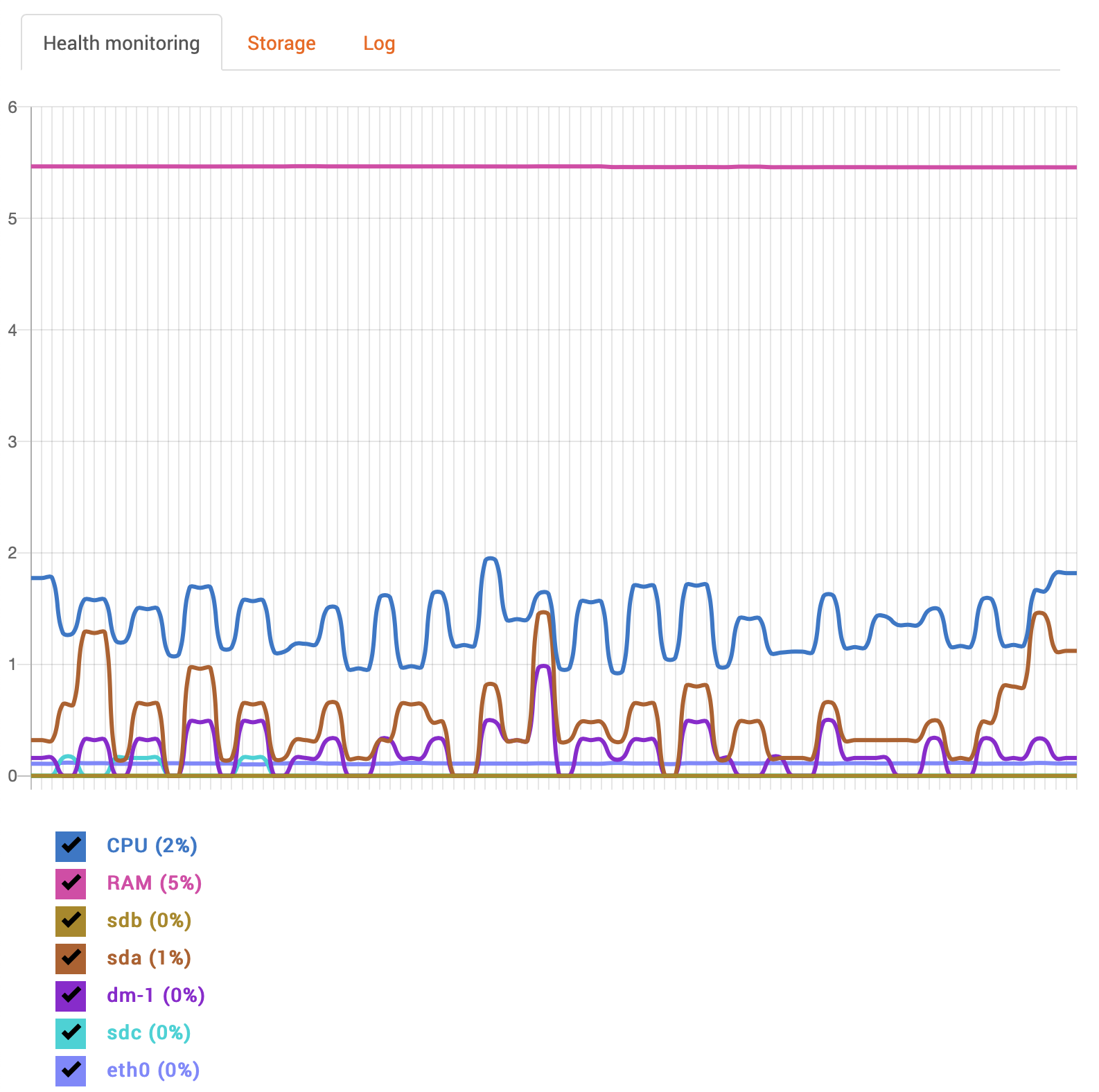
When I close the Mac desktop client app, the "Too long frame queue" messages stop. I verified this on two separate Mac systems (one running 10.15 and the other running 10.14).
If I then open the (iOS) mobile app, I start to see the messages in the log file again!
So I think there's something else going on here... is there any way to enable more verbose logging?
0 -

Hi Eddy,
It goes beyond the server. The client sends requests to the server, but the server sents request to the cameras ad when the camera can't keep up, it ends up to fill up a queue.
Since the camera has to provide 4 TCP streams (2 for live view and 2 for recording) it makes sense that the issue is abundant when the client is closed, which saves you 2 streams. What might help is to lower the framerate and/or quality. This would lower the load on the cameras.
0 -
Hmm, I'm a bit confused.
Boris said:
> client requests video data from server but cannot display it in time
which initially made sense to me, based on the function name "QnRtspDataConsumer"... it seemed like the warning message was saying that something consuming an RTSP stream generated by the server wasn't able to keep up, so frames got dropped. I thought maybe it was the touch panels (which are embedded devices with weak ARM CPUs), but the touch panels turned out to not even be in play when these messages get generated, so it wasn't being caused by them.
I then determined that I see these messages only when I open a client (such as the Mac desktop client or the iOS mobile app), and am displaying even just a single camera in the client.
It seems somewhat hard to believe that a Core i7 desktop client, connected locally on the wired gigabit network where the server is running, can't consume data fast enough to prevent "too long frame queue" messages while viewing a single camera.
Since the warning messages only occur when a client is open (and the client only talks to the server and not the cameras directly) I'm not sure how connections to the camera come in to play here, or how "the cameras can't keep up". Looking at the periodic "Network usage" entries in the log file, the four cameras (and therefore eight streams) are only generating around 1250 KB/s (or approximately 10 Mbit/s) of traffic, which is less than 1% of the available 1000 Mbit/s connectivity:
2020-01-15 00:07:03.876 106 WARNING QnGlobalMonitor(0x5631e25779e0): eth0. in 1245KBps, out 38KBps
2020-01-15 01:17:03.904 106 WARNING QnGlobalMonitor(0x5631e25779e0): eth0. in 1272KBps, out 38KBps
2020-01-15 02:27:03.931 106 WARNING QnGlobalMonitor(0x5631e25779e0): eth0. in 1257KBps, out 38KBps
2020-01-15 03:02:03.945 106 WARNING QnGlobalMonitor(0x5631e25779e0): eth0. in 1272KBps, out 38KBps
2020-01-15 04:12:03.973 106 WARNING QnGlobalMonitor(0x5631e25779e0): eth0. in 1286KBps, out 38KBps
2020-01-15 05:22:03.997 106 WARNING QnGlobalMonitor(0x5631e25779e0): eth0. in 1252KBps, out 37KBps(It's worth pointing out that the 10 Mbit/s observed value is very close to the Nx Calculator value of 9.75 Mbit/s for four 1080p cameras using H.265 high-quality at 25 fps!)
Is there something else that could be going on here? I'm running the server under Ubuntu 18.04.3 and wonder if maybe there are some kernel network parameters that need tuning...
0 -
Hi Eddy,
The Core i7 Desktop isn't the issue. What likely happens is that the CPU/RAM of the camera isn't powerful enough.
Try to set the cameras to 15 fps @ medium and see if this resolves the issue. Also, changing the codec from H.265 to H.264 will reduce the load on the cameras. It might take some time to find the sweet spot of the cameras on which they can offer you the maximum performance, without dropping packages.The server is requesting data from the cameras, this will take 2 streams transcoding the stream into *.mkv files to the server.
If the client is requesting live footage, it will take another 2 streams for live viewing, which makes a total of 4.There are cameras that are not capable of proving 2 x HD@25 FPS + 2xCIF@7 FPS with minimal compression (high). Also H.264 adds additional load to the camera and all in all the camera drops frames, while the server keeps requesting the frames and when they don't get them, drops them as well.
It might be nice to run Wireshark on the server so you can see what happens in the communication between server and camera with and without cameras opened in the desktop client.
0 -
Thanks for the explanation Norman.
I was definitely confused by where the drops that are being logged are occurring.
I didn't realize that a live viewer created another pair of connections from the server to each camera being viewed live! For some reason, I assumed (probably based on my past experience using ZoneMinder) that the server only needed a single (pair of) connections to each camera. If that's not the case, then I can see how adding two additional H.265 streams could stress the camera's processing power. So what happens if a second (or third or fourth...) client wants a live view?
Based on this new information, I will try adjusting the settings on the cameras and see what effect it has.
Also, that's a great idea to do some packet captures on the server to get a better understanding of what is connecting where and when.
Thanks again for explaining how the issue could be on the camera side and not at all related to the server or client!
0 -
I changed the video settings on all 4 of my cameras (H.265 to H.264, frame rate from 30 to 15) and I am no longer seeing nearly as many "Too long frame queue, drop frame" messages in the log. I do see them occasionally, but not as regularly.
Is there any way to increase the verbosity of log messages like this to include identifying information (like IP address) associated with the queue that is "too long"? That would help narrow down if it's a particular camera, a particular client, etc.
On an unrelated note...
I have noticed (particularly when I open a client), I see blocks of messages in the log like this:
2020-01-16 07:57:42.595 5433 WARNING QnOnvifStreamReader(0x7f78a057f830): Data processor is already added: QnRtspDataConsumer(0x7f781c0b8a10)
2020-01-16 07:57:49.724 5439 WARNING QnOnvifStreamReader(0x7f78a05b9020): Data processor is already added: QnRtspDataConsumer(0x7f781c0b8a10)
2020-01-16 07:57:49.724 5439 WARNING QnOnvifStreamReader(0x7f78a05e8a80): TOO MANY SIMILAR MESSAGES: Data processor is already added: QnRtspDataConsumer(0x7f781c0b8a10)Any idea what this "warning" is about?
0 -
Hi,
Of course, we can change the log level, but in this case, it is better to use Wireshark to determine the culprit.
Likely even multiple culprits.Changing the log level will create additional load on the hardware, while Wireshark will give you much more detailed information.
In the System Administration, you also can check the Event Log for Network Issues - RTP package loss.
In this way, you can see which cameras have the issue.Regarding the warnings. No worries. They are for the developers in case there are any issues in the system.
0 -
Thanks again for the reply.
When I open the Event Log and select "Any Camera Issue", the only thing I see (since the beginning of the log) are "Connection to camera was unexpectedly closed" which are explainable, since they are all associated with times when I was changing a video format setting on the camera.
I'll report back after I've had a chance to do some packet captures.
Thanks for the info on those "Warnings". I guess that label is a bit of a misnomer if it's just intended to be "Informational"? (Maybe it could have its log severity lowered?)
0 -
>> Maybe it could have its log severity lowered
Actually we plan to move such worrying messages to a higher log level, but that might take quite a while before they are all moved.0
Please sign in to leave a comment.
Comments
12 comments