Hardware recommendations for 100+ 5mp cameras with 90 days of storage
Completed
Greetings!
I am considering NX Witness as a VMS for our organization. We are looking at a new 100+ camera install, and I'm trying to wrap my head around possible hardware configurations.
From the minimum server requirements, it looks like we should be ok with just about anything. However, I'm wondering with this many cameras what the best way forward is.
We had looked at Milestone, and they recommend a Dell r740xd. Where I am at, we'd have to wait 8 weeks to import one, but we do have Synology 2418rp+'s available.
So, if we went with a NAS like this, could we write directly to it from our VMS server with this many cameras? Or would we need intermediate storage for our VMS server, and then run nightly backups to the NAS?
And would two small "servers", like Dell 3060's, be better than a single low end PowerEdge, like a T140 in terms of having some redundancy? Would two help with writing directly to the NAS?
Thanks for the feedback. We want to find a solution that works well, as we have 4-5 sites that are in the 80-110 camera range. But as a non-profit, every penny counts! We just want to help insure a positive ROI.
-

Hi Luke,
We don't do any recommendations regarding any brand since Nx can run just fine on nearly all brands (can't think of any specific exception at this moment) as long as it meets our requirements which you can find below:
Nx Witness Server Hardware Specs
Nx Witness Desktop Hardware SpecsThat being said, the Dell r740xd should be more than fine, or actually quite a bit overpowered.
I would pick 2 servers with an i3 processor and 8 GB RAM. In this way, you can divide the load on both servers, while they are also capable of running all 100 cameras on a single server with 15 fps at medium quality. In this case, when one server might fail, the cameras will move automatically over to the remaining server and continue to record and you are still able to view all cameras as well.In any case, it is very easy to add NAS storage. the only thing to consider it significant throughput. 100 x 5 MP cameras @15fps at medium quality require a bandwidth of approx. 260 Mbit/s in total.
The disclaimer I have to mention: These numbers are meant to act only as a guide to building your system and real-life results could differ significantly, up and down.
0 -
Thanks for the helpful response.
I am really liking the idea of using 2 servers. We have several extra Dell 3060 micros (8th gen i5 w/ 8GB). I think they would work great, but I’d be limited in not being able to add a 10GbE NIC or internal storage.
And that’s the main thing I’m trying to understand now, is do I need to record to internal storage? And then doing a daily “backup archive” to the NAS? Or can I just write directly to the NAS itself.
Can you help me understand how NX writes to storage? From the documentation, it seems to store everything in RAM and then write to storage once every minute?
The performance specs for my NAS say:
Aggregated 1GbE SMB - Sequential Throughput (64KB): ~450 MB/s read/write
1GbE SMB - Windows File Transfer (1MB file x 3000): ~90/65 MB/s read/write.
So with the way that NX writes to storage, could you estimate based on these numbers what I might be looking at? It’s a 12 bay drive, in RAID 5, SATA 3.5” 10TB 7200/256. Their test drives have read/write specs at around 230MB/s, and mine around 270MB/s.
I think that writing to internal drives, that could net us 3-5 days of storage would be the best setup, as it would add another layer of redundancy if we had trouble with the NAS. But, I don’t know if we can pursue that option yet, so trying to find out if we can write directly to the NAS.
We likely won’t actively review archived footage very frequently, but I do want to take that into consideration for bandwidth.
And as I’m typing, that may mean that we have to have 10GbE on the server(s) to support receiving the feeds, but also to support live streaming to a few different clients.
I know you don’t recommend hardware, so just asking for some clarification to help me pursue options. :D. THANKS!
0 -
-

Hi,
Im using Intel Xeon Silver 4110 CPU
32GB DDR4 ECC
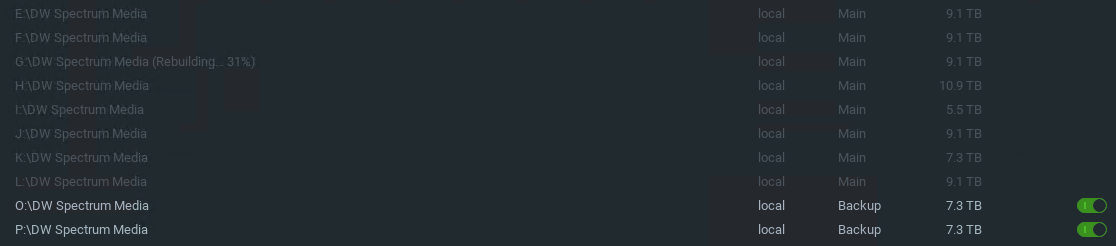
8x10TB Enterprise SATA 7200RPM Disk Non-RAID
2x10TB for backup Non-RAID
for 90x5MP cameras all H.265+, 24hr Hi+Low record
and it works just fine
CPU usage is around 30-40%I able to keep record around 6 months
0 -
@Tanapol
Thanks for the helpful information. Do you mind if I ask a few questions?
I’m excited that you are getting around 6 months. This is 24x7 constant on high and low? Impressive! Are you using VBR?
What is your memory usage like. I had been planning on just 16G.
What are you seeing for your incoming network throughout normally?
And how do you handle your backup since it is smaller than your primary storage?
0 -
-
Hi Luke,
Ignore the 10 Gbit NIC recommendation. Based on the information you provided, I don't see the need for it.
For the number of cameras and the calculation I made (100 x 5 MP cameras @15fps at medium quality require a bandwidth of approx. 260 Mbit/s in total), a 1 Gbit NIC is more than enough.
Regarding the storage. You can add the NAS as external storage in Nx (Like shown in THIS video) The NAS can be set as 'Main Storage' so in case your server hasn't the capacity to meet the required retention time, you can expand it easily and thus write directly to the NAS.
Still, I would also equip the server with local storage to keep recording in case the connection between server and NAS fails. Rare in a LAN, but better safe than sorry.
Based on the average bandwidth of approx. 260 Mbit/s in total, you would need approx 90 TB of storage for 30 days.
But since this strongly depends on your situation. A scene with 24/7 movement gives a lot more storage that a storage room with maybe a few minutes of movement during the day.Also, do you really need 5 MP? Often a camera is used for an overview of a scene and a 1080p (or even a 720p) camera can do this job just fine and will save you a lot of storage. Also, areas with not too much movement could also be set to Motion+Lo-Res recording, which also saves you a lot of motion.
Regarding RAM, we initially write to RAM, but it remains there as short as possible. The 1-minute delay is meant to add the data to the storage and add the metadata into the database.
In my home system (i5+8 GM) the buffer is approx. 10-15 sec. but is shown as 1 minute. Also, I can't export the data at this minute yet. I'll have to wait till it is processed in the database.
If you like I can bring you into contact with one of our resellers who can advise you what you need, based on your specific situation. Just tell us where you are based.
At last, if you have the servers and NAS already, I'm more than happy to provide you some trial licenses, so you can just start using the software, see if you like it and what the storage will be, based on your situation. If you can record the data for at least a week, you can use the built-in storage analytics to see how much storage you would need for your specific situation.
@Tanapol made a valuable addition. The use of H.265 might reduce the storage significantly, especially in a situation where the movement is limited.
0 -
I using that server for something else too
but memory usage of NX mediaserver alone is about 3.5GB I think your 16GB of RAM maybe OK
and my record is 7x24, All of them are VBR
(Auto configure by NX; 70% are set to Hi or Best 15fps/ 30% are set to medium 15fps)
most of my cameras are indoor cams(only people moving on working hours)
AVG bitrate around 0.2-3.0 Mbpsand about 10 of them are outdoor cams
AVG bitrate around 3.0-5.5 MbpsTotal bitrate of 115 Mbps
I use Dual 10 Gbit NIC (one for standard LAN another for CCTV Network)Incoming network throughput for CCTV NIC report by Windows's taskmanager is about 70-100 Mbps
I think 1 Gbps is fine for you plan to use this exclusively for NX onlyFor backup I use scheduled backup(realtime backup will not work because backup disk is much more smaller than Main storage) so it will backup only few newest days which is OK for me.
PS. I use DW Spectrum 3.2.20833 (one of NX OEMs)
I have some issue for version higher than is so I stick with this until v.4.0 is available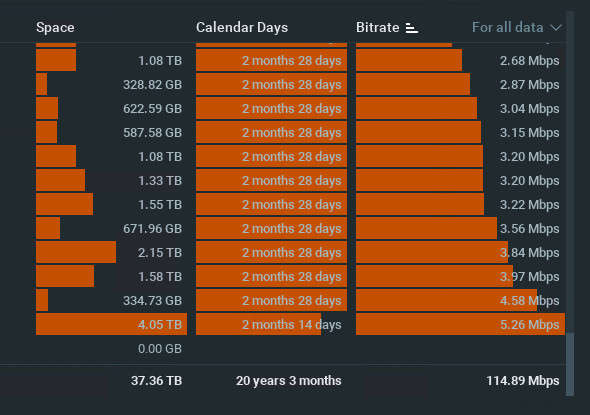
 0
0 -
@Tanapol, thanks for the detailed response!
@Norman, Thanks for the info as well. I do not yet have the server/NAS, still doing a bit of research before moving forward with a decision.
I really like the Hive ability for failover, but I'm wondering for simplicity about just running the VMS from my NAS in a VM? I've seen that there a Docker package, but seems that a VM would be better for support?
My available NAS options include the follow processors:
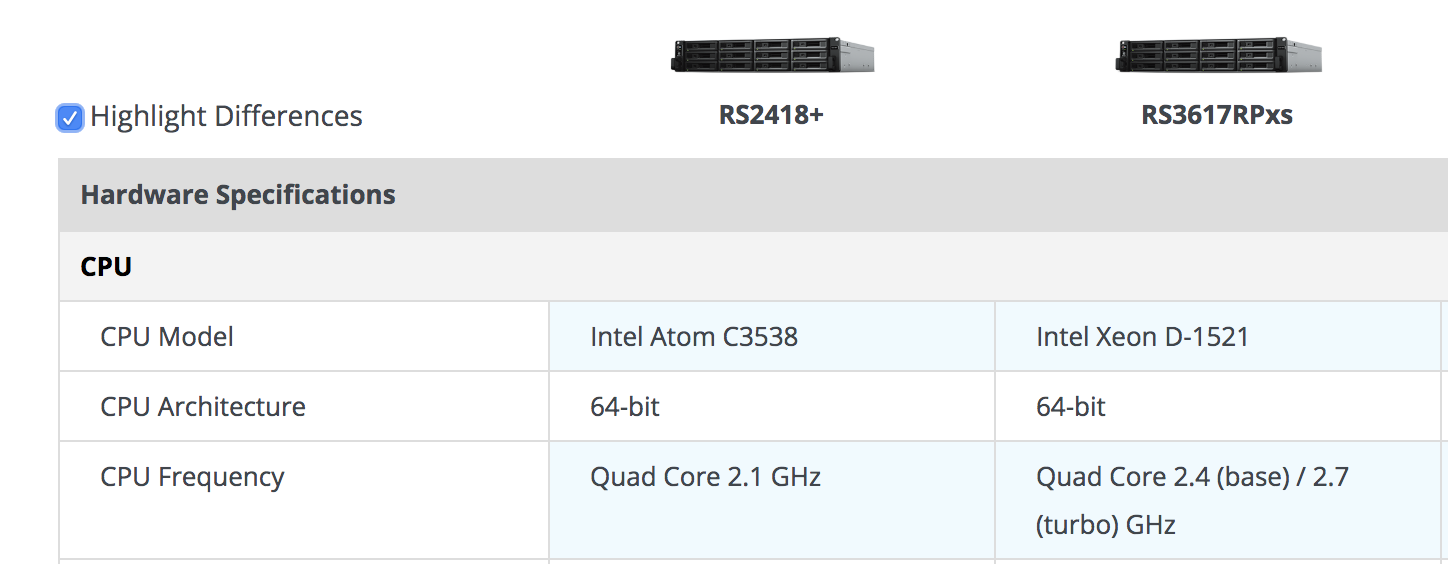
It's about a $1000 price jump to the higher model. Would the Atom be able to run the VMS with 110 cameras well? I could put that cost difference into two i5 Dell's with a 8TB drive for intermediate storage, which would be better from several perspectives, but just curious about the capabilities with these two processors. I'd bump the RAM to 16GB for anything.
0 -
-
@tanapol Any particular reason you are not using RAID with your drives? Just curious
0 -
-
I didn't use RAID in CCTV
Because it waste of space
and older footages is didn't really importance
(but it nice to have for quick overview of movement)
Only a newest month in backup should be enough for meFor using RAID5 or 6 in 10TB drives it will take too long to rebuild the array once it fails and when rebuild, all of disk will take 100% of load and may causes another disk failure which mean totally lost of all data. I experienced that before.
So no RAID5 for me but I still do RAID6 if it impotence.
I do a quick test on single lost of HDD without RAID only some segments of each camera will lost (eg. 1min segment of VDO for evey 5 mins in each camera ) so it acceptable for meFor NAS running VM I already try it with some 3000$ NAS but compared this price to proper Supermicro or any other server brand it way underpowered and I think it VM is too unreliable (I didn't use it with VMS) but VM sometime crashed or stop responding for no reason.
0 -
Check this out, look at Launch Date of the CPU that synology offer i think it not worth it if you going to run VM on it.
https://ark.intel.com/content/www/us/en/ark/products/91202/intel-xeon-processor-d-1521-6m-cache-2-40-ghz.htmlI use Synology before and I love it in term of home use(share photos and files) because it have nice GUI and offer some app like DSPhoto which easy to use for user.
But when it come to business it way too underpowered and overpriced.1 -
Thanks for that feedback. Yes I wish I could easily order a custom server. But it is a bit difficult here.
We only have one r740 configuration for new servers, and a few options for used servers. New r740 is 8 bay, r630xd is 12 bay. But most all are over configured for what we need, and just have to buy as is.
Dell PowerEdge R740 Server, Intel Xeon Silver 4114 2.2G, 10C/20T, 9.6GT/s 2UPI, 14M Cache, Turbo, HT (85W) DDR4-2400, iDRAC Group Manager, Enabled, PowerEdge 2U LCD Bezel,Chassis with up to 8 x 3.5" SAS/SATA Hard Drives for 1CPU Configuration, Riser Config 1, 4 x8 slots, 14G OpenManage placemat, Quick Sync 2 (At-the-box mgmt),32GB(2x 16GB) RDIMM, 2666MT/s, Dual Rank, Blank for 1CPU Configuration, No Additional Processor, iDRAC9,Enterprise, (4x2TB) 7.2K RPM NLSAS 12Gbps 512n 3.5in Hot-Plug Hard Drive , PERC H730P RAID Controller, 2GB NV Cache, Mini card, 6 Performance Fans forR740/740XD, Standard 1U Heatsink, DVD+/-RW,SATA,Int, Dual, Hot-plug, Redundant Power Supply (1+1), 750W,2x Deskside Power Cord, 220V, 2M (Cambodia), Trusted Platform Module 1.2,2x Long Jumper Cord, C13-C14,4m,12a (APCC except ANZ), Broadcom 57416 2 Port 10Gb Base-T + 5720 2 Port 1Gb Base-T, rNDC, No Operating System, 3years warranty on hardware.
This one is around $4500, but comes with expensive drives that would be hard to resell here I think.
0 -
Post is closed for comments.
Comments
11 comments