Multiple User Live Streaming via NX Witness Cloud API - Video Element Errors for Additional Clients
Answered
Hi People:
I'm building a web application that needs to serve live camera streams from NX Witness to multiple concurrent users viewing the same camera. (first time interacting with NX)The first user gets a perfect live stream, but when additional users join, their HTML5 video elements throw errors and fail to display the stream.
WHAT I'M TRYING TO ACHIEVE:
Goal: Multiple users (3-5) watching the same camera live stream simultaneously
Architecture: Node.js server as proxy between frontend and NX Witness Cloud
Use Case: Security dashboard where multiple operators need to view same cameras
end point used:
GET https://{cloud-id}.relay.vmsproxy.com/rest/v3/devices/{cameraId}/media.webm
Complete API call example:GET https://xxxxxxxxxxx-xxxx-46b3-8f6e-00e2ab8e9ca1.relay.vmsproxy.com/rest/v3/devices/{xxxxxxxx-xxxx-8c8d-5802-ae16cf7d14b9}/media.webm?durationMs=0&pos=now&speed=1.0&stream=primary&_clientId=client-1753781196634-e5citefpn
Query Parameters:
{
 durationMs: 0,        // Live streaming (no duration limit)
 pos: 'now',           // Force live position
 speed: '1.0',         // Normal playback speed
 stream: 'primary',    // Use primary stream
 format: 'webm'        // WebM format for web compatibility
}
Request Headers:
{
'x-runtime-guid': '{auth-token}',
'x-session-id': '{unique-session-id}',
'accept': '*/*',
'user-agent': 'ConciergeSharedProxy/{session-id}'
}Error:
Media proxy: 403 Forbidden - Multiple concurrent connections detected | {"cameraId":"{xxxxxxxx-xxxx-8c8d-5802-ae16cf7d14b9}","clientId":"172.68.175.57","sessionId":"1753775710401-mgunw6k9i","connectionId":"1753775710401-mgunw6k9i-xxx.xxx.175.57","error":"Request failed with status code 403","url":"https://xxxxxxxx-xxxx-46b3-8f6e-00e2ab8e9ca1.relay.vmsproxy.com/rest/v3/devices/{xxxxxxxx-xxxx-8c8d-5802-ae16cf7d14b9}/media.webm?durationMs=0&_clientId=client-1753775710267-x42hr22m6"}
[2025-07-29T07:55:14.048Z] [INFO] Media proxy: Released reserved slot due to 403 error | {"cameraId":"{xxxxxxx-xxxx-8c8d-5802-ae16cf7d14b9}","oldCount":2,"newCount":1}
All feedback would be much appriciated
-

Hi Adam,
This issue is likely due to transcoding limitations on the Media Server side.
Please note that Nx Cloud only proxies the request — the actual transcoding still relies on the Media Server. It’s possible that in your case, the system has reached the server’s transcoding capacity.
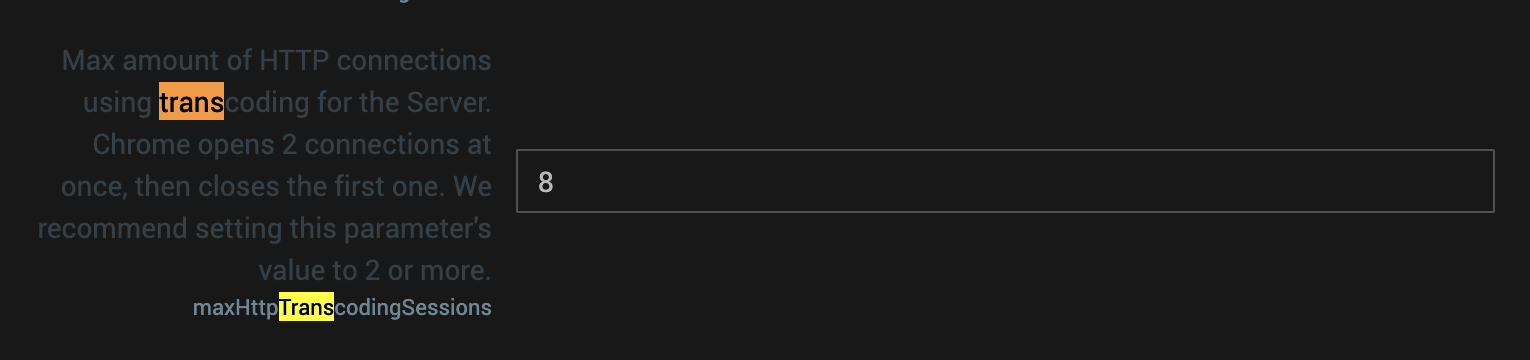
You can try to change the configuration via
https://{cloud_system_id}.relay-us-lax-1-prod-dp.vmsproxy.com/#/settings?advanced=trueAlso, please note that this method can create significant load on the system, so it’s not recommended for heavy-use scenarios.
In your case, it would be more appropriate to use the Nx WebRTC Manager, which is specifically designed to simplify and handle video request workflows more efficiently.
In short, we recommend using Nx WebRTC Manager, and this is also our official suggestion moving forward.
Thanks!
P.S. Just a small note — the correct name is Nx Cloud, not “Nx Witness Cloud.”
0 -
thank you for the detailed reply. I will start to work on it now.
0 -
Hi Again,
We implemented the NX WebRTC Manager, and recently realized when replaced a camera that we are getting transcoding error.*** STREAM ERROR OCCURRED ***
Network Optix stream error: transcodingDisabled
WebRTC stream error: {
cameraId: 'a003a6dc-0604-8b74-8cc9-xxxxxxxx',
doorName: 'Display Wall',
error: 'Network Optix WebRTC stream error',
type: 'networkoptix-stream'
}
WebRTC Configuration:
const webRtcConfig = {
systemId: '<cloud-system-id>',
cameraId: 'a003a6dc-0604-8b74-8cc9-xxxxxx',
accessToken: '<valid-nx-cloud-token>',
resolution: '480p',
speed: 1.0,
deliveryMethod: 'srtp'
}


WebRTCStreamManager.connect(webRtcConfig, videoElement)
Is it possible to go around this without modify anything on the server side?
0
Please sign in to leave a comment.
Comments
3 comments