Consultation on Implementing Security Plans for Entry Zones
Answered
Hello,
We would like to implement an alarm arming schedule for entering specific zones within the NX plugin. I have reviewed the SDK documentation but couldn't find the corresponding method to achieve this. I would like to consult with you regarding how to implement a similar interface as shown in the image, which allows users to freely select time periods for arming.
Thank you, and best regards!
-

Hi Uniview SDK Support Team,
Thank you for your inquiry.
If you’re referring to the event schedule, that functionality should already be available—given that you’ve implemented events for entering specific zones.
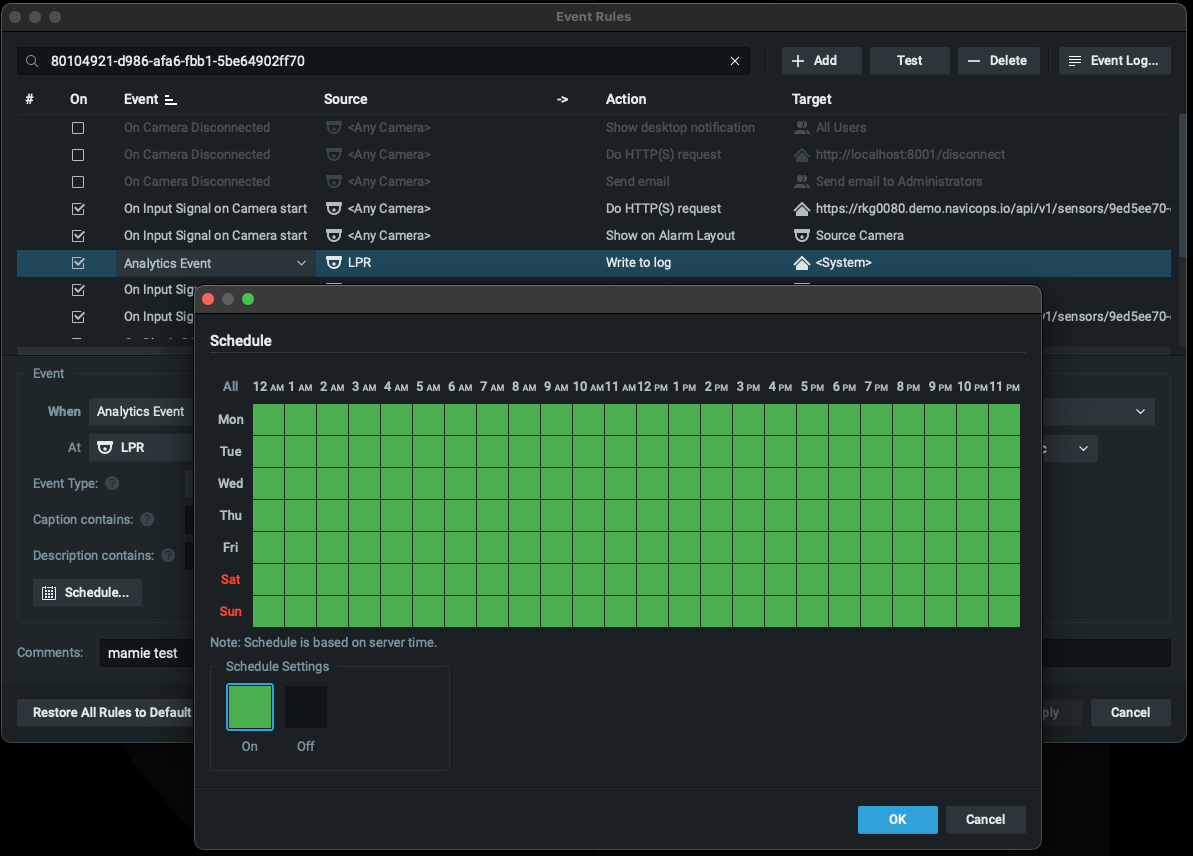
However, if your question relates to arming/disarming the overlays or zones that configure on your cameras, this feature is not handled natively by our system for third-party plugins. Instead, this functionality is suggested to be implemented within your own plugin logic. You can achieve this by including relevant configuration options in the plugin settings.
We tend to not manage arming/disarming logic for any third-party plugins, as doing so poses potential risks—particularly since we have no control over external plugin behavior. As a result, if this feature is essential for your use case, it should be implemented directly within your plugin’s engine or device_agent.
This approach ensures that you retain full control over the logic while keeping the mediaserver process stable and unaffected if anything unexpected.
Thanks.
0 -
The arming/disarming functionality can be implemented in two ways: either by disabling the detection logic within your plugin or by disabling specific features directly on the camera.
Since your team has in-depth knowledge of the camera firmware, I recommend discussing internally to determine which approach is more suitable for your use case. You likely also have insight into which APIs should be used to disable or re-enable the relevant modules on the camera.
Based on that, you may consider implementing the arm/disarm mechanism within your plugin and writing the necessary configuration back to the camera as needed.
Thank you.
0 -
Hello:
Thank you for your reply. Our plan is to implement the configuration of the device's deployment plan in the plugin, which is different from the deployment plan on the platform. We would like to know what controls in the SDK need to be called to implement the same interface as the schedule in your image in the plugin.
Best wishes!
0 -
Hi Uniview SDK support team,
Thank you for your question — implementing a calendar feature sounds like a good idea.
However, this functionality is not currently supported in the SDK, and as of now, it has not been added to the development backlog.If this feature is essential for your integration, here are two possible suggestions:
1. Refer to Nx Client Source Code for Schedule Module
You can review the Nx Desktop Client’s implementation of the schedule module on our open-source GitHub repository: Schedule Module Source Code – GitHubThis is the exact implementation used in the Nx Desktop Client. You may consider building your own calendar-based feature using this code as a reference.
2. Redirect to the Camera’s Web Interface for Scheduling
Another approach is to redirect the user to the camera’s native web interface for schedule-related configuration. For example: you could add a button in your plugin settings UI that links to the camera’s schedule configuration page.This approach helps avoid duplicate implementation and gives end users full control over scheduling functionality on the camera and/or its analytics. It is especially useful in scenarios where the camera configuration is managed independently from the VMS.
While this may not be the most ideal solution, it could serve as a practical workaround for now when factoring in resource availability and implementation effort.
Please evaluate your current requirements and choose the approach that best fits your use cases.
Thanks.0 -
Hello:
Thank you for your suggestion. We will learn the source code of NX client, and if there are any problems in the future, we will consult with you again.
Best wishes!
0 -

Hello, Ichiro,
Based on the suggestion 1: Refer to Nx Desktop Client for the implementation of the schedule module. How can I build my own calendar feature module and embed or display it in the plugin interface? How do I implement this, or are there any case studies I can refer to?
-1 -
Hi uniview_01,
Sorry for the confusion.
However, this functionality is not currently supported in the SDK, and as of now, it has not been added to the development backlog.
The code we show to you is how we implement the calendar module on desktop client, but this setting feature is not supported in SDK not available at the moment. i.e. there is no calendar or schedule available in plugin settings page. So unfortunately, there is no sample nor example could be shared.
So per previous response - Redirect to the Camera’s Web Interface for Scheduling.
Might be the practical approach now. Redirect the user to the camera’s native web interface for schedule-related configuration. For example: you could add a button in your plugin settings UI that links to the camera’s schedule configuration page.Considering this approach helps avoid duplicating the operational logic and gives users full control over scheduling functionality on the camera and/or its analytics, it may be a practical solution despite some limitations.
Based on our previous experience, arming/disarming typically revolves around notifications, meaning that detection may continue to operate in the background on the cameras, those metadata still generated and stored, but users are not alerted unless the rule is armed.
A possible workaround could be:
- Maintain the current camera and analytics settings as-is.
- Use Nx Rules schedules to control whether notifications (e.g., pop-ups, emails, mobile alerts) are triggered.
- The boundary box might keep displaying though.
This way, analytics continues to function, but user experience aligns with expectations around system behavior during armed/disarmed states.
While this might not be the most elegant or comprehensive solution, it could represent the most practical approach given the features currently supported. I acknowledge this may not be entirely precise and could reflect some bias, but it appears to be a viable direction under present constraints.
Please evaluate your current requirements and choose the approach that best fits your use cases.
Thanks.0
Please sign in to leave a comment.
Comments
7 comments