Tracking box in the wrong place
Completed
Hey guys,
I'm using an Axis P1467-LE with the latest 12.3.56 firmware. Unfortunately, the object analytics aren't working correctly. The preview images show the wrong image section, and the tracking box is in the wrong place.
Do you have any ideas about this issue?
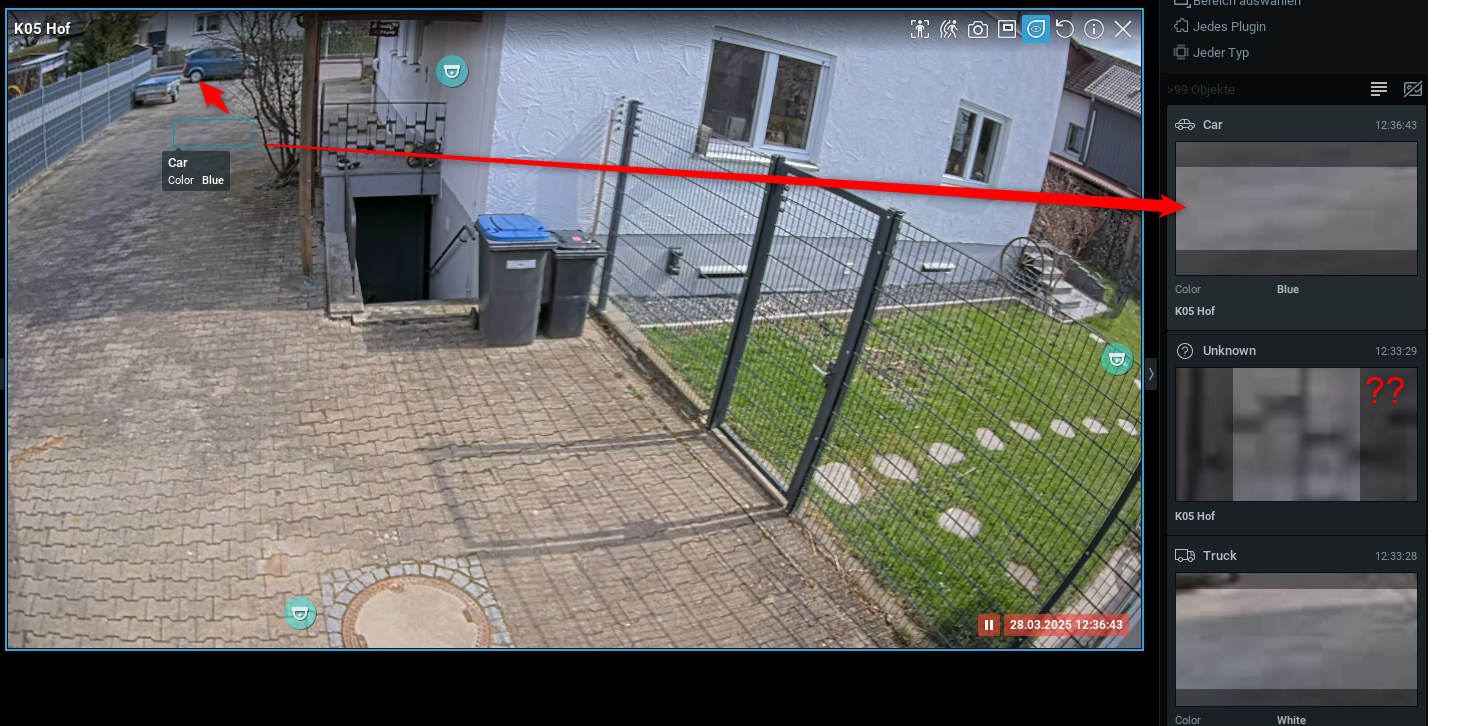
-
Thanks!
This camera isn't an isolated case. It affects several of the same model, even with different firmware. All models are new, calibrated, and have been reset several times. I don't understand the rest of your answer. It has nothing to do with the browser, axis companion, or camera station. I use nx. Furthermore, the tracking boxes in the camera's web interface are correct. This error only occurs in nx!
0 -

Hi Claudius,
Typically this means the device provide the incorrect coordinates.}
To investigate the issue, Wireshark capture files might help to find more details.0 -
I think we've solved the problem. It was due to the different aspect ratios (16:9 and 4:3) set in the stream and in the object analytics.
0
Post is closed for comments.
Comments
3 comments