NX Apache vulnerability
Completed
Im running the latest release of NX VMS 6.0.0.39503 and one of our vulnerability scanning tools has picked up that its running a version of Apache that is vulnerable to CVE-2017-9798, CVE-2021-40438 and CVE-2021-44790. Are there any patches being developed for this? does anyone know of a way to manually update the Apache binaries in use?
-

Hi Ron Chutney,
It sounds like a false positive, as Nx Witness doesn’t use or install Apache.
Best regards,
0 -

I am getting this from my scan too, and not just 1, but 2 scanner - here the nmap results
58656/tcp open rtsp
| fingerprint-strings:
| FourOhFourRequest, GetRequest, HTTPOptions:
| HTTP/1.0 404 Not Found
| Content-Length: 0
| Date: Wed, 13 Nov 2024 00:30:11 GMT
| Server: Nx Witness/6.0.0.39503 (Network Optix) Apache/2.4.16 (MSWin)
| RTSPRequest:
| RTSP/1.0 404 Not Found
| Content-Length: 0
| Date: Wed, 13 Nov 2024 00:30:11 GMT
| Server: Nx Witness/6.0.0.39503 (Network Optix) Apache/2.4.16 (MSWin)
| SIPOptions:
| SIP/2.0 404 Not Found
| Content-Length: 0
| Date: Wed, 13 Nov 2024 00:30:11 GMT
|_ Server: Nx Witness/6.0.0.39503 (Network Optix) Apache/2.4.16 (MSWin)so it look like the rtsp is using apache 2.4.16 which has the vulnerable in them - is this going to be updated, if so when?
0 -
Hi Martyn Brennan,
This header currently includes a reference to Apache to support compatibility with legacy systems. We plan to remove this mention as soon as possible, as it didn’t make it - the task was finished - into version 6.0 for a reason unknown to me.
To check and confirm if Apache is actually installed and see its version, you can use
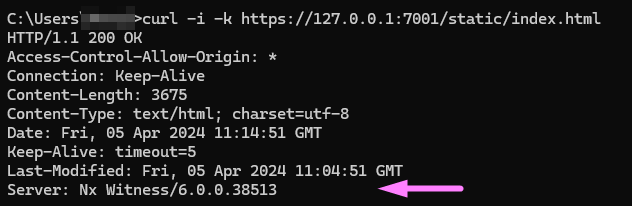
"apache2 -v"on Linux or look for an Apache installation directory on Windows. If Apache isn’t installed, you’ll either see a 'command not recognized' message on Linux or find no Apache directory on Windows.For your information, once the fix is included, the mention of Apache should be gone from the output as shown below, and should not pop up in vulnerability scanners anymore.
 0
0 -
Hi Martyn Brennan,
There is a fix, which you can use if there are no legacy integrations present for the VMS.
You can navigate to the WebAdmin of the system, like this:
https://<server>:7001/#/settings/advanced
Scroll down till you see
serverHeader:
Here you change the default value$vmsName/$vmsVersion ($company) $compatibilityto$vmsName/$vmsVersionand save the settings, and the Apache headers aren't displayed anymore.
Below the result of a default setting:Server: Nx Witness/6.0.0.39503 (Network Optix) Apache/2.4.16 (Unix)
And after you changed the
serverHeaderthe result will be:Server: Nx Witness/6.0.0.39503
If you change this setting, and run the scanner again, there shouldn't be any notifications anymore.
0 -
Hi Ron Chutney and Martyn Brennan,
We published an article about this issue:
0
Post is closed for comments.
Comments
5 comments