How to develop an event plugin to add events and combine them with Uniview's cameras?
Completed
Version Information:
Operating system: Windows 10
Nx Witness MediaServer:5.1.4.38659
I developed the plugin according to the following URL:
https://meta.nxvms.com/docs/developers/knowledgebase/273-step-6-adding-analytics-events
I don't use OpenCV but Unvieiw's SDK, and I want to add multiple events. But when I add an event and open the plugin, the event type drop-down box cannot be clicked and selected, and there is no event in it.
I refer to the Event folder in the sample folder, but I don't know how to add new events and adapt them to the Unview camera. I would like to know if there is a development process document or a function documentation? Or is there an example demo that tells me how to develop it.
Looking forward to your reply, thank you.

-

Hi wenbin,
Thanks for your question.
I am afraid you there could be misunderstanding the architecture of the implementation.
There is no event plugin, but a device plugin only, and the device plugin would contain the proper functions or features once you have implemented them properly. Analytics Event is one of the required implementation if you want to see the analytics event.
This event part has nothing to do with OpenCV or proprietary SDK. It is about if you implement the event structure in the "deviceAgent" of your plugin.
Some basic troubleshooting and essential information can be checked :
1) The first step is that you may be able to check if you declared the eventType in the DeviceAgent::manifestString() correctly?
2) The second step is if the plugin is properly launched and bound to the devices?
3) The third step could be checking if all the cameras you have selected are all supported the events.
The current claim and information is kind of limited and not clear, so it is suggested you can provide the full scenarios and likely tell us what you have done, so the issue can be interpreted and understood more clearly.
Thanks.
0 -
Thanks for your help,
I also have the following questions:
I want to implement the event push function you implemented for Uniview cameras.Specifically, it is the event function of the uniview_analytics_plugin.dll
1. Whether the uniview_analytics_plugin.dll in the NX platform can provide plug-in source code reference;
2. If you can't provide the source code, whether there are demo examples and development documents for reference, and the corresponding guidance documents are not found in the current website;
3. Does NX implement Event events through LAPI? How does the plug-in we implement push the event to the NX platform after receiving the event?Thanks.
0 -
Hi Wenbin,
Thanks for your question.
1) No, we can't provide any source code externally, and this request would not be possible in all cases unfortunately.
2) The document is published on the developer portal, which can be found here.
I believe you have read the specific tutorial already, and the sample code is on the portal as well.
You may use git to pull the latest version too.git clone https://github.com/networkoptix/nx_open_integrations.git cd nx_open_integrations/cpp/vms_server_plugins/opencv_object_detection_analytics_plugin

3. There is no significant relationship between Nx Events and LAPI.
The LAPI is the interface that is used to communicate with UNV devices.
Nx plugin is the interface which is providing the functionalities to interact with Nx Witness
So you can use any options that UNV devices support in Nx plugin, ex: LAPI, ONVIF...etc. We currently LAPI for UNV analytics only, for rest of the control, it is in ONVIF.For Analytics event, you are suggested to implement the communication of UNV devices and mediaserver, for example, whenever there is an event, mediaserver would get the notifications or at least can understand there is an event.
Once the plugin "is notified or get the events" then you can then tell mediaserver to action accordingly. So the first step is to allow your plugin to know "there are events on the camera", and I believe this is pure in LAPI.
Regarding to the actions after receiving the event, that is event rules, you don't need to implement that in your plugin as that is a part of Nx Witness event-rule engine. You can see the interface on the desktop client

Hope this helps.
0 -
Thanks for your help,
I followed this definition and declared event types, but I did not see the types I declared in the Event Type drop down list. I want to know which step I am missing that prevents me from seeing the type I declare.

 0
0 -
Hi Wenbin,
Thanks for your questions, but we are stilling waiting for the answer from earlier response.
Some basic troubleshooting and essential information can be checked :
1) The first step is that you may be able to check if you declared the eventType in the DeviceAgent::manifestString() correctly?
I believe it is yes. But we might need to see what have been set to confirm the correctness, so is that possible you can provide your sample code?
2) The second step is if the plugin is properly launched and bound to the devices?
We have not seen the information for this question, so we kindly suggest you to provide the application log, both mediaserver and client log, as well as your plugin debug log for further investigation and assistance. This is the critical and mandatory part for any troubleshooting, here is the article for enable the logging, please help to provide them all to get the full scenario of your issue.
3) The third step could be checking if all the cameras you have selected are all supported the events.
We are still waiting for your answer, maybe you can start by one camera as the debugging real practice, the simpler of your system is, the easier you can trace the log.
As a result, we kindly ask if you can start from only one camera and reproduce your issue with logging enable, and please make sure you logging do contain the test period you were operating.
We will create an internal ticket for this issue from here. You may provide the necessary information privately.
Thanks.0 -
Thank you for your help.
Could you provide me with an email address? I am unable to attach compressed log files and code images when posting here.
Thanks
0 -
Hi Wenbin,
Please check your inbox of email, there should be ticket notification for that.
Also, if that is too large, please use some online shared storage, ex: WeTransfer
Thanks.
0 -
The recording is mandatory as of now, please check the notice on the client.
This is the current implementation, although we may probably optimize in the future, but at the moment, you are kindly asked to follow the operation to make sure the functions would work properly.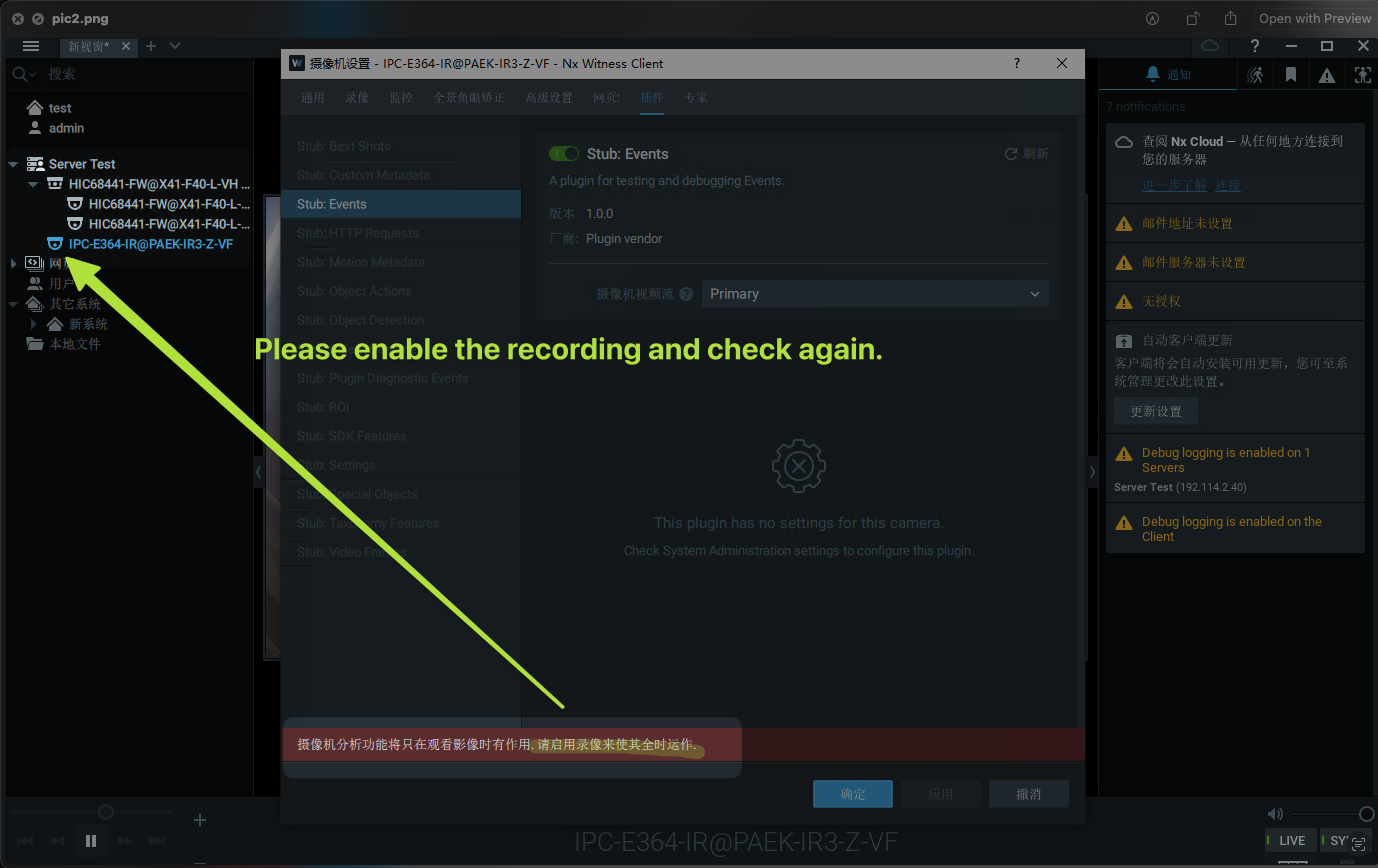 0
0
Please sign in to leave a comment.
Comments
8 comments