Client application freezes and crashes on Windows client with 2 displays after 5.1.0.37133 update
AnsweredSummary
I have a customer that uses a windows 11 Dell Optiplex Micro Plus 7010 machine to view 2 cloud connected systems and one local system on 2 monitors. 1 system is on the LAN and connected directly. The other two are connected via Wisenet Wave Sync. After upgrading to 5.1.0.37133 from a 5.0.x.x version one or 2 or all of the connected systems wave instances are freezing. I can't pinpoint anything that triggers the freeze or one its sometimes one vs the other, the customer just sees the screen and notices that it has frozen.
Environment
<
- Nx Witness Version: Wisenet Wave 5.1.0.37133
- Client OS: <Windows 11 Pro Version 22H2. Build number 22621.1992>
- Client Machine with the issue specs: 13th Gen Intel(R) Core(TM) i7-13700T 1.40 GHz, 16GB RAM. 256GB OS SSD. Intel® UHD Graphics 770. 2 4k tv connected to this machine using display port to hdmi adapters
- Server OS: This scenario is using 4 separate servers. 2 are combined into one system via Wave sync cloud. The other two are individual.
- Network Topology: see summary above
- Special features: none. straightforward system.
>
Reproduction Scenario
I can't pin point what causes the freeze but the error popup generates when I remote in and try to click on anything in that specific Wave instance.
Expected Behavior
Until the upgrade to 5.1.0.37133 this setup had been working well it seemed.
Actual Behavior
Randomly one, two, or all connected client instances will freeze as described above and sometimes cause this error when anything is clicked. Other times I just X out the program and no error generates. I can restart the instance and reconnect to the system and it works at that time. It then freezes after some time but there's no indication as to what happens.
Error code is this.
Failed to create OpenGL context for format QSurfaceFormat(version 2.0, options QFlags <QSurface Format: FormatOption> 0, depthBufferSize 24, redBufferSize - 1, greenBufferSize - 1, blueBufferSize -1, alphaBufferSize 8, stencilBufferSize 8, samples -1, swapBehavior QSurfaceFormat:DoubleBuffer, swapinterval 1, colorSpace QSurfaceFormat:DefaultColorSpace, profile QSurfaceFormat::NoProfile).
This is most likely caused by not having the necessary graphics drivers installed.
Install a driver providing OpenGL 2.0 or higher, or, if this is not possible, make sure the ANGLE Open GL ES 2.0 emulation libraries (libEGL.dll, libLESv2.dil and d3dcompiler. * dil) are available in the application executable's directory or in a location listed in PATH.
Additional Information
I can provide any logs that might help. The Cpu usage on this viewing client is not high. Around 25-35%. Ive attached screenshots of the system. These are the two separate monitors connected to the PC.
Turning on Hardware video decoding makes all the systems unusable with 100% cpu usage. All layouts are on auto resolution. I have tried clean uninstalling the Wisenet Wave client and reinstalling with the same results.


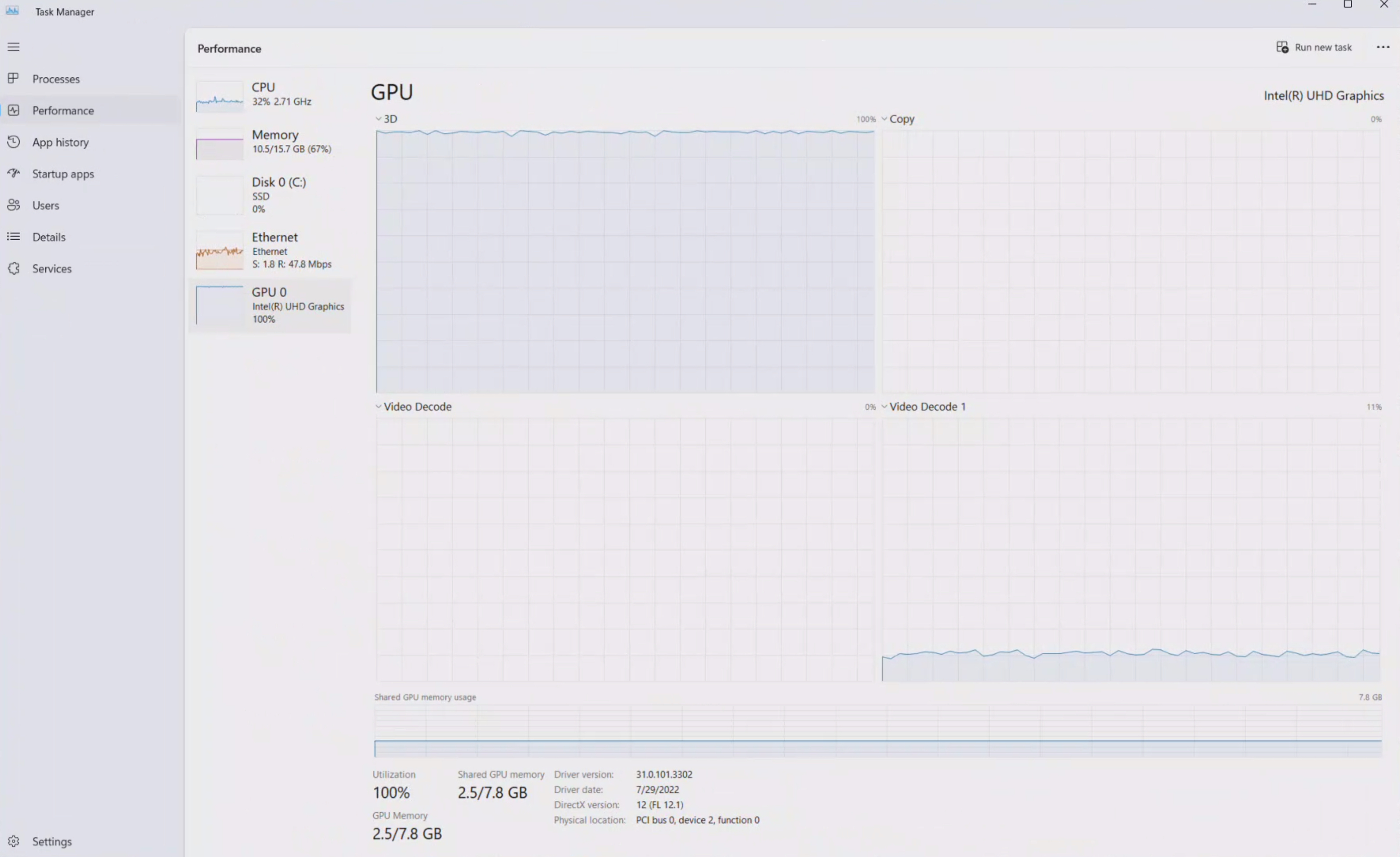


-

I found these errors in the windows event viewer. I have no way of knowing if the times of their error correlate to exactly when the application freezes. Both of these errors are shown multiple times in event viewer.
Faulting application name: Wisenet WAVE.exe, version: 5.1.0.37133, time stamp: 0x649c0a93
Faulting module name: ntdll.dll, version: 10.0.22621.1928, time stamp: 0x7dd9e350
Exception code: 0xc0000374
Fault offset: 0x000000000010c1f9
Faulting process id: 0x0xA9C
Faulting application start time: 0x0x1D9BCA6BB29DDAE
Faulting application path: C:\Program Files\Hanwha\Wisenet WAVE\Client\5.1.0.37133\Wisenet WAVE.exe
Faulting module path: C:\Windows\SYSTEM32\ntdll.dll
Report Id: daa140ef-e76e-48f8-93c0-5d6f333db2c5
Faulting package full name:
Faulting package-relative application ID:And also this error,
Faulting application name: Wisenet WAVE.exe, version: 5.1.0.37133, time stamp: 0x649c0a93
Faulting module name: Qt5Core.dll, version: 5.15.6.0, time stamp: 0x63788074
Exception code: 0xc0000409
Fault offset: 0x0000000000020928
Faulting process id: 0x0x15A0
Faulting application start time: 0x0x1D9BCA307F19186
Faulting application path: C:\Program Files\Hanwha\Wisenet WAVE\client\5.1.0.37133\Wisenet WAVE.exe
Faulting module path: C:\Program Files\Hanwha\Wisenet WAVE\client\5.1.0.37133\Qt5Core.dll
Report Id: af845168-7e6b-4f53-afb4-4910fb9d48ad
Faulting package full name:
Faulting package-relative application ID:
 0
0 -
-

Hi Calvin Wientjes,
I hope this message finds you well. While reviewing our community discussions, I noticed that there hasn't been a response from other community members regarding your query. Could you please confirm if your question is still relevant? If so, I'd be more than happy to explore ways we can assist you.
Best regards.
0 -
I reduced the number of client instances running and lowered the gpu usage. This seemed to fix the problem. I guess 5.1 caused the client application to use more gpu resources regardless of video streams being decoded by the CPU. That's the idea Wisenet support came up with anyways. From now on for client devices, we plan to use video cards.
0 -
-
Hi Calvin Wientjes,
I still think it is interesting to investigate the issue, since to me, it still looks like unexpected behavior, unless I'm overlooking something.
Would it be possible to share crash dumps of the system? If so, please confirm, and I'll transfer this topic into a support ticket for further investigation with the help of our support team.
0 -
Unfortunately I don't have the crash dumps and it has not happened since we moved 1 of the client instances to another PC.
0 -
-
Hi Calvin Wientjes,
Thank you for the update. I'm pleased to hear that the issue was resolved by using another client PC. In the event that a similar situation arises in the future, could you please collect crash dumps and share them with us? This will greatly assist in our further investigations.
0 -

I am experiencing the same problem; my issue started after updating to version 5.1.0.37133, and even after updating to the latest version, 5.1.2.37996, I am still having the same problem. The program freezes and close.
0
Please sign in to leave a comment.
Comments
7 comments