rename camera with api
Answered
Hi Everybody,
I want to ask a question about NX api command. As we know that camera features can be set with the command of "setResourceParams" with the post request. like
http://user:password@172.16.101.21:7001/ec2/setResourceParams
I am trying to set the camera name on the NX. I have used parameters like rename, renameCamera, RenameCamera in the post request(like below) but I couldn't change the camera name with the post request. Could you please help us what would be the right command for it.
http://user:password@172.16.101.21:7001/ec2/setResourceParams[{
"name": "RenameCamera",
"resourceId": "{b7cccc9c-1908-fc92-380d-22dc545f6df7}",
"value": "Camera 1"
}]
Thanks,
-

Hi @...,
You may misunderstand the usage of /ec2/setResourceParams. The name is the resource parameter name and you may be able to obtain the available parameter name by the API /ec2/getResourceParams.
If you'd like to change the camera's name, you could use the APIs:
- /ec2/saveCameraUserAttributes (JSON object, for signle camera)
- /ec2/saveCameraUserAttributesList (JSON array, for multiple cameras)The required attributes could be obtained by /ec2/getCameraUserAttributesList. The cameraName should be the one that you are looking for.
Let me know if you have further questions, thank you.0 -
Hi Wendy,
I am using this post command below, but It is not working. Could you help me, what is wrong with it.
http://user:password@172.16.101.21:7001/ec2/saveCameraUserAttributes
{
"cameraId": "{b7cccc9c-1908-fc92-380d-22dc545f6df7}",
"name": "Camera_1"
}Thanks,
0 -
Hi @...,
There're a lot of required parameters for this API call. You could refer to the details from the API document or testing tool:
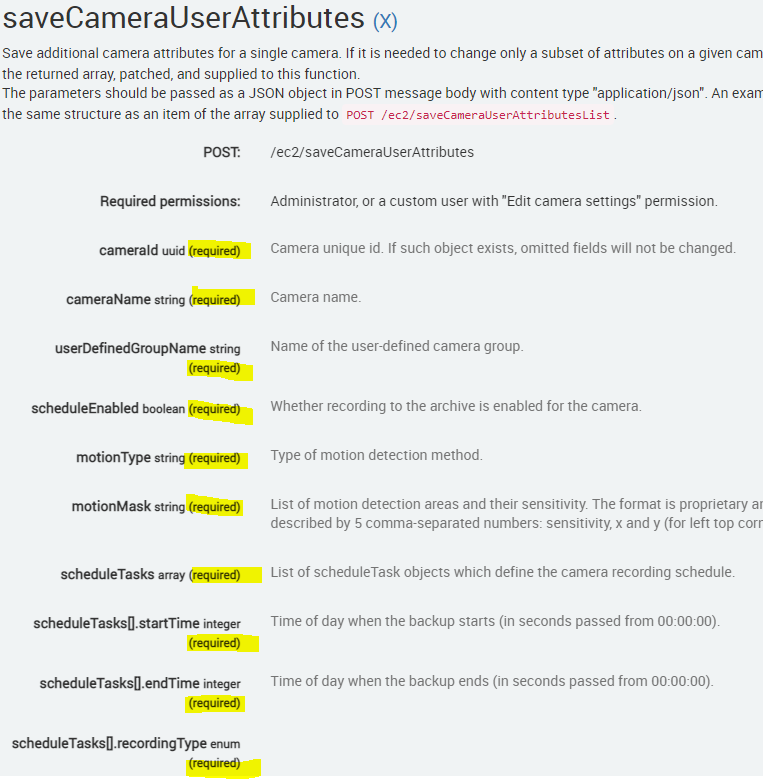
Thus, I would suggest you run the /ec2/getCameraUserAttributesList first. Copy and paste the result on the request body of JSON content.
Thanks.
0 -
Thanks for help Wendy.
It worked properly, when I copied the all values to the post statement for the specific camera.
Thanks.
0
Please sign in to leave a comment.
Comments
4 comments