Plugin cannot load on Windows 7 - Specified module cannot be found
Answered
Hi,
I've developed a C++ metadata sdk plugin and tested with Nx Meta, Nx Witness and DW Spectrum on Windows 10. It's the same machine on which I developed the plugin using Visual Studio 2019. The plugin works fine in this environment.
Our urgent requirement is that we have a 64-bit Windows 7 server with DW Spectrum (Digital Watchdog) installed and are required to present a demo of the plugin on this server.
The problem is that plugin installation is failing, the logs keep saying:
Failed loading Server Plugin [C:/Program Files/Digital Watchdog/DW Spectrum/MediaServer/plugins/calipsa_analytics_plugin/calipsa_analytics_plugin.dll] (): [cannotLoadLibrary]: Cannot load library C:\Program Files\Digital Watchdog\DW Spectrum\MediaServer\plugins\calipsa_analytics_plugin\calipsa_analytics_plugin.dll: The specified module could not be found.
I've put the dependency ChilkatRelDll_x64.lib in my folder (calipsa_analytics_plugin) inside plugins as well. But still the same error. The only external dependency that the plugin has is this one (the C++ Chilkat library I'm using for making HTTP requests)
What's strange is that the relatively simple stub_analytics_plugin sample (compiled on my same Windows 10 machine, Visual Studio 2019) is also giving the same error.
So I'm suspecting that I need to make some changes to CMake or Visual Studio config before compiling my code. But I could be completely wrong.
It's set up as a CMake build project in Visual Studio. This is what my CMakeLists.txt is:
## Copyright 2018-present Network Optix, Inc. Licensed under MPL 2.0: www.mozilla.org/MPL/2.0/


cmake_minimum_required(VERSION 3.3.2)

project(calipsa_analytics_plugin)


set(metadataSdkDir "" CACHE PATH "Path to unpacked VMS Metadata SDK zip.")

if(metadataSdkDir STREQUAL "")

    set(metadataSdkDir ${CMAKE_CURRENT_LIST_DIR}/../..) #< Assume building samples inside the SDK.

    if(NOT EXISTS ${metadataSdkDir}/src/nx/sdk OR NOT EXISTS ${metadataSdkDir}/nx_kit/src/nx/kit)

        message(FATAL_ERROR "Define metadataSdkDir cache variable to point to the unzipped SDK.")

    endif()

endif()


set(CMAKE_CXX_STANDARD 14)

set(CMAKE_CXX_EXTENSIONS OFF)


set(CMAKE_CXX_VISIBILITY_PRESET hidden)

set(CMAKE_POSITION_INDEPENDENT_CODE ON)


if(UNIX)

    # In Linux, for the plugin .so library, set `rpath` to "$ORIGIN" and do not set `runpath`, thus

    # enabling the lookup of the dependencies in the plugin dir first.

    string(APPEND CMAKE_SHARED_LINKER_FLAGS " -Wl,--disable-new-dtags")

endif()

set(CMAKE_SKIP_BUILD_RPATH ON)

set(CMAKE_BUILD_WITH_INSTALL_RPATH ON)

set(CMAKE_INSTALL_RPATH "$ORIGIN")


if(WIN32)

    #string(APPEND CMAKE_CXX_FLAGS " /MP") #< Use all CPU cores by MSVC.

endif()


if(WIN32)

    set(API_EXPORT_MACRO "__declspec(dllexport)")

else()

    set(API_EXPORT_MACRO "__attribute__((visibility(\"default\")))")

endif()


#--------------------------------------------------------------------------------------------------

# Define nx_kit lib, static.


set(nxKitLibraryType "STATIC" CACHE STRING "" FORCE)

set(nxKitWithTests "NO" CACHE STRING "" FORCE)


add_subdirectory(${metadataSdkDir}/nx_kit ${CMAKE_CURRENT_BINARY_DIR}/nx_kit)


#--------------------------------------------------------------------------------------------------

# Define nx_sdk lib, static, depends on nx_kit.


set(SDK_SRC_DIR ${metadataSdkDir}/src)

file(GLOB_RECURSE SDK_SRC ${SDK_SRC_DIR}/*)


add_library(nx_sdk STATIC ${SDK_SRC})

target_include_directories(nx_sdk PUBLIC ${SDK_SRC_DIR})

target_link_libraries(nx_sdk PRIVATE nx_kit)


target_compile_definitions(nx_sdk PRIVATE NX_PLUGIN_API=${API_EXPORT_MACRO}) #< for nxLibContext()


#--------------------------------------------------------------------------------------------------

# Define calipsa_analytics_plugin lib, dynamic, depends on nx_kit and nx_sdk.


set(CALIPSA_ANALYTICS_PLUGIN_SRC_DIR ${CMAKE_CURRENT_LIST_DIR}/src)

file(GLOB_RECURSE CALIPSA_ANALYTICS_PLUGIN_SRC ${CALIPSA_ANALYTICS_PLUGIN_SRC_DIR}/*)


add_library(calipsa_analytics_plugin SHARED ${CALIPSA_ANALYTICS_PLUGIN_SRC})

target_include_directories(calipsa_analytics_plugin PRIVATE ${CALIPSA_ANALYTICS_PLUGIN_SRC_DIR})


include_directories(${metadataSdkDir}/../chilkat/include)


target_link_libraries(calipsa_analytics_plugin PRIVATE nx_kit nx_sdk ws2_32 ${metadataSdkDir}/../chilkat/libs/ChilkatRelDll_x64.lib)


target_compile_definitions(calipsa_analytics_plugin

    PRIVATE NX_PLUGIN_API=${API_EXPORT_MACRO}

)
Anton Babinov
@...
Any help would be sincerely appreciated.
Thank you.
-

Hi Usama,
try to use dumpbin.exe tool to examine the dependencies of the compiled dll. dumpbin.exe usually comes with Visual Studio and you can find it in in tools directory(https://docs.microsoft.com/en-us/cpp/build/reference/dumpbin-reference?view=msvc-160).
You can use it in command line like this:
dumpbin /dependents some.dllLet's start by checking which dependencies are required by your dll files.
What's strange is that the relatively simple stub_analytics_plugin sample (compiled on my same Windows 10 machine, Visual Studio 2019) is also giving the same error.
So none of compiled plugins(stub and calipsa) working on Windows7 machine and calipsa plugin is working on Windows 10, but stub isn't working on Windows 10?
VMS server folder has pre-compiled .dll for stub plugin located at plugin_optional directory. Could you please copy stub plugin from plugin_option to plugins to see if Windows will be able to load it?
0 -

Hello Usama,
I guess, you are building the debug version of the plugin, and it works on your machine since all the debug libraries injected into the plugins .dll are present in your system. You can see library dependencies as Anton has described.
Our urgent requirement is that we have a 64-bit Windows 7 server with DW Spectrum (Digital Watchdog) installed and are required to present a demo of the plugin on this server.
Taking this into account, most probably you are copying the debug-built version of the plugin to another system, which does not have any needed debug libraries installed.
Try to build the "Release" version of the plugin and see if the problem persists.
0 -
Hey Anton Babinov, Hey Andrey Terentyev
stub and calipsa are both working on my Windows 10.
None are working on Windows 7.
Yes, the precompiled stub dll inside plugins_optional is working.
I have two build configurations, x64-Debug and x64-Release...I've tried both and still the same problem. May be the toolset is the issue? (I don't exactly know what "toolset" is)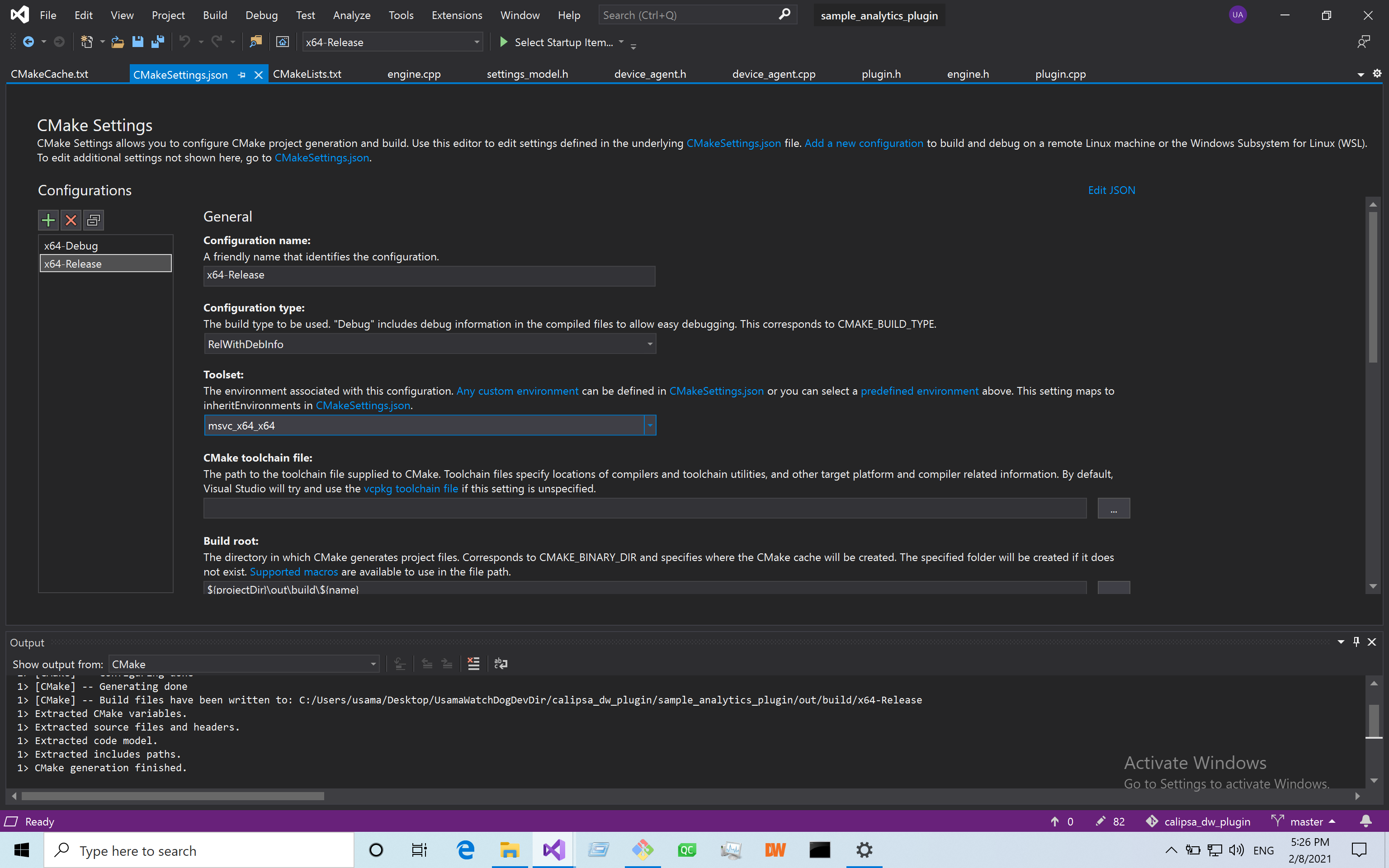
Here is the output of dumpbin:Dump of file calipsa_analytics_plugin.dll
File Type: DLL Image has the following dependencies:
KERNEL32.dll
ADVAPI32.dll
MSVCP140.dll
VCRUNTIME140.dll
VCRUNTIME140_1.dll
api-ms-win-crt-runtime-l1-1-0.dll
api-ms-win-crt-stdio-l1-1-0.dll
api-ms-win-crt-filesystem-l1-1-0.dll
api-ms-win-crt-string-l1-1-0.dll
api-ms-win-crt-convert-l1-1-0.dll
api-ms-win-crt-heap-l1-1-0.dll
api-ms-win-crt-utility-l1-1-0.dll
api-ms-win-crt-environment-l1-1-0.dll
api-ms-win-crt-time-l1-1-0.dll
WS2_32.dll
SHELL32.dll
Summary 1000 .00cfg 21000 .data 5000 .idata 2A000 .pdata 1D8000 .rdata 8000 .reloc 1000 .rsrc 4A0000 .text 1000 .tls0 -
Usama,
There is in dependencies a number of .dll from "Microsoft Visual C++ Redistributable" package.
Make sure you have "Microsoft Visual C++ Redistributable" package installed in Windows 7.
If having the package in Windows 7 is not possible, you could try to build a statically linked plugin binary.1 -
Hello Usama,
What changes do I need to make to go from a DLL to a static, so to speak self-contained plugin (if I'm not mistaken)?
In the Visual Studio it's set in the Properties of a project.
Properties->C/C++ -> Code Generation -> Runtime library
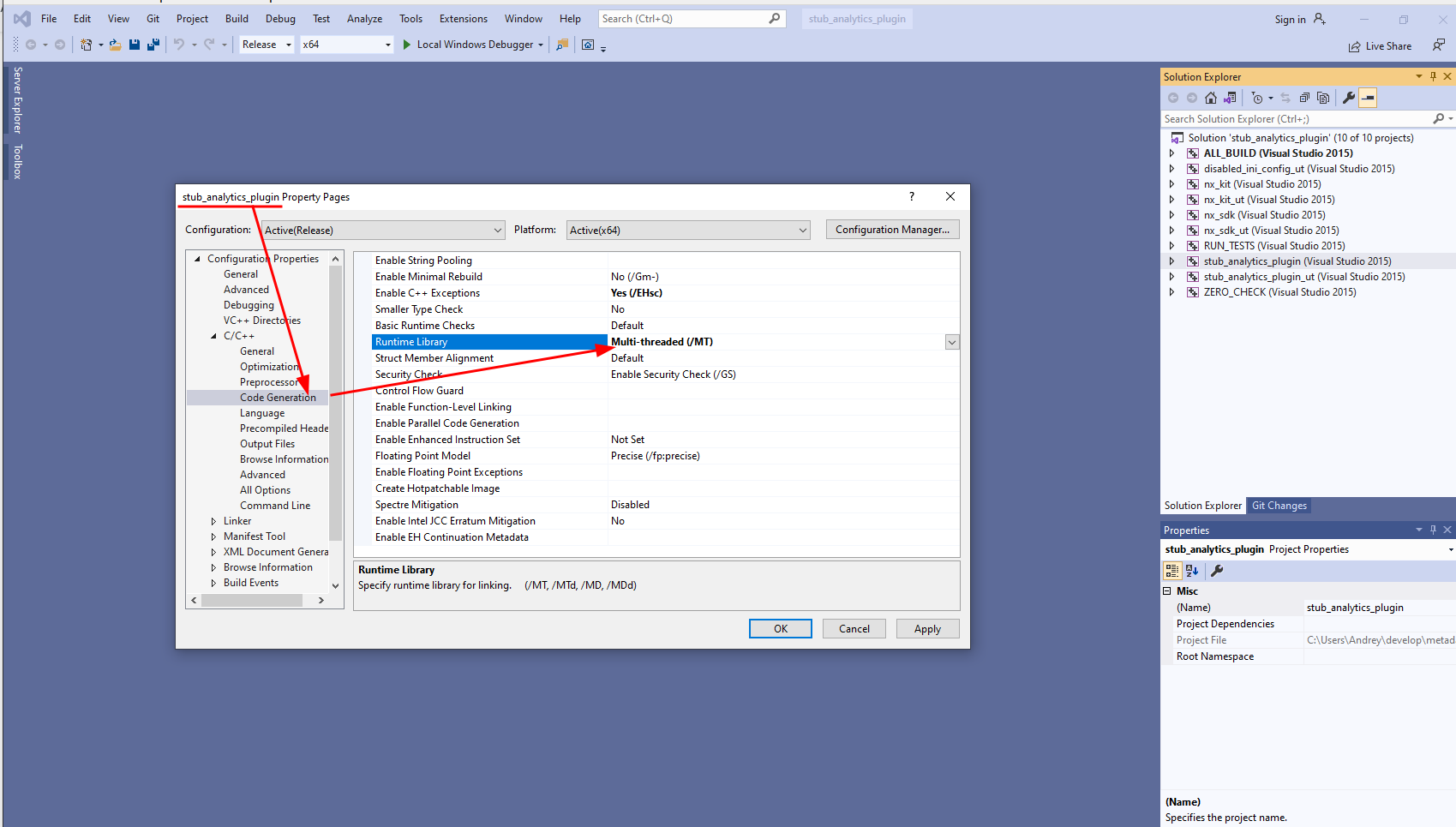
/MT is for linking dependencies statically. Be aware, the libraries to be linked have to provide statically linkable .lib files.
For example, to statically link stub_analytics_plugin dependencies you need to set "/MT" for the "Runtime library" setting in the following projects:
- stub_analytics_plugin
- nx_kit
- nx_sdk
1
Please sign in to leave a comment.
Comments
5 comments