How to show Hikvision detection area's and annotation in Nx Witness
Answered
Hi,
We have multiple Hikvision DS-2DF8225IX-AEL camera's wich we use in combination with NX Witness 4.0. We use the Hikvision Deep Learning analytics for intrusion detection and send these alarms to a control room, so far so good everything works wel. But the control room is now complaining that they receive to many false alarms and are not able to verify what the alarm triggerd. So when i check the alarms in NX Witness to see where the alarms come from i don't see the detection area and annotation frame around the object that is triggering the alarm, and when i check the stream on the camera UI i do see the area's and frames.
So my question is, does anyone know a solution to make this metadata visible on the stream in Nx Witness?
-

Hi @...,
For the cameras I have used, Hikvision used the secondary stream to display the analytics rules as shown below;
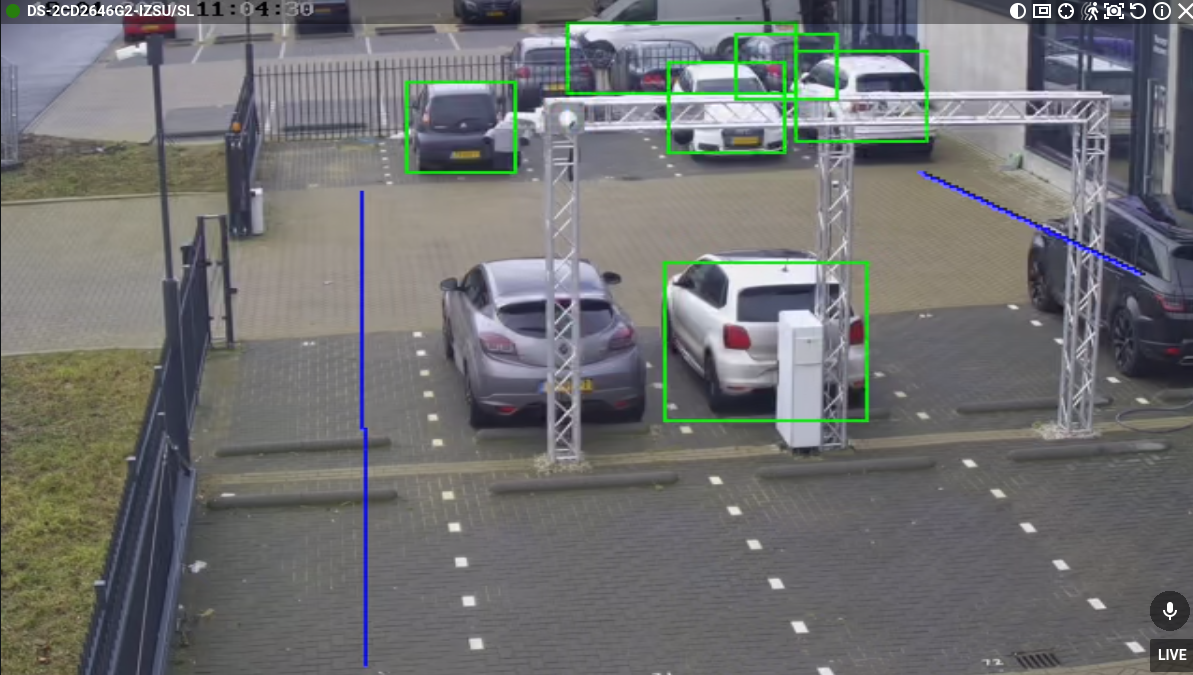
So, in the grid, you right-click, select Resolution and pick Low. This way the secondary stream will be shown and thus the analytics events that have been set up, and you can see the rules changing color when the event is triggered.
0
Please sign in to leave a comment.
Comments
1 comment