Problem with the microphone icon
Answered
Hello,
All time when "Sound" is disable in camera settings...
NxClient display "Microphone icon" : 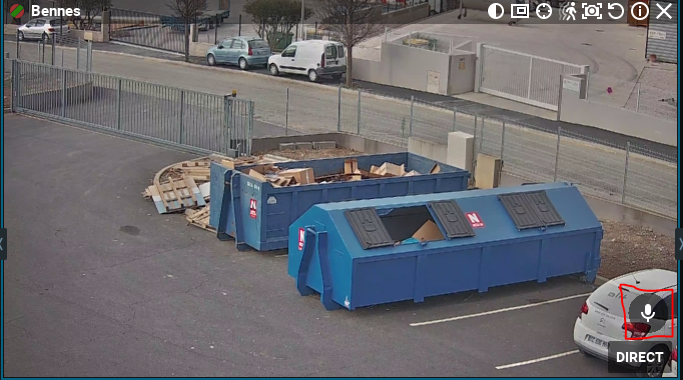
But see in settings : 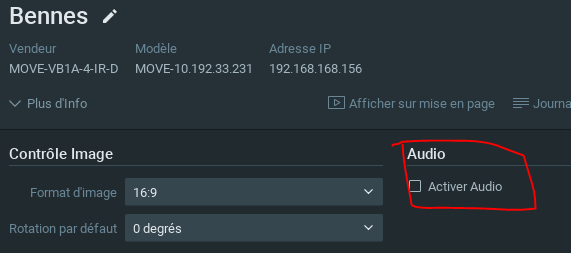
How can I hide this icon?
Best regards,
-

Hi Jordan IUNCKER,
This is an Onvif issue/characteristic. If Onvif determines the audio output, it will display the microphone.
The tickbox for Audio is for the adding sound to the video (input).0 -
Hi Norman
No solution to hide the microphone icon?
When you switch to "Wall" mode... this icon uses a part of the image... maybe a solution to hide all the OSDs in "Wall" mode and display only the camera name ?
My customer asks me if it is possible to activate the camera name at any time and set the font size in wall mode ?
Because he has about 100 cameras on 2 screens... and all the camera names have a very small font on the screen... he needs a larger font size
0 -
Hi Jordan IUNCKER,
Regarding:
No solution to hide the microphone icon?
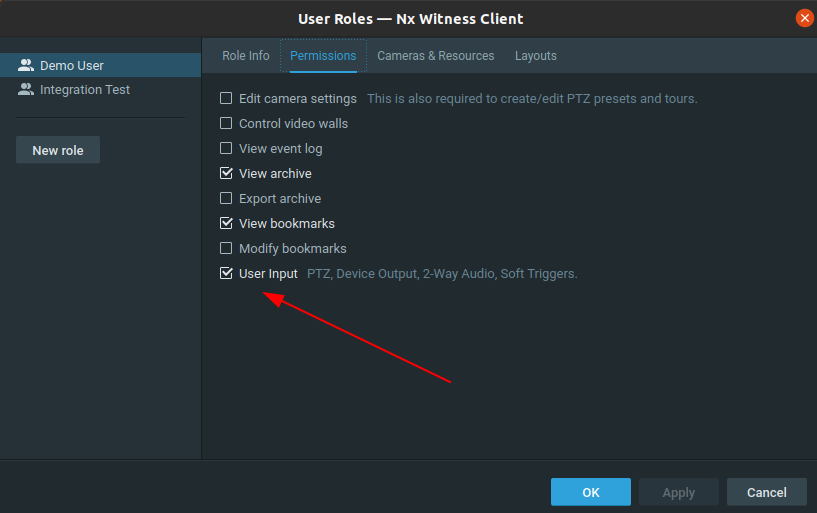
The only option you have is to log in with a user role with the User Input option unchecked.
You can't change the font size. Also, 50 cameras on a single screen is not a common practice, since the human brain can't process such numbers. An interesting scientific article about this subject can be read HERE.
I would suggest adding 'intelligence' to the system, so operators, for the majority, look at relevant footage, instead of footage in general. Even for a generic overview I would recommend displaying a maximum of 16 cameras on a single monitor.
0 -
Hi Norman
"The only option you have is to log in with a user role with the User Input option unchecked"
>> not possible when it's a PTZ camera... Maybe you need to separate PTZ, trigger button, etc ...
Maybe it is possible to build a list, and check/uncheck each item...
About 50 cameras on one screen,
>> I know this is not a common practice... but when a client wants a layout with a lot of cameras... I can't tell him "no, it's not a common practice", sometimes it's hard to change the habits of a policeman. And this kind of client is quite sensitive... We have to adapt to their way of working. On the old system he could only show the names of the cameras on the thumbnails of the video wall and not the rest etc...
We change the system to NX but he finds himself with less functionality... In this case it is difficult to make understand certain things to the governements customers and to the police
0
Please sign in to leave a comment.
Comments
4 comments