Video Frame Data Is Too Small Or Null
Answered
Hi,
I'm using Testcamera as specified in the docs, running this to simulate it
./testcamera.exe -I=127.0.0.1 files="sample2.mp4";
sample2.mp4 file is fairly high quality (640x360, 23.98 frames per second, total bitrate 609kbps, data rate 483kbps, it is 8 seconds long).
I'm sending out an HTTP multipart request using Chilkat libraries from inside pushUncompressedVideoFrame(const IUncompressedVideoFrame* videoFrame)
This request contains the data from the videoFrame retrieved via videoFrame->data(0).
The plugin is listening to the primary stream from the test camera, whose settings I've shown in the attached screenshot: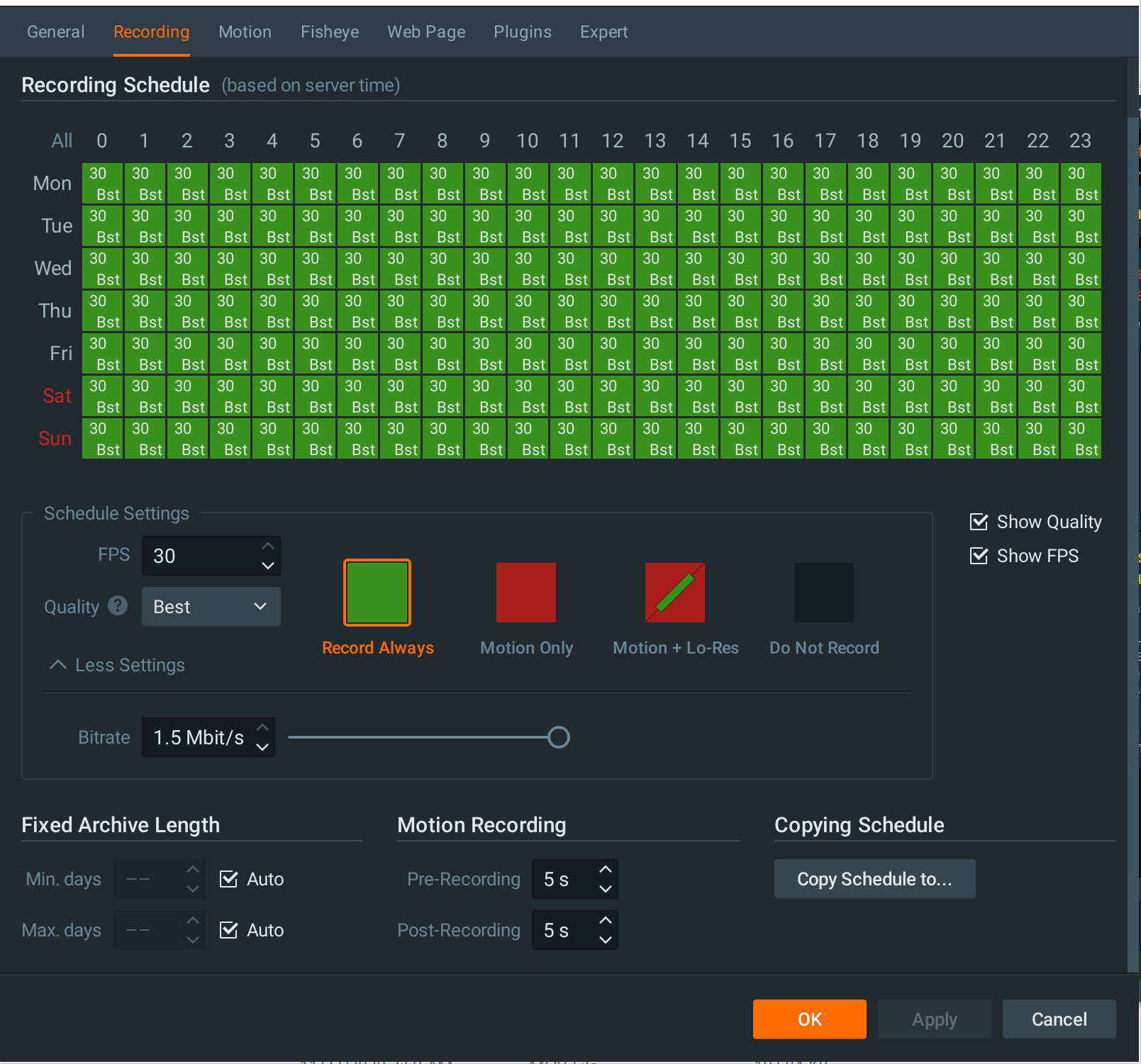
Code for making the HTTP request:
CkHttp http;
CkHttpRequest req;
CkBinData binData;
CkByteData byteData;


int frameDatasize = videoFrame->dataSize(0);

int planeCount = videoFrame->planeCount();
int width = videoFrame->width();
int height = videoFrame->height();
char* destination = new char[videoFrame->dataSize(0)];
memcpy(destination, videoFrame->data(0), frameDatasize);
//binData.AppendEncoded(destination, "Base64");
byteData.appendEncoded(destination, "base64");


req.put_HttpVerb("POST");
req.put_ContentType("multipart/form-data");
req.put_Path("/post-image");

req.AddParam("data_size", std::to_string(frameDatasize).c_str());
req.AddParam("width", std::to_string(width).c_str());
req.AddParam("height", std::to_string(height).c_str());
req.AddParam("plane_count", std::to_string(planeCount).c_str());
req.AddParam("string_image", videoFrame->data(0));

req.AddBytesForUpload("event_images", "image.jpg", byteData);
//req.AddBdForUpload("event_images", "image.jpg", binData, "image/jpg");


CkHttpResponse* resp = 0;
resp = http.SynchronousRequest("some remote IP", std::stoi(80), false, req);
I tried two different formats in the Engine manifest:
needUncompressedVideoFrames_yuv420
needUncompressedVideoFrames_rgb
With YUV420:
The dataSize(0) is always 23100
Plane count is 1
data() is never empty, but always very small...nowhere near 23100 bytes
With RGB:
The dataSize(0) is always around 691200
Plane count is 1
But data() is always empty
Here's an interesting thing:
The string_image parameter in the request is always too small compared to the value of dataSize(0) I'm getting...but it does have some data with RGB as well.
I'm guessing there's a byte encoding, decoding issue here...but I could be wrong.
I'm in the middle of testing these HTTP multipart requests to a remote server...so right now I'm just sending the request for every single frame received in pushUncompressedVideoFrame.
Eventually, I'll be buffering the frames (one per second) and then send 3-6 of them in one HTTP request.
My preferred choice, for now, is to use RGB since I can avoid the hassle of YUV420 to JPEG conversion on the remote server. I fully realize that YUV420 is the recommended format for performance reasons. For now, just for demoing purposes I just need a working solution, will optimize later.
Another thing, I'm always getting this warning/error every few seconds: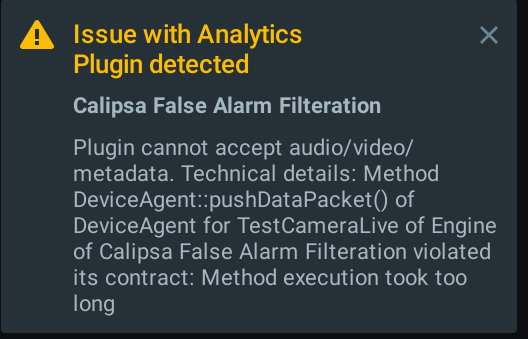
Though this is expected I suppose...I think since I am sending the request for every frame and not making the HTTP request in a separate thread (asynchronously)...so the queue builds up.
Any help on this would be greatly appreciated.
Thank you.
-
Hi Anton Babinov, Hi Andrey Terentyev
Any help on this would be greatly appreciated. Sending valid JPEG images to the remote server is the most critical part of an integration that I'm working on.
Thank you.0 -

Hi Usama,
diagnostic event from your screenshot indicates that the execution of function pushUncompressedVideoFrame was stoped due to the timeout. If the execution of pushUncompressedVideoFrame takes longer than 5 seconds, server generates "Method execution took too long" exception. You should try to find out what's causing this timeout in your code.
As for the size of string_image parameter, I'm going to need some time to analyze your code sample.
0 -
Hi Anton Babinov
Thanks so much for the reply. I've actually gotten rid of the timeout issue by just pushing frame data to a queue and moving frame processing over to a different thread (which reads from the queue one-by-one).
The data(0) problem is still there unfortunately.
Right now I'm thinking of all the various factors that might be responsible for this problem i.e. fps, frame format, decoding etc.
Btw, I've read that data(0) returns binary data. How would you suggest converting this binary data (stored in char*) to a base64 string without losing any bytes/data?
Again, my objective is to send JPEG images to a remote server over HTTP and have them be properly viewable as JPEGS on the remote server.
The remote server is written in Node.js btw, I'm using Express and Multer.0 -
I did some experiments and data() function seems to return the correct char* data. Base64 encodes 3 bytes of real data into 4 encoded bytes. As a result, the Base64 string should be longer than the original binary data. Do you see that data is cut in your remote server or inside of the plugin? I'm guessing it's possible that you're using the original datasize from the video frame and apply it to base64 encoding string, which could lead to losing about 30% of ending bytes.
0 -
Hey Anton Babinov
So I saved the file as described in this comment:
https://support.networkoptix.com/hc/en-us/community/posts/360049554894/comments/360012722114
It's an invalid JPEG file, can't be opened.
I also tried saving raw YUV files with .yuv extension. We've been trying a lot to convert that to JPEG using ffmpeg, ImageMagick etc but still not luck. For example with ffmpeg we tried many different commands with different switches and parameters, for example:ffmpeg -y -s 640x360 -pix_fmt yuv420p -f rawvideo -vcodec rawvideo -i 3.yuv 3result1.jpeg
Keep getting errors like this:[rawvideo @ 0x7fe0d900c800] Invalid buffer size, packet size 921600 < expected frame_size 1382400
Error while decoding stream #0:0: Invalid argument
[swscaler @ 0x7fe0d8f13000] deprecated pixel format used, make sure you did set range correctly
But, using this website I was able to at least view the image. So the .yuv file is definitely valid.
Again, our ultimate objective is just to get JPEG images...regardless of whether we listen for YUV420, RGB, BGR etc as defined in the engine manifest.
Thanks.0 -
[rawvideo @ 0x7fe0d900c800] Invalid buffer size, packet size 921600 < expected frame_size 1382400
This error usually indicate that either resolution or pixel format is wrong. Also, I can see that you're using "-vcodec rawvideo". -vcodec option sets codec for output file, so you should use either "-vcode mjpeg" or don't specify this option.
Check this post which explains how it is possible to convert raw frame received from server via API into jpeg - https://support.networkoptix.com/hc/en-us/community/posts/1500000035622/comments/1500000028321
0 -
I have used the following command but the output is not correct.
what is the wrong with the command ?ffmpeg -f rawvideo -pixel_format yuvj420p -s 640x360 -i 4.yuv -frames:v 1 -c mjpeg -b:v 230400 output.jpegYUV file: https://easyupload.io/braxu2
I am getting output: 0
0 -
Could you please show your code that you used to save .yuv file and tell me video parameters from the original stream(codec, bitrate, resolution)?
0 -
Hey Anton Babinov
The engine manifest defined in engine.cpp is:std::string Engine::manifestString() const
{
// Ask the Server to supply uncompressed video frames in YUV420 format (see
// https://en.wikipedia.org/wiki/YUV).
//
// Note that this format is used internally by the Server, therefore requires minimum
// resources for decoding, thus it is the recommended format.
return /*suppress newline*/ 1 + R"json(
{
"capabilities": "needUncompressedVideoFrames_yuv420,
"preferredStream" : "primary",
"eventTypes": [
{
"id": ")json"+ kCalipsaEventType + R"json(",
"name": "Calipsa Alarm"
}
],
"objectTypes": [
{
"id": ")json" + kCalipsaAlarmObjectType + R"json(",
"name": "Calipsa Alarm Object"
}
]
}
)json";
}
In device_agent.cpp within pushUncompressedVideoFrame(const IUncompressedVideoFrame* videoFrame) to save a file like 640x360.yuv I've written:const std::string outFile = "C:/" + std::to_string(videoFrame->width()) + "x" + std::to_string(videoFrame->height()) + ".yuv";
std::ofstream frameFile;
frameFile.open(outFile, std::ios::out);
frameFile.write(videoFrame->data(0), videoFrame->dataSize(0));
frameFile.close();
We've tried with quite a few videos. Some of the parameters are:
.mp4 video, 640x360, 23.98 fps, 609 kbps total bitrate, 483 kbps data rate, 8 seconds long
.mp4 video, 1272x720, 24.93 fps, 5523 kbps total bitrate, 5522 kbps data rate, 6 seconds long
.mov video, 1280x720, 30 fps, 10830 kbps total bitrate, 10612 kbps data rate, 7 seconds long
two .mkv videos with no meta information available.
Here are all these files zipped and uploaded:
https://drive.google.com/file/d/1nwXJE7asNePUuFBttMfWyie3hL0Aobge/view?usp=sharing
This is the command I execute to stream these videos to the server.
./testcamera.exe -I=127.0.0.1 files="hi.mkv"
I've also triedneedUncompressedVideoFrames_rgb
needUncompressedVideoFrames_bgr
needUncompressedVideoFrames_rgbaand tried saving them with the respective extensions (.rgb, .bgr, .rgba), but no luck,
We've kind of hit a roadblock because of this issue of JPEG conversion :)
I would really appreciate it you could please go through these files and help us use ffmpeg (or any other tool) to do this YUV to JPEG conversion (in Node.js code actually, where we're using the fluent-ffmpeg npm package).
I've been trying to follow the answers here as well:
https://support.networkoptix.com/hc/en-us/community/posts/360049554894-Viewing-the-saved-frame0 -
Hi Usama,
It's not enough to save only pixel data to the file. For example, YUV format consist of multiple planes and you need to save all of then according to the YUV specification. As a most simple example, you can use rgb frames, check my example bellow:
1. I used your hi.mkv file and used testcamera :
.\testcamera.exe --camera-for-file --no-secondary files="hi.mkv" --local-interface=127.0.0.1
2. I modified Engine::manifestString() and DeviceAgent::pushUncompressedVideoFrame in sample_analytics_plugin like this:
std::string Engine::manifestString() const
{
// Ask the Server to supply uncompressed video frames in YUV420 format (see
// https://en.wikipedia.org/wiki/YUV).
//
// Note that this format is used internally by the Server, therefore requires minimum
// resources for decoding, thus it is the recommended format.
return /*suppress newline*/ 1 + (const char*) R"json(
{
"capabilities": "needUncompressedVideoFrames_rgb"
}
)json";
}
bool DeviceAgent::pushUncompressedVideoFrame(const IUncompressedVideoFrame* videoFrame)
{
++m_frameIndex;
m_lastVideoFrameTimestampUs = videoFrame->timestampUs();
if (m_frameIndex % 60 == 0) {
const char* outFile1 = "F:/Frames/image.rgb";
FILE* fout = fopen(outFile1, "wb");
fprintf(fout, "P6\n%d %d\n255\n", videoFrame->width(), videoFrame->height());
fwrite(videoFrame->data(0), 1, videoFrame->width() * videoFrame->height() * 3, fout);
fclose(fout);
}
auto eventMetadataPacket = generateEventMetadataPacket();
if (eventMetadataPacket)
{
// Send generated metadata packet to the Server.
pushMetadataPacket(eventMetadataPacket.releasePtr());
}
return true; //< There were no errors while processing the video frame.
}As you can see, before wring frame pixel data, it is required to add rgb header, which would specify frame resolution.
3. This allows me to store every 60th frame as rgb frame and resulted file can be converted to jpeg by any online file converter.
0
Please sign in to leave a comment.
Comments
10 comments