Hikvision Encoder licence
Answered
Summary:
I've added my Hikvision Recorder and it’s correctly showing within Nx as an encoder. The Nx console reports requiring encoder licences to enable recording. Hence why i purchased an encoder licence. I’m under the impression that as per previous knowledge base articles 1 encoder licence is 4 channels under 1 device ip address. My channels all correctly show in the tree under the encoder and live viewing works perfectly. I've also noticed that my encoder licence only shows 1 archive stream allowed. Shouldn't this be 4?
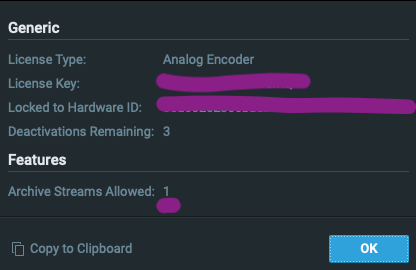
Environment:
* Nx Witness Version: Server: 5.0.0.35745 Client: 5.0.0.35745
* Client OS: Mac OS (M1) + Windows 11
* Server OS: Ubuntu LTS.
* Network Topology: 1 Server 3 Clients 2 Mobiles.
* Special features: N/A
Reproduce:
My encoder license only allows 1 channel to be recorded.
Expected Behaviour: 1 encoder licence = 4 channels recording within 1 IP address channel.
Actual Behaviour:
My 1 encoder licence only activates 1 channel.

I also note in your latest set of release notes published note the following:
*encoders added to the analog list: Hikvision DS-7616 series which includes this recorder hence why it's showing as accepting encoder licences. Any guidance would be greatly apprichiated.
Regards,
J
-

Hi Joshua Crooks,
Please follow the steps as described below:
- Stop the mediaserver application and paste the resource_data.json file in this LINK at the following location:
For Windows: C:\Program Files\Network Optix\Nx Witness\MediaServer
For Linux: /opt/networkoptix/mediaserver/bin/
- Now start the mediaserver application again.
To stop and start the media server, please do it as follows:
For Windows:
Open the task manager, select tab ‘Services’ find the mediaserver application, right-click and select; Stop or StartFor Linux:
Open the terminal (Ctrl+Alt+T) and enter the following command; sudo service networkoptix-mediaserver stop or sudo service networkoptix-mediaserver start.After this, the request should be fulfilled.
Please confirm, and we will add the fix to a future patch.0 - Stop the mediaserver application and paste the resource_data.json file in this LINK at the following location:
-
Thankyou for your reply,
do i need to remove and re-add my recorder for this to take effect?
0 -
Hi Joshua Crooks,
That's not required. Restarting the mediaserver should assure the right licences should be applied.
0 -
Thanks,


Still seems to show the encoder licence being used by channel 1 and is requiring 1 encoder licence per channel - am i right in thinking i should be able to use channels 1-4 with the 1 licence? If so i'll try and apply the patch again to make sure.
0 -
Hi Joshua Crooks,
1 encoder licence should suffice for 4 channels.
So, please apply the resource_data.json file and this should resolve the issue.0 -
I have applied the .json file but the result is still as above. I'm curious is it anything to do with this?


I purchased this key under SKU: L06-NXWI which i beleive should be for 4 channels within 1 IP address. I do believe this key should allow channels 1-4 on my encoder,
thanks for your timely response.
0 -
Hi Joshua Crooks,
It seems like the issue will require further investigation, as a result, we would like to connect remotely through port forwarding to your device with the reported issue in order to resolve the problem as soon as possible.
If this is possible, I'll transfer this topic into a support ticket, so you can share the information to login privately.
0 -
Yes please no problem. Please let me know what you need access to and ill setup port fowarding.
0 -
The issue was a human error. The wrong license key was generated.
0
Post is closed for comments.
Comments
9 comments