NTP Server
Answered
Another feature from Synology Surveillance software that is nice is being able to use the Server as NTP time sync.
In Synology you can set the time synchronization to be the actual server and it pushes that info to the camera. You can also then force sync it to the camera every hour.

-
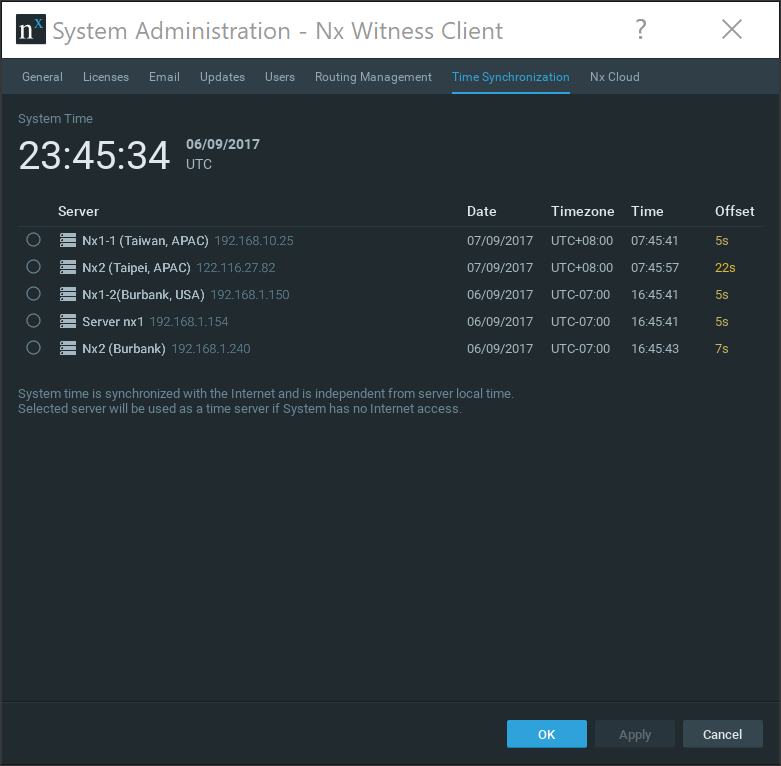
If a System has any Internet connection, it will always synchronize with our NTP Server.
If, however, you have a System with absolutely no Internet connection then users can choose any Nx Server to synchronize all Servers. (see screenshot).
I'd be glad to know why the feature would be useful for you.
 0
0 -
Thanks for the response. I'm aware of this and my understanding is that is to sync the servers. Maybe I'm not fully understanding capability. What I am looking for is to sync the camera times to the NVR. If all the cameras timenisnsunced to the NVR and you can push this easily as a setting to all the cameras then the OSD time will always be in sync for all cameras.
0 -
Hey Scott - any specific reason you need to synchronize times between all cameras and the server? Is this causing an issue with your system or more of a cosmetic problem?
0 -
Thanks for the response. We keep the camera timestamp on the OSD so the recording has the date time and camera name on the recording.
Easily setting the time on all the cameras to just sync to the server makes setup a lot easier.
0 -
Gotcha -
Just wanted to make sure you know the time code can be added on export from the System as well.
0 -

Ussualy on my systems, the server syncs on the internet on one Nic, and I configure the server to Run ntp server.
All the câmeras are on a second Nic on diferent VLAN with no internet Access and they sync time with the Nx server0 -

Hi all,
We expect the same functionnality, we usually got 2 NIC on server (as requested in your hardware page), one NIC might have acess to internet.
The other NIC is made for communication for camera, means they can't synchronize with external NTP server.
So yes an option would be to to buy a Timenet Pro and place is on second NIC, but that cost is far too high for many installations.
And yes @... we are able to add time code on the export, but this function is not available while selecting .nov or .exe. And in France it's forbidden to provide open file (.avi / .mkv / .mp4) to Police, must be nov or exe.
So the only option we got is to display camera time on camera OSD, and synchronize it with an NTP server.
Would love to get Nx Server as NTP server for our cameras like Synology can do, and Chinese NVRs too.
Regards
@... and Norman I know one of our partners Jordan IUNCKER got similar question in the past but can't fin in community.
0 -

Salut Guilhem,
Tu peux retrouver mon post ici, la nouvelle feature a été accepté.
https://support.networkoptix.com/hc/en-us/community/posts/1500000475301-NxWitness-Client-Export
Et je me permet de rebondir sur une de tes phrases, il n'est plus interdit de fournir des fichiers en .avi / .mkv / .mp4 maintenant. C'est pour ça qu'on avait fait la demande pour les OSD. (Source Gendarme Référent).
De plus, un fichier .exe ne pourra pas être ouvert par la Gendarmerie, sachant qu'ils sont sous linux :)
Et pour la solution de NTP, sinon il suffit juste d'activer l'option NTP (pour transformer ton serveur physique en serveur NTP) option disponible sur W10. Cela te permettra de pouvoir utiliser un NTP "local"
Mais oui dans tous les cas, il serait bien que Nx Sache le faire, mais je vois pas vraiment l'intérêt car si le serveur a un accès réseau quelconque on peut facilement aller pointer vers un NTP "public" du moment que tu as activé l'option NTP sur ton serveur/pc !0 -

Hi Jordan,
Please keep it English, so anyone can read your comments.
Hi Decoux Guilhem,
When exporting as .nov or .exe, timestamps are still available.
If we would have sold software on a box, like Synology and the Chinese, adding NTP would be easy, just change the OS, but what if a company installs Nx on the enterprise network and we overrule the current NTP services?
So we assume that anyone installing Nx is also capable of setting up an NTP server on the operating system.
0 -
Hi Jordan IUNCKER thanks for commenting so quickly, and for your link.
I don't know about AVI files accepted, and I undertand why you requested to get group ov video function with AVI.
For some cases we like to keep .NOV cause Police still can use motion area search (and agree EXE file are so heavy sometimes), and we provide the player separately on flash drive)
Norman As to run NTP server on the OS we are able to setup, but some SI are not, in addition doing on Windows is quite easy, but on Debian it's getting more complicated.
I double checked, and can't find any setting to add Timestamp on video export while using the nov/exe file you are sure of that Norman ?
0 -
Hi Guilhem Decoux,
Regarding:
As to run NTP server on the OS we are able to setup, but some SI are not, in addition doing on Windows is quite easy, but on Debian it's getting more complicated.
If an SI cannot set up an NTP server, then maybe it is better to buy options like the Timestamp Pro devices. I don't know if Debian is more complicated. It depends on what you are used to. Besides that, there are tens of step-by-step instructions for both Windows and Linux available online.
I double checked, and can't find any setting to add Timestamp on video export while using the nov/exe file you are sure of that Norman ?
I'm sure. In the .nov file you can export anything and add a timestamp as well. You can display the timestamp as well when you playback the footage.
0
Please sign in to leave a comment.
Comments
11 comments