Kubernetes deployment of NX server (docker) + Test Camera App
Answered
Hi,
I'm trying to deploy the docker version of the NX server in kubernetes environment along with the Test camera app.
In the test camera app documentation, it is mentioned that in the Ubuntu package it is included in the server package (https://nxvms.com/integrations/34-test-camera/how-to-setup [nxvms.com]
Can help to clarify the below
- NX Media server (docker) networking setup in Kubernetes
- “test camera” app for docker deployment of Media server
Thank you
-
Hi,
I manage to deploy the nx server(media-server) in Kubernetes environment. However, I need your inputs on the below
1. The VMS server packaged in the docker deployment is version 5.0.0.35744. The server application is getting started, however when I try to connect the client application it is giving error "The server is incompatible".
2. The test camera app is available, however to mount the test files, when I try to a new directory, its is taking..probably the change I'm making is getting overridden. Can you please update the docker file to mount the test files for the camera-app, so the testcamera app is self-sufficient to test.
Thank you0 -

Hi @...,
You can download the client for v5.0.0.35744 here:
Can you try these and confirm this resolves the issue?
For the test camera, more details are required, like detailed steps description, to understand what you do and where it goes wrong.
0 -
Hi,
Thank you for the support. Now with the v5.0.0.35744 version the client is able to communicate with the server.Reg. the test-files required for the test camera app, I'm trying the below.
1. Created a directory called test-files with the .mkv samples in the folder nx_open_integrations/docker/config-volumes
2.In docker-compose.yaml under the volumes section I added the below
${VOLUMES_PATH}/test-files:/test-files
3. With this change I built the docker image and deployed to the Kubernetes environment
4. Then I logged in to the docker environment, docker exec --stdin... and try to find the test-files.But I couldn't find test-files folder inside the docker environment, I need some help in mounting the sample files for the test camera app.
Can help on this please ?0 -
Hi @...,
I'm pending answers from our team regarding running testcamera in Docker.
As soon as I know more, I'll let you know.0 -
Hi @...,
Could you share the docker-compose.yaml file?
0 -
Hi Norman,
I tried to adapt the original files a bit.. please find the below. I copied the .mkv files under docker/config-volumes/test-files.ports:
- ${PORTS}
# To use the host network mode, comment out the ports above and uncomment the line below.
# network_mode: "host"
volumes:
- ${VOLUMES_PATH}/etc:/opt/${COMPANY}/mediaserver/etc
- ${VOLUMES_PATH}/var:/opt/${COMPANY}/mediaserver/var
- ${VOLUMES_PATH}/nx_ini:/home/${COMPANY}/.config/nx_ini
- ${VOLUMES_PATH}/entrypoint.d:/opt/mediaserver/entrypoint.d
- ${VOLUMES_PATH}/recordings:/recordings
- ${VOLUMES_PATH}/tmp:/tmp
- ${VOLUMES_PATH}/test-files:/test-files0 -
Hi @...,
The yaml file content you share, is just a part of the example file.
You need to use the whole content as shown in THIS link, and change all the variables according to the .env file, you can find through THIS link.
When you finished the installation, the Test Camera application can be found at the following location:
/opt/{customisation}/mediaserver/bin0 -
Hi @...,
Just checking in to make sure you received our response as it has been a while since we have heard from you.
Please let us know if you still need help by responding to this message.0 -
Hi,
Sorry. I was on leave. Thank you for your response. I will revert this week.0 -
Hi Norman,
Apologies. sorry for the late reply. What I meant is the access to the test .mkv files... I'm able to find the binary file (testcamera app).. But I would like to have some same video files for the app.I created a directory called recordings and copied some sample movie files for the testcamera app. But I couldn't access those files.
Can help on this please ? thanks0 -
Hi @...,
In THIS article, at the bottom, two options are offered, currently the Traffic Stream links are broken, but you could use the Timer clips. I reported the broken link, and this should be resolved as soon as possible
You also could use two clips you recorded yourself in your system, by collecting them from the storage of the system and copying these clips to the Test Camera binary folder.
0 -
Hi Norman,
Sorry. The sample clips are not part of the docker image. How do I load them along with the docker image. Is it possible for you to include some sample camera streams(.mkv) to the github repo..So when we load the docker image it is easier to refer the pre-integrated camera stream ?
I tried to copy those files manually to the recordings/test-files folder, it isn't included in the final published image to the repository.0 -
Hi Norman,
Sure. Thanks... I copied a sample file manually. However, when I tried to access from NX client (got incompatibility error).
The docker version requires NX 35744 desktop client. I downgraded the nxclient version, however I couldn't login to the server. The default username is admin. Could you please advise what is the default passwd?0 -
Hi @...,
When conecting the first time to a system, you'll get a window like this:
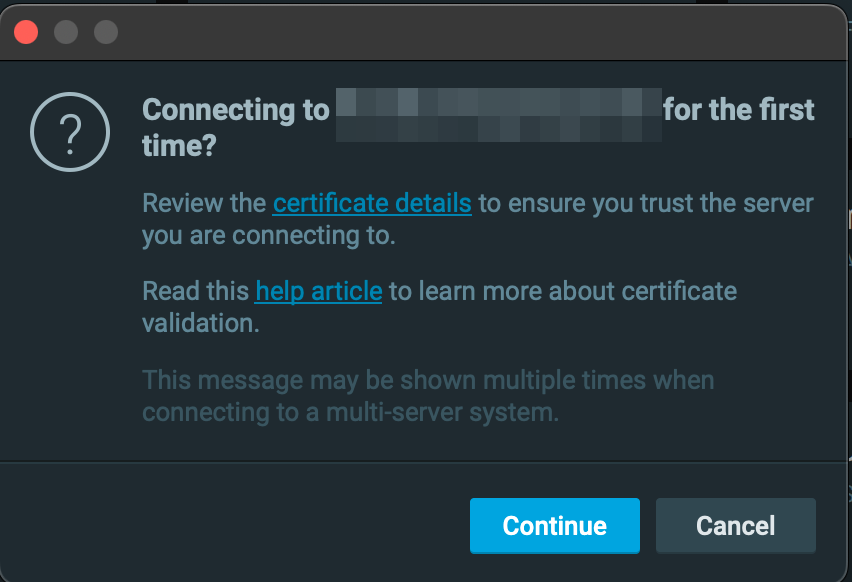
Here, you click Continue.
After this windows, another window shows:

Here, you click Restart or Download in case the right version isn't installed yet.
0 -
can help to explain how is the default passwd set for a fresh installation. Is it hard-coded in the server or set thru the NX client ?
I think in my case it is taking from cache...0 -
Hi @...,
Passwords are set through the Nx clients, and there is no default password for Nx and definitely no hard-coded passwords. For the desktop clients, it won't be saved in cache, only for the web client and cloud client if you have this enabled in your browser.
0
Please sign in to leave a comment.
Comments
18 comments